

Network Scanner: Device Finder
AI APPS SRL Utilities iPhoneiPadiPod touch
Network Scanner: Device Finder is a free Utilities app for iPhone and iPad by AI APPS SRL. Rated 4.5/5 from 3,418 ratings. Requires iOS 17.0.
- Rating
- 4.5
- 3.4K ratings
- Price
- Free
- on the App Store
- Size
- 40 MB
- Age 4+
- Updated
- Oct 12
- 2026 · v2.5.1
Screenshots


About Network Scanner: Device Finder
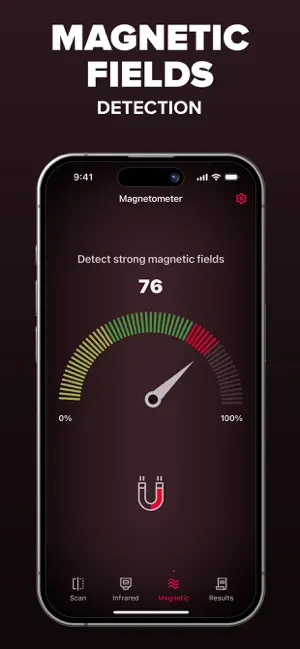
Network Scanner is a simple utility app that helps you explore your surroundings in fun and informative ways. With a combination of Wi-Fi, Bluetooth, magnetic field, and camera filter tools, you can better understand the environment around you and feel more confident wherever you are. What it does: - Wi-Fi & Bluetooth Device Finder – Scan nearby connections to see what devices are around you. - Magnetometer Sensor – Detect changes in magnetic fields using your phone's built-in sensor. - Infrared Camera Filters – Apply unique filters (green, red, blue, and monochrome) to discover what your camera sees in different visual layers. - Simple & Accessible – Easy-to-use tools, no technical knowledge required. Why Use Network Scanner? - Explore Your Environment – See what's connected, what's nearby, and how signals behave. - Stay Curious – Use filters and sensors to view the world in a new way. - Peace of Mind – Feel more aware of your surroundings when traveling or at home. Try Network Scanner today and take control of your privacy. Upgrade to Premium to enjoy an ad-free experience, Unlimited scanning, Advanced Device Identification Subscription: Payment will be charged to iTunes Account at confirmation of purchase. Subscription with a free trial period will automatically renew to a paid subscription. Subscription automatically renews unless auto-renew is turned off at least 24 hours before the end of the current period. Account will be charged for renewal within 24 hours prior to the end of the current period at the rate of the selected plan. Subscriptions and auto-renewal may be managed by going to Account Settings after purchase. You can cancel your subscription or free trial in the iTunes settings at least 24-hours before the end of the free trial period. The cancellation will take effect the day after the last day of the current subscription period and you will be downgraded to the free service. Subscription options: Week Price: $ 3.99 Lifetime: $ 59.99 Privacy policy: https://aiapps.com.co/privacy-policy/ Terms of use: https://aiapps.com.co/terms/ Contact: [email protected]
Ratings & reviews
4.5
3.4K ratings
What’s new
Version 2.5.1 · Updated October 12, 2026
We’re always working to make Network Scanner better. This update includes small corrections and refinements for a more polished experience.
App privacy
The developer, AI APPS SRL, reported these privacy practices to Apple.
Data Used to Track You
The following data may be used to track you across apps and websites owned by other companies:
- Identifiers: Device ID
Data Linked to You
The following data, which may be collected and linked to your identity, may be used for the following purposes:
- Identifiers: Device ID
Used for: Other Purposes
Data Not Linked to You
The following data, which may be collected but is not linked to your identity, may be used for the following purposes:
- Usage Data: Other Usage Data
- Diagnostics: Other Diagnostic Data
- Other Data: Other Data Types
Used for: Other Purposes
Alternatives to Network Scanner: Device Finder
Looking for apps like Network Scanner: Device Finder? Here are 6 similar apps on the App Store. The highest rated is Spy Camera Scanner - SpyGuard (4.7/5), and all 6 are free to download.
-
 Hidden Spy Camera Finder Pro
4.4
-
 Hidden Camera Detector FindSpy
4.4
-
 AntiLost - Clap to Find Phone
4.5
-
 Hidden Spy Camera Detector App
4.5
-
 #1 Hidden Camera Detector
4.2
-
 Spy Camera Scanner - SpyGuard
4.7
| App | Rating | Price | Last updated | Compare |
|---|---|---|---|---|
| Network Scanner: Device Finder | 4.5 / 5 (3,418 ratings) | Free | October 12, 2026 | |
| Hidden Spy Camera Finder Pro | 4.4 / 5 (11,840) | Free | May 22, 2026 | Compare |
| Hidden Camera Detector FindSpy | 4.4 / 5 (4,077) | Free | Jun 4, 2026 | Compare |
| AntiLost - Clap to Find Phone | 4.5 / 5 (2,050) | Free | Sep 15, 2026 | Compare |
| Hidden Spy Camera Detector App | 4.5 / 5 (1,702) | Free | Aug 20, 2025 | Compare |
| #1 Hidden Camera Detector | 4.2 / 5 (3,744) | Free | Aug 12, 2025 | Compare |
| Spy Camera Scanner - SpyGuard | 4.7 / 5 (357) | Free | Aug 28, 2024 | Compare |