

PDF Mate : Quick PDF Converter
Nimesh Patel Utilities iPhoneiPadiPod touch
PDF Mate : Quick PDF Converter is a free Utilities app for iPhone and iPad by Nimesh Patel. Requires iOS 15.6. Updated August 10, 2026.
- Price
- Free
- on the App Store
- Size
- 57 MB
- Age 4+
- Updated
- Aug 10
- 2026 · v2.0.0
Screenshots


About PDF Mate : Quick PDF Converter
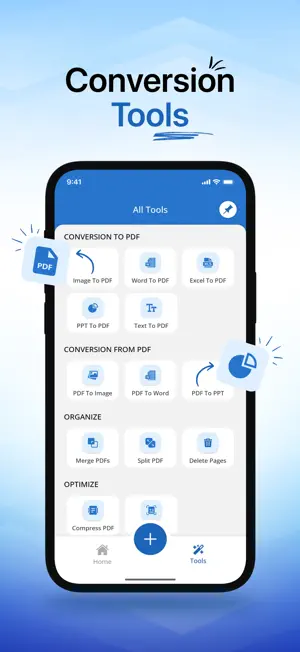
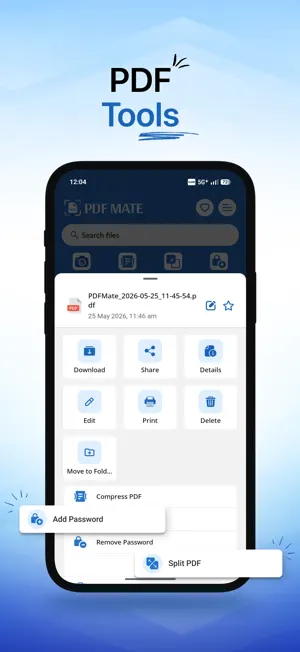
Introducing PDFMate: Discover the ultimate tool for all your PDF needs with PDFMate! This versatile app makes it easy to convert, manage, and enhance your PDF documents effortlessly. With a wide array of features, PDFMate is your go-to solution for transforming images, text, and more into professional PDF files. Key Features: 1. Image to PDF Turn your images (JPG, JPEG, PNG, and more) into high-quality PDF documents with ease. Whether it's scanned documents, photos, or graphics, PDFMate ensures a smooth and organized conversion process, allowing for easy sharing and archiving. 2. Scan Documents Use your device's camera to scan physical documents and convert them into PDF files. This is perfect for creating digital copies of important papers on the go. 3. Word to PDF Easily convert your Word documents into PDF format, maintaining the original formatting and layout. This feature is perfect for creating professional reports, resumes, and more. 4. PPT to PDF Transform your PowerPoint presentations into PDFs, ensuring that your slides are preserved with all their visual elements intact. This is ideal for sharing presentations without requiring PowerPoint software. 5. Excel to PDF Convert your Excel spreadsheets into PDF documents, keeping your data intact and organized. This is great for sharing financial reports, charts, and data analysis. 6. Text to PDF Convert plain text files into professional PDF documents while preserving the integrity of your content. Enjoy the benefits of easy sharing, printing, and archiving, making it perfect for e-books, reports, and more. 7. OCR (Optical Character Recognition) Extract text from scanned documents and images using our powerful OCR feature. 8. Merge PDFs Combine multiple PDF files into a single document, making it easier to manage and share your information. 9. Split PDFs Divide large PDF files into smaller, more manageable documents. This is perfect for extracting specific pages or sections. 10. Add and Remove Passwords Secure your PDF files by adding passwords to protect sensitive information. You can also remove passwords from PDF files for easier access. 11. Compress PDFs Reduce the file size of your PDFs without compromising quality. This feature is ideal for sharing large documents via email or online. 12. Delete Pages Easily remove unwanted pages from your PDF documents, streamlining your files and making them more concise. User-Friendly Experience PDFMate is designed to be intuitive and easy to use. Simply select your document, choose the desired conversion or editing option, and let PDFMate do the rest. The conversion process is quick and hassle-free, saving you time and effort. Security and Privacy Your files are completely secure when using PDFMate. All processes occur locally on your device, ensuring that your documents remain private and secure. This makes PDFMate suitable for both personal and business use. Ongoing Improvements At PDFMate, we're committed to continuously improving our app and expanding its capabilities. Keep an eye out for updates that will bring even more features and enhancements to help you manage your PDF documents. We Value Your Feedback We love hearing from our users! If you have any suggestions, ideas, or feedback, please reach out to us at [email protected]. Your input helps us make PDFMate even better. Experience the convenience and efficiency of managing your documents with PDFMate. Download the app today and unlock the full potential of PDF conversion and editing at your fingertips!
What’s new
Version 2.0.0 · Updated August 10, 2026
- Redesigned the overall app UI to provide a more modern and user-friendly experience. - Added new image editing functionality. - Fixed minor bugs and improved app usability. - Performance improvements and stability enhancements.
App privacy
The developer, Nimesh Patel, reported these privacy practices to Apple.
Data Not Linked to You
The following data, which may be collected but is not linked to your identity, may be used for the following purposes:
- Contact Info: Email Address, Name
- User Content: Photos or Videos
Used for: App Functionality
Alternatives to PDF Mate : Quick PDF Converter
Looking for apps like PDF Mate : Quick PDF Converter? Here are 6 similar apps on the App Store. The highest rated is VPN 111: Warp IP DNS Changer (4.6/5), and all 6 are free to download.
-
 The Ebook Converter
4.5
-
 VPN 111: Warp IP DNS Changer
4.6
-
 NumberBox:CallerID
4.5
-
 Streisand
4.4
-
 Hiddify Proxy & VPN
4.4
-
 Leaf VPN
3.8
| App | Rating | Price | Last updated | Compare |
|---|---|---|---|---|
| PDF Mate : Quick PDF Converter | – | Free | August 10, 2026 | |
| The Ebook Converter | 4.5 / 5 (2,474) | Free | Oct 28, 2026 | Compare |
| VPN 111: Warp IP DNS Changer | 4.6 / 5 (1,553) | Free | Sep 19, 2026 | Compare |
| NumberBox:CallerID | 4.5 / 5 (568) | Free | Oct 5, 2026 | Compare |
| Streisand | 4.4 / 5 (2,119) | Free | Nov 1, 2026 | Compare |
| Hiddify Proxy & VPN | 4.4 / 5 (847) | Free | Feb 19, 2026 | Compare |
| Leaf VPN | 3.8 / 5 (392) | Free | Mar 14, 2026 | Compare |