

Video Looper - for Safari
Nick Dubov Utilities iPhoneiPadiPod touchMac
Video Looper - for Safari is a paid Utilities app for iPhone and iPad by Nick Dubov. Requires iOS 18.0. Updated June 15, 2026.
- Price
- 2.99 USD
- on the App Store
- Size
- 13 MB
- Age 4+
- Updated
- Jun 15
- 2026 · v3.0
Screenshots

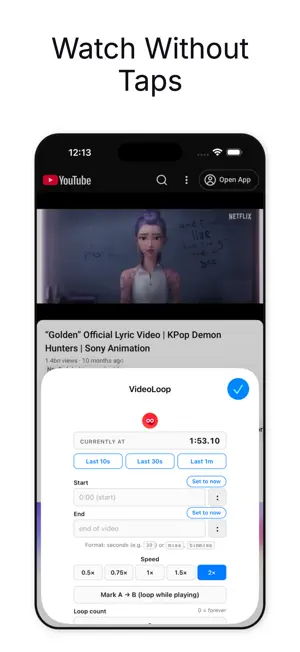

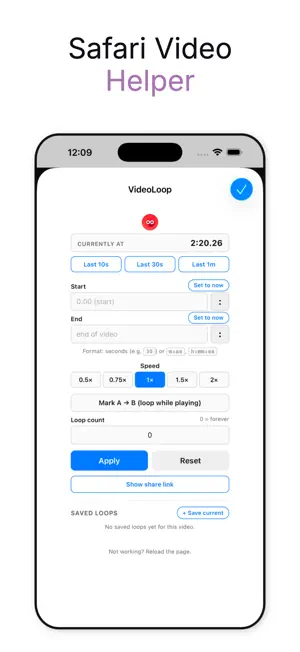
About Video Looper - for Safari
Loop any moment of any video on the web - right inside Safari. VideoLoop turns Safari into a video looper. Replay a chorus, repeat a dance step, drill a sentence in a language you're learning, or just keep a video playing forever. It works on YouTube, Vimeo, X, TikTok web, and pretty much any site that plays HTML5 video. HOW IT WORKS 1. Enable VideoLoop in Safari Settings > Extensions > All Websites > Allow. 2. Open any video. 3. Tap the toolbar icon, set a Start and End time, or hit "Mark A to B" while it plays. EVERYTHING YOU CAN DO - Loop the whole video automatically - no more tapping replay. - Loop a custom range. Type a time or tap "Set to now" to grab the current playback position. - A to B repeat. One tap to mark A while the video plays, second tap to mark B. Loop starts immediately. - Playback speed: 0.5x, 0.75x, 1x, 1.5x, 2x. Perfect for music, dance, and language practice. - Quick loops: last 10 seconds, 30 seconds, or 1 minute - one tap. - Save named loops per video. Long-press a saved loop to rename. - iCloud sync. Saved loops follow you across iPhone, iPad, and Mac. - Loop count limiter. Loop 5 times, 10 times, until you say stop. - Shareable loop links. Send a friend the exact moment, with the loop pre-set. - Per-video memory. Your loop and speed are restored next time you visit. - Reliable on YouTube - no more auto-advance, no more page freezes. PERFECT FOR • Musicians learning a song • Dancers drilling choreography • Language learners repeating phrases • Athletes reviewing a clip • Coaches breaking down technique • Parents who just need that one video to keep playing Free. No subscriptions, no in-app purchases, no ads. Privacy: VideoLoop runs locally inside Safari. It does not track you, doesn't have an account, and doesn't send your browsing history anywhere.
What’s new
Version 3.0 · Updated June 15, 2026
Bigger than the last few updates put together: - Mark A to B - one-tap looping while a video plays. First tap marks the start, second tap starts the loop instantly. - Live "Currently at" display in the popup so you always see where the playhead is. - Quick loops - last 10 seconds, 30 seconds, or 1 minute, in a single tap. - Playback speed control - 0.5x, 0.75x, 1x, 1.5x, 2x. - Set to now - pull the current playback position straight into Start or End. - Save named loops per video. Long-press to rename. - iCloud sync - saved loops follow you across iPhone, iPad, and Mac. - Recents - your last 50 loops, across every video. - Loop count limiter (loop 5 times then stop) and shareable loop links. - Per-video memory - your loop and speed are restored on every revisit. - YouTube fixed: no more page freezes, no more auto-advance taking over. Thanks for using Video Looper !
App privacy
The developer, Nick Dubov, reported these privacy practices to Apple.
Data Not Collected
The developer does not collect any data from this app.
Alternatives to Video Looper - for Safari
Looking for apps like Video Looper - for Safari? Here are 6 similar apps on the App Store. The highest rated is NextLoupe 4K Magnifying glass (5.0/5), and 4 of the 6 are free to download.
-
 Skippa: Skip Cookie Banners
-
 RandomTimer - Randomized
-
 StrongPass Password Generator
-
 Video Control for Safari
-
 Irrigation Calculator Pro
-
 NextLoupe 4K Magnifying glass
5.0
| App | Rating | Price | Last updated | Compare |
|---|---|---|---|---|
| Video Looper - for Safari | – | 2.99 USD | June 15, 2026 | |
| Skippa: Skip Cookie Banners | – | 3.99 USD | Oct 3, 2026 | Compare |
| RandomTimer - Randomized | – | Free | Oct 22, 2026 | Compare |
| StrongPass Password Generator | – | Free | Sep 30, 2025 | Compare |
| Video Control for Safari | – | Free | Mar 21, 2026 | Compare |
| Irrigation Calculator Pro | – | Free | Sep 30, 2025 | Compare |
| NextLoupe 4K Magnifying glass | 5.0 / 5 (5) | 0.99 USD | Aug 29, 2026 | Compare |