

VoxScan
Yasuo Hasegawa Photo & Video iPhoneiPadiPod touch
VoxScan is a free Photo & Video app for iPhone and iPad by Yasuo Hasegawa. Requires iOS 17.0. Updated November 8, 2024.
- Price
- Free
- on the App Store
- Size
- 27 MB
- Age 4+
- Updated
- Nov 8
- 2024 · v2.0
Screenshots



About VoxScan
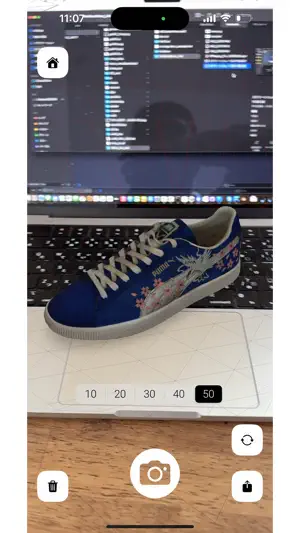
Key Features: Capture and Export Functionality: VoxScan seamlessly captures and exports your creations in various formats, including .vox, .ply, .usdz, .stl, .glTF, and .obj, offering versatility for your 3D modeling projects. USDZ Import Service: Explore new dimensions by importing USDZ 3D file formats, enabling Voxel Model creation even on iPhone models without LiDAR cameras. Apple Vision Pro Compatibility: VoxScan extends its support to Apple Vision Pro, supporting only functionality to experience the Voxel Model Creation feature. Capture Feature Requirements: To utilize the capture feature, iOS 17+ and an iPhone with a LiDAR camera are essential. Apple Vision Pro and Other iPhone Models(Without LiDAR Camera Support) Note: Please be aware that on Apple Vision Pro and other iPhone models without LiDAR camera support, only the input feature will be functional. Supported Input Format: The exclusive supported input format is USDZ. Particularly effective are 3D models created through object capture using Photogrammetry. However, please note that importing USDZ files containing complex 3D models, such as those with separated objects, excessively large or small mesh data, and animated objects, may result in display issues, including the possibility of rendering nothing in the space. Exercise caution when importing such files. Supported Export Formats: Export your creations in diverse file formats, including .vox, .ply, .usdz, .stl, .glTF, and .obj. Tested on: VoxScan has undergone successful testing on iPhone 12 Pro and 15 Pro models. MagicaVoxel Note: Please note that the model's color will be based on the default MagicaVoxel color palette, resulting in a different appearance compared to our app. Unlock the potential of 3D modeling with VoxScan – Download now and bring your creations to life!
What’s new
Version 2.0 · Updated November 8, 2024
version 2.0: - Added blend color editing functionality - Introduced 2D image-to-voxel conversion - Added support for FBX (ASCII) and DAE exports - Resolved minor bugs
App privacy
The developer, Yasuo Hasegawa, reported these privacy practices to Apple.
Data Not Collected
The developer does not collect any data from this app.
Alternatives to VoxScan
Looking for apps like VoxScan? Here are 6 similar apps on the App Store. The highest rated is Object Capture: Photogrammetry (4.9/5), and all 6 are free to download.
-
 Polymuse 3D scanner
4.2
Polymuse 3D scanner
4.2
-
 Storytelling XR
-
 Object Capture: Photogrammetry
4.9
Object Capture: Photogrammetry
4.9
-
 Flourish - Color Photo Editor
4.0
Flourish - Color Photo Editor
4.0
-
 MEISAI Σ
3.5
MEISAI Σ
3.5
-
 i3DDepthCam
3.7
i3DDepthCam
3.7
| App | Rating | Price | Last updated | Compare |
|---|---|---|---|---|
| VoxScan | – | Free | November 8, 2024 | |
| Polymuse 3D scanner | 4.2 / 5 (5) | Free | Oct 2, 2026 | Compare |
| Storytelling XR | – | Free | Oct 26, 2024 | Compare |
| Object Capture: Photogrammetry | 4.9 / 5 (10) | Free | Apr 8, 2024 | Compare |
| Flourish - Color Photo Editor | 4.0 / 5 (2) | Free | Apr 1, 2024 | Compare |
| MEISAI Σ | 3.5 / 5 (8) | Free | Feb 4, 2024 | Compare |
| i3DDepthCam | 3.7 / 5 (3) | Free | Jul 9, 2024 | Compare |
Compare VoxScan with the top alternatives: ratings, updates, ASO score and keyword gaps →