

Donera: Screen Time Control
雄志 夏 Productivity iPhoneiPadiPod touch
Donera: Screen Time Control is a free Productivity app for iPhone and iPad by 雄志 夏. Rated 5.0/5 from 1 ratings. Requires iOS 17.0. Updated November 4, 2026.
- Rating
- 5.0
- 1 ratings
- Price
- Free
- on the App Store
- Size
- 131 MB
- Age 4+
- Updated
- Nov 4
- 2026 · v3.2.2
Screenshots
Save to Pinterest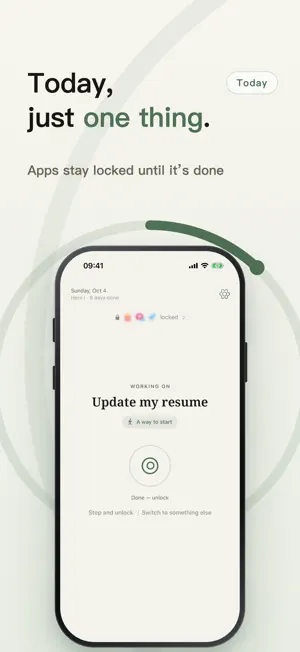


About Donera: Screen Time Control
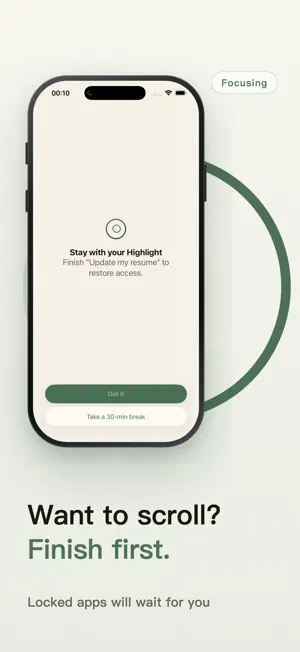
Most of us don't struggle with knowing what to do. We struggle with starting — because the phone is always easier. Donera flips the order: finish today's one important thing first. Until then, your distracting apps stay locked. HOW IT WORKS 1. Pick one Highlight — the single task that matters most today. 2. Choose the apps that steal your attention. Donera locks them. 3. Hold to finish. Your apps unlock, and the day is closed. WHY IT WORKS • One thing a day. Your home screen shows only this one — no lists, no counts, no overwhelm. • A way to start. Know what to do but can't move? Cast a hexagram for a tiny opening move, or just ask for the simplest first step. Or let AI break the task into steps and hand you the next one each time you finish. • Pick a time to start. Set when you'll begin; Donera reminds you right then. • Focus timer. Pomodoro or stopwatch, full screen and dark, with breaks — and it shows on your Lock Screen and Dynamic Island. • Review. See where your days slip — which things keep getting moved, and what time of day you actually finish — and get one small thing to try tomorrow from AI. • Blocking that holds you to your word. Built on Apple's Screen Time framework — no VPN, and nothing leaves your device. • Something urgent? Open it anytime. Take a 30 or 60 minute break, as many per day as you allow yourself — or unlock on purpose, with nothing recorded and no guilt trip. • Multi-day plans. Split a goal into days; each morning the next step becomes your Highlight. Write your own (fill every day at once with "Same every day"), copy an official plan and make it yours, or let AI draft one. • Ranks. Finished days add up — from Mortal to Eternal — and every rank has stages along the way, so a step up is never far off. Ranks only ever go up; a missed day never drops you. Four built-in systems, with ranks and stages you can rename. • Widget and Live Activity. Today's one thing, in sight on your Home and Lock Screen. AI is built into Pro — no API key needed. Prefer your own key? That works too. DESIGNED FOR QUIET Warm paper, ink, and serif type. No tags, folders, or dashboards. No guilt. Your tasks stay on your device. Donera doesn't ask you to become disciplined. It simply helps you begin more easily — and finish with more care.
What’s new
Version 3.2.2 · Updated November 4, 2026
3.2.2 - What's on your mind: say everything that's in your head; get today's one thing with a first step, and the rest put away for later - Rest days: plan a day off, or one every week — that day nothing locks, carries over or reminds you - After a couple of days you loosened and didn't come back, the choices get softer: take 15 minutes, do just 5, or move it to tomorrow - AI steps: "Another way" offers three different ways to do the step — tap one, or add a short hint about how you work
App privacy
The developer, 雄志 夏, reported these privacy practices to Apple.
Data Not Linked to You
The following data, which may be collected but is not linked to your identity, may be used for the following purposes:
- Diagnostics: Crash Data, Performance Data, Other Diagnostic Data
Used for: Analytics
Alternatives to Donera: Screen Time Control
Looking for apps like Donera: Screen Time Control? Here are 6 similar apps on the App Store. The highest rated is LeavePhone | Less Screen Time (5.0/5), and all 6 are free to download.
-
 Unurge: block app & Screentime
-
 AppTime: Screen Time Control
3.3
-
 PixStep - AI Planner for ADHD
-
 LeavePhone | Less Screen Time
5.0
-
 Zen Space: Focus & Habits
5.0
-
 DrillLock: Math App Blocker
5.0
| App | Rating | Price | Last updated | Compare |
|---|---|---|---|---|
| Donera: Screen Time Control | 5.0 / 5 (1 rating) | Free | November 4, 2026 | |
| Unurge: block app & Screentime | – | Free | May 7, 2026 | Compare |
| AppTime: Screen Time Control | 3.3 / 5 (3) | Free | Sep 8, 2026 | Compare |
| PixStep - AI Planner for ADHD | – | Free | Jan 27, 2026 | Compare |
| LeavePhone | Less Screen Time | 5.0 / 5 (3) | Free | Oct 23, 2026 | Compare |
| Zen Space: Focus & Habits | 5.0 / 5 (1) | Free | Oct 23, 2026 | Compare |
| DrillLock: Math App Blocker | 5.0 / 5 (1) | Free | Nov 1, 2026 | Compare |