

Listero: Grocery List & Chores
AMAZING SOFT S.R.L. Productivity iPhoneiPadiPod touchApple Watch
Listero: Grocery List & Chores is a free Productivity app for iPhone and iPad by AMAZING SOFT S.R.L. Requires iOS 16.0. Updated September 7, 2026.
- Price
- Free
- on the App Store
- Size
- 60 MB
- Age 4+
- Updated
- Sep 7
- 2026 · v1.4.2
Screenshots
About Listero: Grocery List & Chores
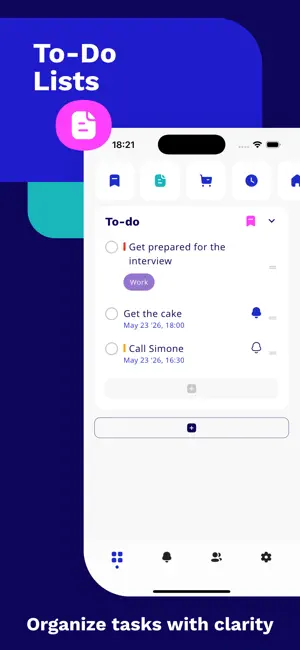
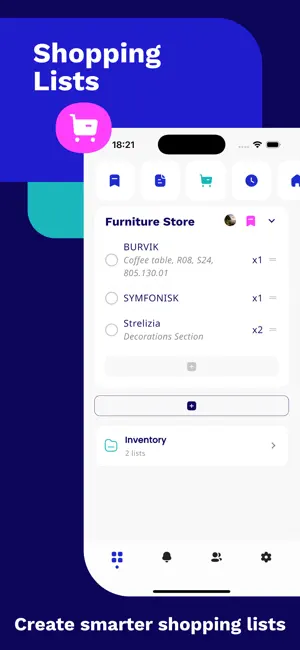
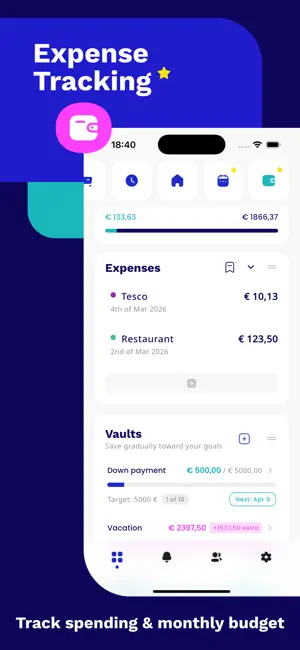
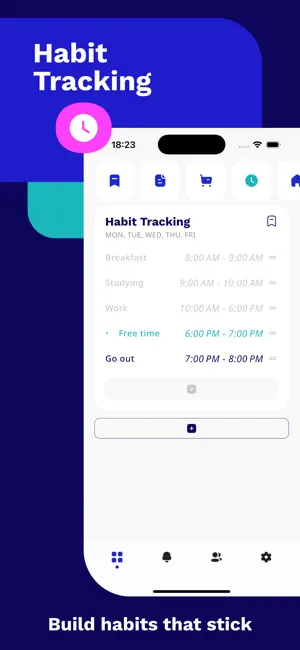
Running a home takes three apps — a grocery list, a chore chart, a budget tracker — and one exhausted person keeping them all updated. Listero replaces the stack. Built for couples, families and roommates: shared shopping lists that sync in real time, household chores you can assign to a person, recurring tasks nobody has to remember, expenses and savings goals you track together, pantry inventory with expiry alerts, and habit reminders. Offline-first. No ads, ever. Truly shared — your partner joins free. Your first shared list is free — forever. Invite your household by email, share lists and collaborate together in real time — the people you invite never need to pay. Especially useful for shopping lists, household planning and shared everyday organization. You can also control who can interact with you and block users when needed. Why households pick Listero: • Both of you see every change, instantly • Chores assigned to a person — no nagging • Budget & savings you track together • Works offline, even in the basement supermarket aisle • Apple Watch & Wear OS • No ads, private by default (EU-built) With Listero, you can create different types of lists based on what you need: To-Do Lists Create task lists with deadlines, completion status and clear progress tracking. Shopping Lists Build shopping lists with quantities and notes, then share them with family members, friends or collaborators. Habit Reminders Create habits with selected days and preferred time ranges, and get reminded at the right time. Household Lists Organize chores, home planning and daily household tasks in a structured way. Recurring Tasks Create recurring tasks by day and time for routines that repeat every week. Expenses and Budget Track expenses by category, set a monthly budget and monitor spending progress with insights and charts. Inventory Management Keep track of products at home with quantity, category, store and expiration date. Mark items as expired or expiring soon, and optionally send them to your shopping list when needed. Savings Vaults Create savings goals with custom rules, weekly or monthly targets, flexible contributions and progress tracking. Stay on track with reminders and alerts. Listero supports reminders for tasks, habits and recurring items, helping you remember what matters at the right time. Alerts can be viewed and managed in one place, and push notifications can open the exact list you need. Your data stays available even when you are offline. Listero uses offline-first sync, so your lists and updates remain available locally and sync when you reconnect. This makes the app practical for real life, even when your connection is unstable. Listero also includes widgets and cross-device convenience. Use home screen widgets for budget, shopping, habits and featured lists. On supported wearable devices such as Apple Watch and Wear OS, you can quickly interact with your lists on the go. Why people use Listero: - Shared lists and collaboration - To-do lists and task tracking - Shopping lists with quantities and notes - Habit reminders and recurring routines - Household organization - Expenses, budgets and savings goals - Inventory tracking with expiration support - Offline-first sync - Widgets and wearable support Listero is designed for people who want more than a basic checklist app. It combines everyday planning, list sharing, budgeting, habits, inventory and organization tools into one flexible experience. From to-do to done, Listero helps you organize life smarter. Download Listero and manage lists, tasks, shopping, habits and more in one app. Terms of Use (Apple Standard EULA): https://www.apple.com/legal/internet-services/itunes/dev/stdeula/
What’s new
Version 1.4.2 · Updated September 7, 2026
Your free month, actually offered Listero has had a one-month free trial in both stores since May, but a bug meant it was never shown and never applied. That is fixed. If you have never subscribed before, your first month is free — and the paywall tells you so before you pay, not after. Signing in with Google or Apple now saves your email and name to your profile. The app always knew them; it just never stored them. Accounts already affected repair themselves the next time you sign in, and a name you chose yourself is never overwritten. Marking a pantry item as used can now put it straight on your shopping list. The switch is on for new items and you can turn it off per item. Your plan’s page now links to the EU right-of-withdrawal form.
App privacy
The developer, AMAZING SOFT S.R.L., reported these privacy practices to Apple.
Data Linked to You
The following data, which may be collected and linked to your identity, may be used for the following purposes:
- Identifiers: User ID
- Usage Data: Product Interaction
Used for: Analytics, App Functionality
Data Not Linked to You
The following data, which may be collected but is not linked to your identity, may be used for the following purposes:
- Diagnostics: Crash Data
- Contact Info: Email Address, Name
- User Content: Photos or Videos, Other User Content
Used for: Analytics, App Functionality
Alternatives to Listero: Grocery List & Chores
Looking for apps like Listero: Grocery List & Chores? Here are 6 similar apps on the App Store. The highest rated is HomeProjectPro.AI (5.0/5), and all 6 are free to download.
-
 Brainy: AI Memory & Reminders
-
 HomeProjectPro.AI
5.0
HomeProjectPro.AI
5.0
-
 Ownly: Home Inventory
-
 Jhozy: Expenses, Chores, Lists
-
 HomeDaily: Chores & Routines
-
 Peblo: Planner & Habit Tracker
5.0
Peblo: Planner & Habit Tracker
5.0
| App | Rating | Price | Last updated | Compare |
|---|---|---|---|---|
| Listero: Grocery List & Chores | – | Free | September 7, 2026 | |
| Brainy: AI Memory & Reminders | – | Free | Sep 17, 2026 | Compare |
| HomeProjectPro.AI | 5.0 / 5 (2) | Free | Mar 5, 2026 | Compare |
| Ownly: Home Inventory | – | Free | Oct 5, 2026 | Compare |
| Jhozy: Expenses, Chores, Lists | – | Free | Oct 2, 2026 | Compare |
| HomeDaily: Chores & Routines | – | Free | Sep 8, 2026 | Compare |
| Peblo: Planner & Habit Tracker | 5.0 / 5 (5) | Free | Oct 16, 2026 | Compare |