

1secNote: Floating Markdown
editoy Inc. Productivity iPhoneiPadiPod touchMacApple Watch
1secNote: Floating Markdown is a paid Productivity app for iPhone and iPad by editoy Inc. Requires iOS 15.0. Updated October 25, 2026.
- Price
- 2.99 USD
- on the App Store
- Size
- 34 MB
- Age 4+
- Updated
- Oct 25
- 2026 · v3.1.0
Screenshots
About 1secNote: Floating Markdown
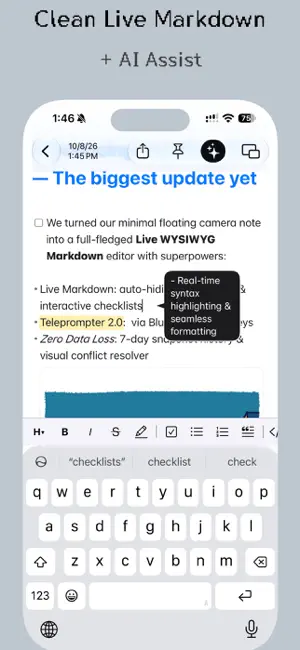
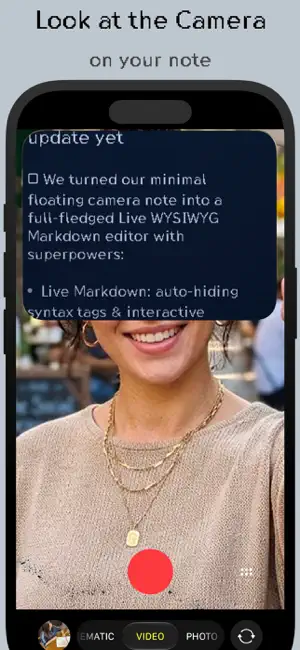
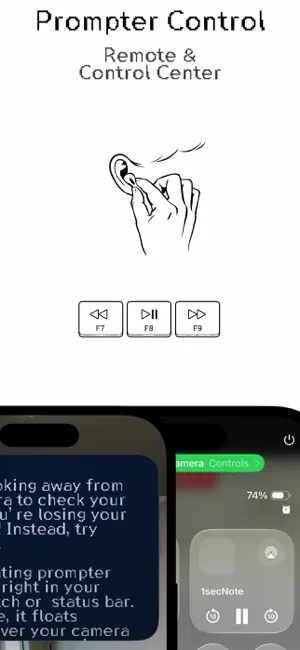
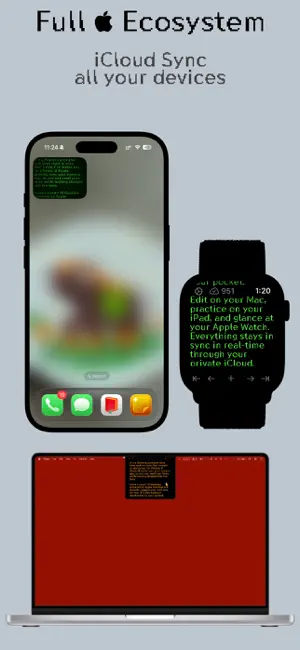
1secNote — Floating Camera Prompter & Live Markdown Note Check your script without looking away from the camera. Slide notes out from your Mac notch or menu bar in 1 second. Write with live Markdown, zero data loss, and unmatched aesthetic warmth. Whether you're recording video for social media, presenting on Zoom, taking quick meeting notes, or drafting long manuscripts, 1secNote keeps your eyes on your audience and your thoughts at your fingertips. WHY PEOPLE LOVE 1SECNOTE: • Floating Camera Prompter: Float notes seamlessly over your iPhone camera or Mac video calls. Speak naturally while looking directly into the lens. • Hands-Free Remote Control: Control teleprompter scrolling using Bluetooth buttons, AirPods, or Control Center. Pause to step line-by-line. • Seamless Live Markdown: Images, links, headings, bold, lists, and checklists format instantly. Raw syntax markers gracefully hide when you move your cursor away for clean, distraction-free reading. • All-New Interactive Widgets: Keep your chosen note or recent notes right on your Home Screen with rich image previews and instant one-tap capture. • Zero Data Loss & 7-Day History: Never lose a draft. Automatic micro-snapshots let you jump back to any revision from the last 7 days. • Mac Notch & Menubar Integration: Access your notes in a single click or glance right from the MacBook camera notch. CRAFTED FOR WRITING LOVERS: • Bespoke Typography: Enjoy writing with our custom-engineered pixel font, designed for razor-sharp readability at any size. • Modern & Vintage Displays: Switch freely between clean modern typography and cozy retro CRT displays (IBM Amber Plasma, Apple ][ Green, Commodore PET Blue, and e-ink). • Instant at Any Scale: From 10 notes to 10,000, 1secNote launches in 1 second with near-zero memory footprint. • Instant Spotlight Search: Find any note in 1 second straight from macOS Spotlight or iOS Search. • Complete Apple Ecosystem: Seamless iCloud sync across Mac, iPhone, iPad, and Apple Watch. No subscriptions. No account sign-ups. No trackers. Just the fastest, most satisfying note-taking companion on Apple devices.
What’s new
Version 3.1.0 · Updated October 25, 2026
• Support for iPhone Duo dual-screen design and landscape split view • PiP teleprompter dynamically adapts to device orientation • Option to automatically move completed to-dos to the bottom of the list • Word and character counter in editor footer • Improved iCloud sync reliability and multi-device conflict handling • Bug fixes on widgets, Peek mode, and editor
App privacy
The developer, editoy Inc., reported these privacy practices to Apple.
Data Not Collected
The developer does not collect any data from this app.
Alternatives to 1secNote: Floating Markdown
Looking for apps like 1secNote: Floating Markdown? Here are 6 similar apps on the App Store. The highest rated is RPN-38 CX (5.0/5), and 4 of the 6 are free to download.
-
 나의 포도송이
-
 My Week: Weekly Planner
-
 RPN-38 CX
5.0
RPN-38 CX
5.0
-
 ReminderCal - Reminder app
-
 BulletsNote
5.0
BulletsNote
5.0
-
 TODO - Tasks & Notes
| App | Rating | Price | Last updated | Compare |
|---|---|---|---|---|
| 1secNote: Floating Markdown | – | 2.99 USD | October 25, 2026 | |
| 나의 포도송이 | – | Free | Jun 3, 2026 | Compare |
| My Week: Weekly Planner | – | Free | Oct 3, 2026 | Compare |
| RPN-38 CX | 5.0 / 5 (7) | 1.99 USD | Oct 15, 2025 | Compare |
| ReminderCal - Reminder app | – | Free | Oct 13, 2026 | Compare |
| BulletsNote | 5.0 / 5 (4) | 1.99 USD | Jan 30, 2026 | Compare |
| TODO - Tasks & Notes | – | Free | Aug 18, 2025 | Compare |