

SpendFit Expense Tracker
Juan González Finance iPhoneiPadiPod touch
SpendFit Expense Tracker is a free Finance app for iPhone and iPad by Juan González. Requires iOS 18.0. Updated September 30, 2026.
- Price
- Free
- on the App Store
- Size
- 40 MB
- Age 4+
- Updated
- Sep 30
- 2026 · v1.9
Screenshots

About SpendFit Expense Tracker
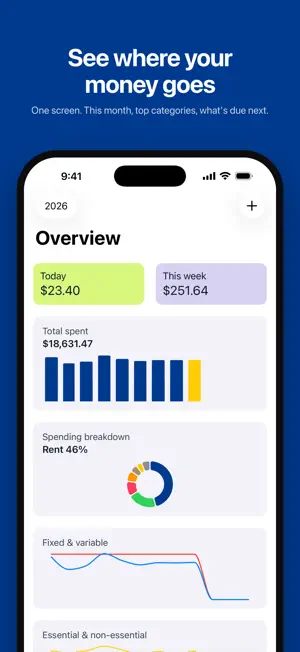
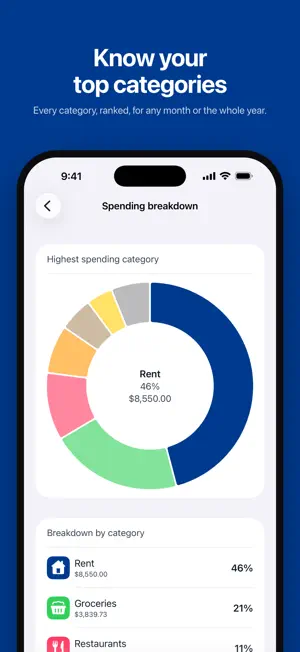
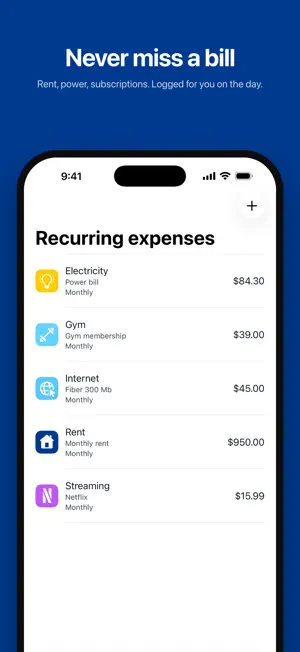
SpendFit shows you where your money goes and helps you spend less on the things that do not matter. Log an expense in a few taps, sort it into a category, and let the Overview do the rest. WHAT YOU GET • Overview: a dashboard with what you spent this month, your top categories, spending trends, and the recurring bills coming up next. • Categories that mean something: mark each one as Fixed or Variable and as Essential or Non-essential, then see at a glance how much of your spending is a need and how much is a want. • Fast logging: amount, category, date, done. No forms, no friction. • Charts that answer questions: monthly totals, averages, breakdowns by category and by type, so patterns stand out instead of hiding in a list. • Sync everywhere: your data is stored securely in the cloud and stays in sync across all your devices. • Sign in with Apple or Google in one tap. No new password to remember. FREE, WITH NO LIMITS Unlimited categories, unlimited expenses, unlimited devices. The free version is the full app, not a trial. PREMIUM: RECURRING EXPENSES Rent, utilities, streaming subscriptions, the gym: set them up once as Recurring Expenses and SpendFit logs each bill on its day, automatically. Pick any schedule, daily to yearly, and optionally backfill the bills you have already been paying. Your Overview shows what is coming up next, so month-end never surprises you. WHY SPENDFIT Most trackers tell you what you spent. SpendFit tells you what you could stop spending. The Fixed/Variable and Essential/Non-essential split turns a pile of transactions into a clear picture of where there is room to save. Download SpendFit and find out where your money goes. Privacy Policy: https://www.iubenda.com/privacy-policy/11095808 Terms: https://www.apple.com/legal/internet-services/itunes/dev/stdeula/ Website: https://spendfitapp.com
What’s new
Version 1.9 · Updated September 30, 2026
SpendFit now speaks your language! This update adds Japanese, German, French, Brazilian Portuguese, Traditional Chinese, Korean and Italian, alongside English and Spanish. SpendFit follows your device language automatically, and you can pick a different one in Settings > Apps > SpendFit > Language. Also in this update: • Bug fixes and improvements
App privacy
The developer, Juan González, reported these privacy practices to Apple.
Data Linked to You
The following data, which may be collected and linked to your identity, may be used for the following purposes:
- Purchases: Purchase History
- Contact Info: Email Address
- Identifiers: User ID
Used for: Analytics, App Functionality
Data Not Linked to You
The following data, which may be collected but is not linked to your identity, may be used for the following purposes:
- Usage Data: Product Interaction
- Diagnostics: Crash Data, Performance Data, Other Diagnostic Data
Used for: Analytics, App Functionality
Alternatives to SpendFit Expense Tracker
Looking for apps like SpendFit Expense Tracker? Here are 6 similar apps on the App Store. The highest rated is Budget Planner - Money Flow (4.7/5), and all 6 are free to download.
-
 Expense manager -Money tracker
4.6
Expense manager -Money tracker
4.6
-
 MoneyControl Spending Tracker
4.5
MoneyControl Spending Tracker
4.5
-
 Fin: Budget Planner App
4.3
Fin: Budget Planner App
4.3
-
 Budget App: Expense Tracker.
4.4
Budget App: Expense Tracker.
4.4
-
 MoneyCoach AI Budget Planner
4.5
MoneyCoach AI Budget Planner
4.5
-
 Budget Planner - Money Flow
4.7
Budget Planner - Money Flow
4.7
| App | Rating | Price | Last updated | Compare |
|---|---|---|---|---|
| SpendFit Expense Tracker | – | Free | September 30, 2026 | |
| Expense manager -Money tracker | 4.6 / 5 (274) | Free | Dec 10, 2023 | Compare |
| MoneyControl Spending Tracker | 4.5 / 5 (114) | Free | Oct 7, 2026 | Compare |
| Fin: Budget Planner App | 4.3 / 5 (63) | Free | Sep 18, 2026 | Compare |
| Budget App: Expense Tracker. | 4.4 / 5 (637) | Free | Jun 10, 2026 | Compare |
| MoneyCoach AI Budget Planner | 4.5 / 5 (2,649) | Free | Sep 26, 2026 | Compare |
| Budget Planner - Money Flow | 4.7 / 5 (749) | Free | Sep 24, 2026 | Compare |