

Music Editor: Mp3 Converter
VODAPLAY CO., LTD Utilities iPhoneiPadiPod touch
Music Editor: Mp3 Converter is a free Utilities app for iPhone and iPad by VODAPLAY CO., LTD. Rated 4.6/5 from 25 ratings. Requires iOS 15.0.
- Rating
- 4.6
- 25 ratings
- Price
- Free
- on the App Store
- Size
- 117 MB
- Age 12+
- Updated
- Oct 4
- 2024 · v1.0.8
Screenshots


About Music Editor: Mp3 Converter
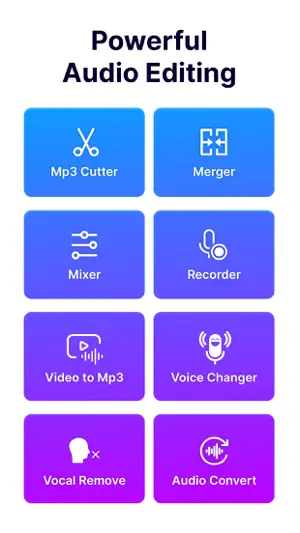
Music Editor: Mp3 Converter is a powerful audio editing application offering a range of advanced features to help users efficiently manage and modify audio files. Here are the standout features of the app: 1. Audio editing: - Audio Cutter helps you easily trim audio files with options for trim side or trim middle. - Adjust volume and speed of audio files effortlessly. 2. Merge and mix audio files: - Merge multiple audio files into one. - Mix different audio tracks to create unique compositions. 3. High-Quality voice recorder: - Provides high-quality voice recording capabilities. - Options to record from camera, microphone, or default settings. 4. Audio processing: - Convert audio file formats. - Extract vocals from music tracks. - Modify voices with effects like baby voice, elderly voice, robot, animal, etc. 5. Convert Video to MP3: - Easily convert video files to MP3 format. - Supports processing multiple video files simultaneously. 6. Video processing: - Cut videos as needed. - Compress and reduce video file sizes. - Adjust video speed. 7. High-Quality Export: - Export files in high quality, ensuring accuracy and clarity of both audio and video after editing. Music Editor: Mp3 Converter is the perfect tool for both professionals and beginners, enabling you to create high-quality audio and video content with ease.
Ratings & reviews
4.6
25 ratings
What’s new
Version 1.0.8 · Updated October 4, 2024
-Fix bugs and optimize app
App privacy
The developer, VODAPLAY CO., LTD, reported these privacy practices to Apple.
Data Used to Track You
The following data may be used to track you across apps and websites owned by other companies:
- Identifiers: Device ID
- Usage Data: Product Interaction, Advertising Data
- Diagnostics: Crash Data, Performance Data
Data Linked to You
The following data, which may be collected and linked to your identity, may be used for the following purposes:
- Location: Coarse Location
- Identifiers: Device ID
- Usage Data: Product Interaction, Advertising Data
- Diagnostics: Performance Data
Used for: Third-Party Advertising, Developer’s Advertising or Marketing, Analytics, Product Personalization, App Functionality
Data Not Linked to You
The following data, which may be collected but is not linked to your identity, may be used for the following purposes:
- Diagnostics: Crash Data
Used for: Analytics, App Functionality
Alternatives to Music Editor: Mp3 Converter
Looking for apps like Music Editor: Mp3 Converter? Here are 6 similar apps on the App Store. The highest rated is Audio Editor - MP3 Cutter App (4.8/5), and all 6 are free to download.
-
 Wave Audio Editor
4.1
Wave Audio Editor
4.1
-
 Audio Editor - MP3 Cutter App
4.8
Audio Editor - MP3 Cutter App
4.8
-
 Audio Cutter Converter Merger
4.7
Audio Cutter Converter Merger
4.7
-
 Merge Audio Files
4.5
Merge Audio Files
4.5
-
 Audio Editor - Audio Cutter
3.3
Audio Editor - Audio Cutter
3.3
-
 MP3 Converter - MP4 to MP3 .
4.7
MP3 Converter - MP4 to MP3 .
4.7
| App | Rating | Price | Last updated | Compare |
|---|---|---|---|---|
| Music Editor: Mp3 Converter | 4.6 / 5 (25 ratings) | Free | October 4, 2024 | |
| Wave Audio Editor | 4.1 / 5 (51) | Free | Aug 9, 2026 | Compare |
| Audio Editor - MP3 Cutter App | 4.8 / 5 (23) | Free | Sep 3, 2026 | Compare |
| Audio Cutter Converter Merger | 4.7 / 5 (301) | Free | Jun 15, 2026 | Compare |
| Merge Audio Files | 4.5 / 5 (50) | Free | Apr 25, 2024 | Compare |
| Audio Editor - Audio Cutter | 3.3 / 5 (3) | Free | Nov 15, 2024 | Compare |
| MP3 Converter - MP4 to MP3 . | 4.7 / 5 (26) | Free | Mar 25, 2026 | Compare |