

Ldgr
Tanner Mares Finance iPhoneiPadiPod touch
Ldgr is a free Finance app for iPhone and iPad by Tanner Mares. Rated 5.0/5 from 2 ratings. Requires iOS 26.0. Updated October 26, 2026.
- Rating
- 5.0
- 2 ratings
- Price
- Free
- on the App Store
- Size
- 10 MB
- Age 4+
- Updated
- Oct 26
- 2026 · v1.1.1
Screenshots


About Ldgr
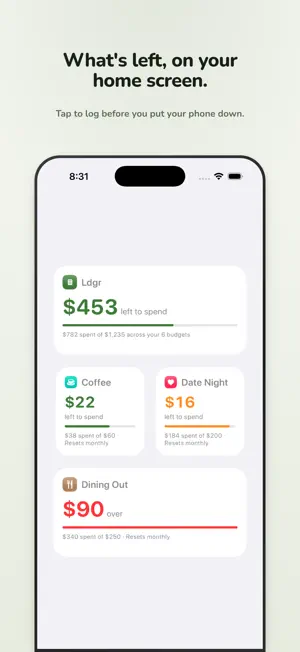
Most budgeting apps are built for looking back: connect your bank, and every purchase lands in a feed you review after the money is already gone. Ldgr is built for the moment that actually matters — right before you spend. There are no bank connections and no imports, on purpose. You add every purchase yourself, watch the number drop, and always know what's left. Staying close to your spending is the point. HOW IT WORKS • Make a budget for anything — groceries, date nights, coffee — with a spending limit that resets daily, weekly, monthly, or yearly. • Add each purchase in seconds: an amount, a date, a quick memo. • Watch what's left. The big number on every screen is the one that matters, and progress bars shift from green to orange to red as you near a limit. • Look back when it resets. Each period starts fresh, and past periods stay in view so you can adjust for next time. ON YOUR HOME SCREEN Add a widget for a single budget or a summary across all of them, and see what's left without opening the app. Tap it to jump straight to adding a purchase — the number that matters, one glance away. SHARE WITH ANYONE Share a budget with your partner, family, or roommates through iCloud. Everyone sees every purchase, anyone can add one, and each purchase shows who made it — so you stay accountable together. WHY I MADE IT At work, every budget has its own virtual card, and choosing a card at each purchase keeps you constantly aware of exactly what's left. I wanted that same discipline at home, privately — but no bank offers it, and every budgeting app wants to connect to your accounts and do the thinking for you. That's the opposite of what makes it work. So I built Ldgr: the same awareness, by hand, kept entirely in your own iCloud. PRIVATE BY DESIGN Your budget lives in your own iCloud account and syncs only between you and the people you invite. Only they and you can ever see it — not even me. No analytics, no ads, no tracking. Ldgr is free. Budget by hand, and stay present with your money.
What’s new
Version 1.1.1 · Updated October 26, 2026
This update is mostly behind the scenes, making Ldgr steadier: • Setting up on a new device or after reinstalling no longer looks like your budgets are gone. Ldgr shows that it's syncing with iCloud, or tells you if it can't reach iCloud, instead of an empty ledger. • The widget does the same, and no longer shows a sample budget before your own have loaded. • Better crash reporting, so problems get found and fixed sooner. Reports carry technical details only, never your budgets or purchases.
App privacy
The developer, Tanner Mares, reported these privacy practices to Apple.
Data Not Linked to You
The following data, which may be collected but is not linked to your identity, may be used for the following purposes:
- Identifiers: Device ID
- Diagnostics: Crash Data
Used for: App Functionality
Alternatives to Ldgr
Looking for apps like Ldgr? Here are 6 similar apps on the App Store. The highest rated is Vassant: Investment Strategy (5.0/5), and all 6 are free to download.
-
 Vassant: Investment Strategy
5.0
-
 OneLine Budget: Money Tracker
-
 Vimoni: Expense Tracker
5.0
-
 Budget Left? Simple Tracker
-
 Kingdom Advisors
5.0
-
 Evolve Bank and Trust Mortgage
3.6
| App | Rating | Price | Last updated | Compare |
|---|---|---|---|---|
| Ldgr | 5.0 / 5 (2 ratings) | Free | October 26, 2026 | |
| Vassant: Investment Strategy | 5.0 / 5 (15) | Free | Oct 17, 2026 | Compare |
| OneLine Budget: Money Tracker | – | Free | Oct 15, 2026 | Compare |
| Vimoni: Expense Tracker | 5.0 / 5 (1) | Free | Oct 18, 2026 | Compare |
| Budget Left? Simple Tracker | – | Free | Oct 14, 2026 | Compare |
| Kingdom Advisors | 5.0 / 5 (14) | Free | Feb 4, 2026 | Compare |
| Evolve Bank and Trust Mortgage | 3.6 / 5 (5) | Free | Jul 22, 2026 | Compare |
Compare Ldgr with the top alternatives: ratings, updates, ASO score and keyword gaps →