

Word Document
Neon Infotech FZ-LLC Productivity iPhoneiPadiPod touch
Word Document is a free Productivity app for iPhone and iPad by Neon Infotech FZ-LLC. Rated 2.3/5 from 3 ratings. Requires iOS 15.6. Updated August 24, 2026.
- Rating
- 2.3
- 3 ratings
- Price
- Free
- on the App Store
- Size
- 40 MB
- Age 17+
- Updated
- Aug 24
- 2026 · v1.3
Screenshots


About Word Document
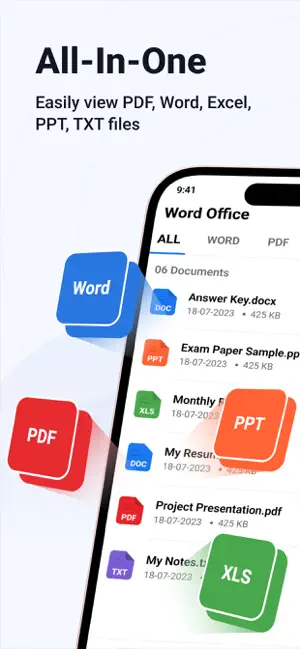
Word Document is a versatile document management app designed to handle five popular file formats seamlessly. With its user-friendly interface, the app offers a variety of features to enhance productivity and file organisation. Key features include: • Supports 5 File Formats: Manage and work with Word, PDF, Excel, PowerPoint, and TXT files effortlessly. • Favourites Feature: Easily mark important files as Favourites for quick access in a dedicated list. • Recent Files: Quickly view the files you've recently opened in the Recent tab, allowing for easy access to frequently used documents. • File Filters: Apply filters to your files to sort and organise them based on criteria like file type, date, size, or name. • File Management Options: You can rename, share, or delete files with ease, providing flexibility in managing your documents. • Search Functionality: Use the built-in search feature to quickly find specific files by name or content. • Bulk File Operations: Select multiple files at once to share or delete, streamlining your workflow. • Multilingual Support: The app is available in multiple languages, ensuring usability for a global audience. • Dark Mode: Enjoy a more comfortable viewing experience with the app’s dark mode feature, especially in low-light environments. Word Document offers a comprehensive solution for managing and organising various file types in a single app, with features designed for efficiency and ease of use. ========================== Subscription Details: - Payment will be charged to iTunes Account at confirmation of purchase. - Subscription automatically renews unless auto-renew is turned off 24 hours before the end of the current period. - Account will be charged for renewal within 24 hours prior to the end of the current period. - No cancellation of the current subscription is allowed during the active subscription period. - Any unused portion of a free trial, if offered, will be forfeited upon purchase. Terms of Use : https://privacypolicycenter.com/new/terms/id6475183628 Privacy Policy : https://privacypolicycenter.com/new/view/id6475183628 EULA: https://privacypolicycenter.com/new/eula/id6475183628
What’s new
Version 1.3 · Updated August 24, 2026
- Bugs Fixing. - Performance Improvement.
App privacy
The developer, Neon Infotech FZ-LLC, reported these privacy practices to Apple.
Data Used to Track You
The following data may be used to track you across apps and websites owned by other companies:
- Usage Data: Advertising Data
- Diagnostics: Crash Data
Data Not Linked to You
The following data, which may be collected but is not linked to your identity, may be used for the following purposes:
- Identifiers: Device ID, User ID
- Usage Data: Advertising Data
- Diagnostics: Crash Data, Performance Data, Other Diagnostic Data
Used for: Third-Party Advertising, Analytics
Alternatives to Word Document
Looking for apps like Word Document? Here are 6 similar apps on the App Store. The highest rated is Office Word Editor-Docs, Share (4.7/5), and all 6 are free to download.
-
 Office Suite: Word, Sheet, PDF
3.0
Office Suite: Word, Sheet, PDF
3.0
-
 Word Editor: DOCX, Office, PDF
-
 Office Word Editor-Docs, Share
4.7
Office Word Editor-Docs, Share
4.7
-
 Office Word: Edit Document
4.7
Office Word: Edit Document
4.7
-
 Word Editor: Docs,Office & PDF
4.3
Word Editor: Docs,Office & PDF
4.3
-
 Office Word Editor:Docs, Share
4.6
Office Word Editor:Docs, Share
4.6
| App | Rating | Price | Last updated | Compare |
|---|---|---|---|---|
| Word Document | 2.3 / 5 (3 ratings) | Free | August 24, 2026 | |
| Office Suite: Word, Sheet, PDF | 3.0 / 5 (4) | Free | Jan 19, 2026 | Compare |
| Word Editor: DOCX, Office, PDF | – | Free | Oct 27, 2026 | Compare |
| Office Word Editor-Docs, Share | 4.7 / 5 (108) | Free | Jan 19, 2026 | Compare |
| Office Word: Edit Document | 4.7 / 5 (1,537) | Free | Oct 5, 2026 | Compare |
| Word Editor: Docs,Office & PDF | 4.3 / 5 (11) | Free | Oct 17, 2026 | Compare |
| Office Word Editor:Docs, Share | 4.6 / 5 (124) | Free | Dec 10, 2025 | Compare |
Compare Word Document with the top alternatives: ratings, updates, ASO score and keyword gaps →