

Word Pads
JongKeun Ji Education iPhoneiPadiPod touch
Word Pads is a free Education app for iPhone and iPad by JongKeun Ji. Requires iOS 17.0. Updated October 27, 2026.
- Price
- Free
- on the App Store
- Size
- 33 MB
- Age 4+
- Updated
- Oct 27
- 2026 · v5.0.0
Screenshots

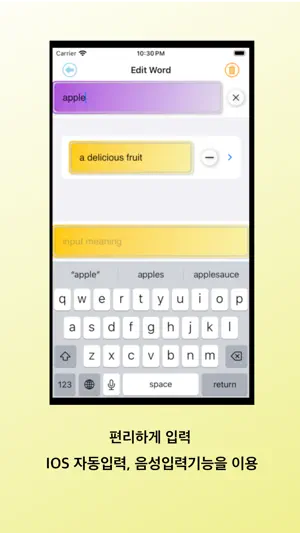

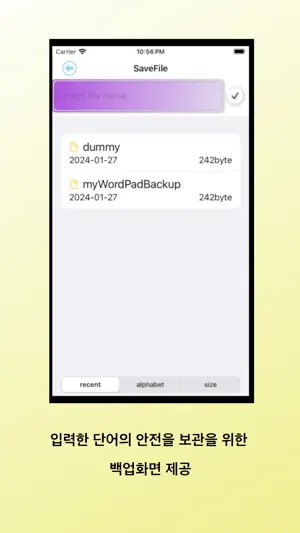
About Word Pads
You can create a vocabulary book, repeat tests of the input words in the order of many errors, few checks, and listen to the input words during the test, which helps you learn pronunciation. Repeated confirmation allows you to statistically check the level of word acquisition. Terms of License link is https://febos.kr/index.php/eula/
What’s new
Version 5.0.0 · Updated October 27, 2026
Your word list is now organized by part of speech • Meanings are grouped by part of speech (noun, verb, and more). • Cards show each meaning's usage (informal, slang, regional, and more) and word forms (plural, past tense, and more). • A meaning can now have more than one example sentence. Write Word • Tap the part-of-speech chip to set a meaning's part of speech, and open Usage to add word features and details. • Type an inflected form such as "leaves" or "went," and the dictionary suggests the base forms. • Drag to reorder parts of speech, meanings, and example sentences. • A "Hide Keyboard" button now appears above the keyboard. New built-in dictionary • The built-in dictionary has been rebuilt. Duplicate meanings were cleaned up and meanings were reordered. • CSV import also finds base forms, and tells you at the end which words had more than one candidate. • Words whose dictionary headword changed are updated to the new headword when you update the app or restore a backup. Today's Study • Missed study days now show as a badge on the Start Studying button and the app icon. • The study schedule marks missed days and reset days with an outline. • Progress now shows active days and delayed days. • Reset Study now also clears your study history and badges. Other changes • Notices are now shown at the top of the Purchase screen. A dot on the home button tells you when there is an unread notice. • You are now told the result of restoring purchases. • A progress bar shows the dictionary and word list being prepared at launch.
App privacy
The developer, JongKeun Ji, reported these privacy practices to Apple.
Data Not Collected
The developer does not collect any data from this app.
Alternatives to Word Pads
Looking for apps like Word Pads? Here are 6 similar apps on the App Store. The highest rated is SAT One Word at a time (5.0/5), and all 6 are free to download.
-
 WordRem
-
 SAT One Word at a time
5.0
SAT One Word at a time
5.0
-
 BOT Copy Editing
-
 LangChill: AI Flashcards
5.0
LangChill: AI Flashcards
5.0
-
 Remember - memorize the words
-
 Lock Learn: Passive Learning!
5.0
Lock Learn: Passive Learning!
5.0
| App | Rating | Price | Last updated | Compare |
|---|---|---|---|---|
| Word Pads | – | Free | October 27, 2026 | |
| WordRem | – | Free | Dec 28, 2023 | Compare |
| SAT One Word at a time | 5.0 / 5 (4) | Free | May 30, 2025 | Compare |
| BOT Copy Editing | – | Free | Sep 25, 2024 | Compare |
| LangChill: AI Flashcards | 5.0 / 5 (2) | Free | Apr 13, 2025 | Compare |
| Remember - memorize the words | – | Free | Mar 22, 2026 | Compare |
| Lock Learn: Passive Learning! | 5.0 / 5 (3) | Free | Jun 25, 2026 | Compare |
Compare Word Pads with the top alternatives: ratings, updates, ASO score and keyword gaps →