

Scanner: Scan To PDF
Krushit Sachapara Utilities iPhoneiPadiPod touch
Scanner: Scan To PDF is a free Utilities app for iPhone and iPad by Krushit Sachapara. Rated 5.0/5 from 1 ratings. Requires iOS 13.0.
- Rating
- 5.0
- 1 ratings
- Price
- Free
- on the App Store
- Size
- 12 MB
- Age 4+
- Updated
- Jan 26
- 2025 · v1.7
Screenshots



About Scanner: Scan To PDF
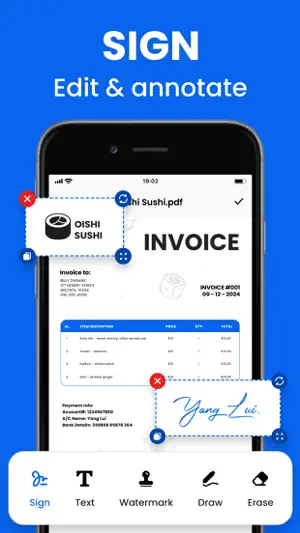
Scanner: Scan To PDF is free to download and turns your mobile device into a powerful scanner that recognises text automatically (OCR) and allows you to create, save, and organise your paper documents as a digital file. Scan anything — receipts, notes, ID cards, recipes, photos, business cards, whiteboards — and turn them into PDF or JPEG files you can work with on your smartphone, tablet, or computer. HOW IT WORKS • Scan any document and convert to PDF or photo. • Get perfect scans of book and magazine pages with Straighten in Book Mode. • Quickly scan and save your important documents to Dropbox or Google Drive so you can access and share them wherever you are. • Adjust the brightness and contrast of your scans in just a few taps. DOCUMENT SCANNER • This tiny yet powerful free scanner app is a must-have for students and anyone involved in a small business: accountants, realtors, managers, or lawyers. Scan anything you need, including receipts, contracts, paper notes, fax papers, books, and store your scans as multipage PDF or JPG files. CAPTURE • Scan anything with precision with this mobile PDF scanner. • Advanced image technology automatically detects borders, sharpens scanned content, and recognises text (OCR). ENHANCE • NEW: Edit in Scan feature allows you to edit your scans. • Preview, reorder, crop, rotate, resize, and adjust color in PDF or photo scans. • Remove and edit imperfections, erase stains, marks, creases, even handwriting. INNOVATIVE PDF SCANNER • Scan documents and photos to PDF, JPG, or TXT • Easily scan multiple pages into one document • Recognize text from any scannable object with OCR • Put your electronic signature on documents HANDY DOCUMENT EDITOR \ FILE MANAGER • Edit scans using color correction and noise removing features • Use file manager with folders, drag \ drop, and document editing features • Protect your confidential scans by locking folders and files with PIN ORGANISE • Capture forms, receipts, notes, ID cards, health documents, and business cards and organise into custom folders so they are easy to access and find. • Contact information will be automatically extracted so you can quickly add to your device contacts — no typing needed. You can even highlight expenses on tax receipts with ease. QUICKLY FIND DOCUMENTS IN PHOTO LIBRARY • This powerful scanner app automatically finds documents and receipts in your photos and turns them into PDF scans, so you don't have to. • Touch up scans or photos from your camera roll. REUSE • Turn your scan into a high-quality Adobe PDF that unlocks text for reuse through automated text recognition (OCR). • Automatic OCR turns text into content you can edit, resize, and reuse in other documents. SCAN ANYTHING, ANYWHERE, ANYTIME • The PDF Scanner app even lets you scan multi-page documents and save with a single tap. • Even lengthy legal documents become manageable and scannable with the PDF Scanner app, which lets you search, select, and copy text. DO MORE WITH ACROBAT • You can also open a PDF scan in Acrobat Reader to highlight key sections, add comments, fill and sign documents. • Free, built-in optical character recognition (OCR) lets you reuse scanned text and content to work with in Adobe Acrobat Reader. IN-APP PURCHASE • Subscribe for even more scanning power. Subscriptions work across Scan and Reader mobile apps and Acrobat on the web. • Combine scans into one file so you can take multiple scans and consolidate into one document. • Export PDFs to Microsoft Word, Excel, or PowerPoint file formats to repurpose or reformat your documents. • Increase OCR capacity from 25 to 100 pages so that you can find text in multiple scans. Download the free mobile scanner to convert important photos and documents into PDF and JPEG files to help you stay organised. PDF Scanner is the PDF converter trusted by millions worldwide.
What’s new
Version 1.7 · Updated January 26, 2025
- Bug Fixed - Performance Improvements
App privacy
The developer, Krushit Sachapara, reported these privacy practices to Apple.
Data Used to Track You
The following data may be used to track you across apps and websites owned by other companies:
- Identifiers: User ID
- Usage Data: Advertising Data
Data Not Linked to You
The following data, which may be collected but is not linked to your identity, may be used for the following purposes:
- Identifiers: User ID
- Usage Data: Advertising Data
- Diagnostics: Crash Data
Used for: Third-Party Advertising, Analytics
Alternatives to Scanner: Scan To PDF
Looking for apps like Scanner: Scan To PDF? Here are 6 similar apps on the App Store. The highest rated is AI Tattoo Design: Tattoo Maker (4.8/5), and all 6 are free to download.
-
 OCR Scanner - Camera Scanner
-
 Easy Scan - Scan PDF & OCR
4.7
Easy Scan - Scan PDF & OCR
4.7
-
 OffIine Video Saver
4.6
OffIine Video Saver
4.6
-
 Smart Camera connect
4.6
Smart Camera connect
4.6
-
 Followers•unfollowers tracker
4.4
Followers•unfollowers tracker
4.4
-
 AI Tattoo Design: Tattoo Maker
4.8
AI Tattoo Design: Tattoo Maker
4.8
| App | Rating | Price | Last updated | Compare |
|---|---|---|---|---|
| Scanner: Scan To PDF | 5.0 / 5 (1 rating) | Free | January 26, 2025 | |
| OCR Scanner - Camera Scanner | – | Free | May 28, 2024 | Compare |
| Easy Scan - Scan PDF & OCR | 4.7 / 5 (6) | Free | Oct 14, 2026 | Compare |
| OffIine Video Saver | 4.6 / 5 (184) | Free | Jun 25, 2024 | Compare |
| Smart Camera connect | 4.6 / 5 (34) | Free | May 29, 2026 | Compare |
| Followers•unfollowers tracker | 4.4 / 5 (18) | Free | Nov 1, 2024 | Compare |
| AI Tattoo Design: Tattoo Maker | 4.8 / 5 (87) | Free | Feb 13, 2024 | Compare |