

Day Agenda
Joshua Sroufe Productivity iPhoneiPadiPod touchMacApple Watch
Day Agenda is a free Productivity app for iPhone and iPad by Joshua Sroufe. Rated 5.0/5 from 6 ratings. Requires iOS 17.0. Updated October 18, 2026.
- Rating
- 5.0
- 6 ratings
- Price
- Free
- on the App Store
- Size
- 188 MB
- Age 4+
- Updated
- Oct 18
- 2026 · v3.10
Screenshots

About Day Agenda
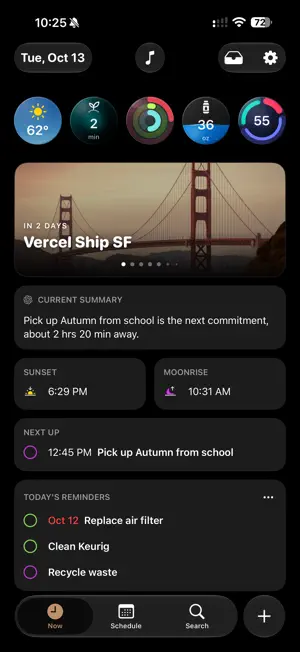
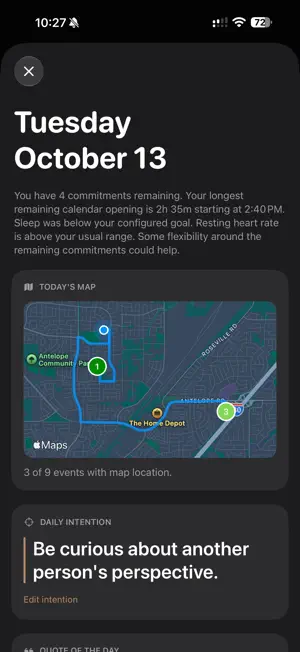
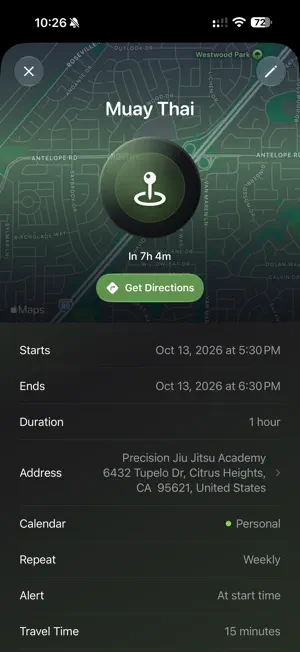
Your calendar, reminders, routines, health, weather, and music—together in one intelligent view. Day Agenda (https://mydayagenda.com) helps you understand what matters now, plan what comes next, and make room for focus and rest. PLAN YOUR DAY Switch between a list and an hourly timeline. See events, reminders, travel time, all-day plans, and schedule gaps together. Preview recurring reminders, add events and tasks, manage invitations, and keep birthdays close at hand. Open focused details with notes, checklists, maps, directions, call links, and relevant actions. Choose and arrange the signals and Now sections that matter to you. MANAGE EVERY KIND OF REMINDER Use standard reminders for everyday tasks, payment reminders for bills and recurring expenses, and medication reminders for doses and routines. Create personal or shared lists, choose all-day or timed schedules, and see past-due items throughout Schedule, Now, summaries, and planning. Mark items complete, paid, taken, or skipped, and review payment and medication history. COUNT DOWN TO WHAT MATTERS Create beautiful visual countdowns for birthdays, trips, milestones, and anything worth anticipating. Smart Highlights brings countdowns and flight updates into one swipeable card. PLAY SOMETHING THAT FITS Listen to Apple Music playlists, albums, and stations without leaving your day. Browse Recently Played, For You, Heavy Rotation, library playlists, and curated collections. Pin favorites and sync them through iCloud across iPhone, iPad, and Mac. Or choose nature sounds, calming soundscapes, colored noise, and Weather Reactive audio. FOCUS, PAUSE, OR WIND DOWN Choose Basic, Mindfulness, Focus, or Sleep timers. Customize durations, audio, and alerts. Focus includes work sessions and short or long breaks. Mindfulness sessions can log to Apple Health with permission. The Sleep Timer plays audio for a set time, then stops quietly—without an alarm, notification, or haptic alert. PLAN FROM A PHOTO OR FILE Describe your goal or attach a schedule, flyer, image, PDF, or text file. AI Planner turns the information into draft events and reminders. Review every suggestion, choose its calendar or reminder list, and add items individually or together. UNDERSTAND YOUR DAILY RHYTHM See activity rings, steps, heart data, daylight, workouts, and fitness trends alongside your schedule. Review sleep stages, your sleep score, and overnight vitals. Set sleep schedules, wind-down time, and optional wake alarms. Choose notifications for daily goals and important updates. STAY A STEP AHEAD Get a Current Summary informed by your schedule, health, and weather, with supported options including Day Agenda, Apple Intelligence, ChatGPT, Gemini, and Claude. Listen to your summary, ask Siri to start a mindfulness or focus timer, or log water. Mark a timed reminder Urgent for an alarm on a supported iPhone. AT HOME ACROSS YOUR APPLE DEVICES Use Day Agenda on iPhone, iPad, Mac, and Apple Watch. Enjoy adaptive layouts, iPhone landscape support, keyboard shortcuts, widgets, Control Center actions, Live Activities, and companion snapshots on supported devices. Start free. Day Agenda Pro adds AI Planner, Focus timers, payment and medication reminders, sleep insights and schedules, visual countdowns, flight tracking, detailed weather, and sun and moon details. Apple Music playback requires an active subscription and permission. Available music varies by account and region. Health features require permission and available data; Mac uses synced companion data. iCloud features require the same Apple Account and may take time to update. AI features, alarms, widgets, and Live Activities vary by device, OS, permissions, and plan. AI Planner usage limits apply. Payment and medication reminders are organizational tools and do not provide financial or medical advice. Privacy: https://mydayagenda.com/privacy Terms of Use: https://www.apple.com/legal/internet-services/itunes/dev/stdeula/
Ratings & reviews
5.0
6 ratings
What’s new
Version 3.10 · Updated October 18, 2026
Bug fixes and enhancements.
App privacy
The developer, Joshua Sroufe, reported these privacy practices to Apple.
Data Not Collected
The developer does not collect any data from this app.
Alternatives to Day Agenda
Looking for apps like Day Agenda? Here are 6 similar apps on the App Store. The highest rated is Susu: Daily Life Planner (5.0/5), and all 6 are free to download.
-
 Susu: Daily Life Planner
5.0
Susu: Daily Life Planner
5.0
-
 Enframe - Calendar insights
-
 Choresly
-
 Todo All The Things
5.0
Todo All The Things
5.0
-
 Milestone: Project Organiser
-
 Timesight: Time Tracking Tools
| App | Rating | Price | Last updated | Compare |
|---|---|---|---|---|
| Day Agenda | 5.0 / 5 (6 ratings) | Free | October 18, 2026 | |
| Susu: Daily Life Planner | 5.0 / 5 (2) | Free | Jun 3, 2026 | Compare |
| Enframe - Calendar insights | – | Free | Jul 18, 2026 | Compare |
| Choresly | – | Free | Feb 7, 2026 | Compare |
| Todo All The Things | 5.0 / 5 (1) | Free | May 10, 2024 | Compare |
| Milestone: Project Organiser | – | Free | Mar 28, 2026 | Compare |
| Timesight: Time Tracking Tools | – | Free | Mar 6, 2025 | Compare |
Compare Day Agenda with the top alternatives: ratings, updates, ASO score and keyword gaps →