

Swing Analyzer - Speed Tracker
zhenyu song Sports iPhoneiPadiPod touchApple Watch
Swing Analyzer - Speed Tracker is a free Sports app for iPhone and iPad by zhenyu song. Requires iOS 15.0. Updated November 8, 2026.
- Price
- Free
- on the App Store
- Size
- 35 MB
- Age 4+
- Updated
- Nov 8
- 2026 · v2.0.10
Screenshots


About Swing Analyzer - Speed Tracker
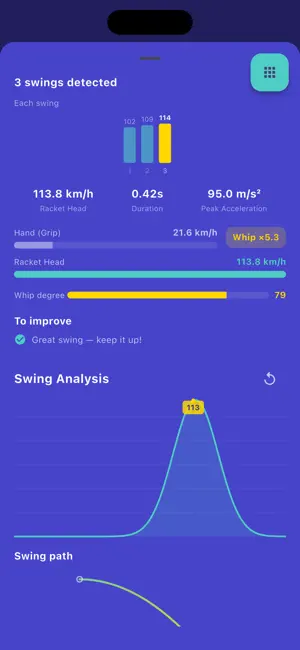
Swing Analyzer - Measure Your Swing Speed with Precision Track and improve your swing speed across 5 sports: Tennis, Badminton, Table Tennis, Baseball, and Golf. KEY FEATURES: Advanced Sensor Technology - Quaternion-based orientation tracking for accurate gravity removal - Complementary filter sensor fusion (gyroscope + accelerometer) - Sport-specific speed modeling: badminton captures the wrist-and-forearm whip, tennis and baseball model the longer arm-driven arc - Automatic swing detection with sport-specific thresholds - Real-time speed measurement with live chart visualization Multiple Sport Modes - Tennis, Badminton, Table Tennis, Baseball, Golf - Each sport has optimized detection thresholds - Switch between sports instantly Swing History & Statistics - Every swing is automatically saved with detailed metrics - View max speed, average speed, peak acceleration, and duration - Track progress with interactive charts (7 days, 30 days, all time) - Personal records highlighted for each sport Swing Analysis - Acceleration curve visualization for each swing - Phase breakdown: Preparation, Acceleration, Follow-through Calibration - Simple one-tap calibration for improved accuracy Share Results - Share your best swings with friends on social media 30+ Languages - Available in over 30 languages worldwide PRIVACY All sensor data is processed locally on your device. No data is transmitted to external servers. HOW TO USE 1. Select your sport mode 2. Hold your phone firmly like a racket or bat 3. Tap Start and swing! 4. Your speed is measured and recorded automatically Perfect for athletes, coaches, and sports enthusiasts who want to track and improve their swing performance. Terms of Use (EULA): https://www.apple.com/legal/internet-services/itunes/dev/stdeula/
What’s new
Version 2.0.10 · Updated November 8, 2026
Apple Watch: you can now see whether the watch is connected while you measure, on the iPhone and on the watch face. If Swing lacks the Health “Workouts” permission, or another workout is running on the watch, the app now tells you instead of silently losing the connection. The watch also no longer drops data because of a stale “not reachable” flag. Plus minor fixes.
App privacy
The developer, zhenyu song, reported these privacy practices to Apple.
Data Used to Track You
The following data may be used to track you across apps and websites owned by other companies:
- Usage Data: Product Interaction
Data Not Linked to You
The following data, which may be collected but is not linked to your identity, may be used for the following purposes:
- Identifiers: Device ID, User ID
- Usage Data: Product Interaction, Advertising Data
- Location: Coarse Location
- User Content: Photos or Videos
- Diagnostics: Crash Data
Used for: Third-Party Advertising, Analytics, App Functionality
Alternatives to Swing Analyzer - Speed Tracker
Looking for apps like Swing Analyzer - Speed Tracker? Here are 6 similar apps on the App Store. The highest rated is SmartScout Baseball (4.7/5), and all 6 are free to download.
-
 Swing Speed Radar
-
 DeepSwing: Golf Launch Monitor
4.6
-
 Baseball Radar Gun High Heat
3.9
-
 ShotVision Launch Monitor
3.5
-
 Golfboy:Launch Monitor
4.6
-
 SmartScout Baseball
4.7
| App | Rating | Price | Last updated | Compare |
|---|---|---|---|---|
| Swing Analyzer - Speed Tracker | – | Free | November 8, 2026 | |
| Swing Speed Radar | – | Free | Aug 8, 2025 | Compare |
| DeepSwing: Golf Launch Monitor | 4.6 / 5 (53) | Free | Nov 10, 2026 | Compare |
| Baseball Radar Gun High Heat | 3.9 / 5 (1,020) | Free | Sep 12, 2026 | Compare |
| ShotVision Launch Monitor | 3.5 / 5 (1,307) | Free | Nov 11, 2026 | Compare |
| Golfboy:Launch Monitor | 4.6 / 5 (840) | Free | Sep 25, 2026 | Compare |
| SmartScout Baseball | 4.7 / 5 (518) | Free | Nov 11, 2026 | Compare |