

KlutchShots AI
KlutchShots Sports iPhoneiPadiPod touchApple Watch
KlutchShots AI is a free Sports app for iPhone and iPad by KlutchShots. Rated 4.2/5 from 11 ratings. Requires iOS 26.0. Updated September 30, 2026.
- Rating
- 4.2
- 11 ratings
- Price
- Free
- on the App Store
- Size
- 174 MB
- Age 4+
- Updated
- Sep 30
- 2026 · v2.2.3
Screenshots


About KlutchShots AI
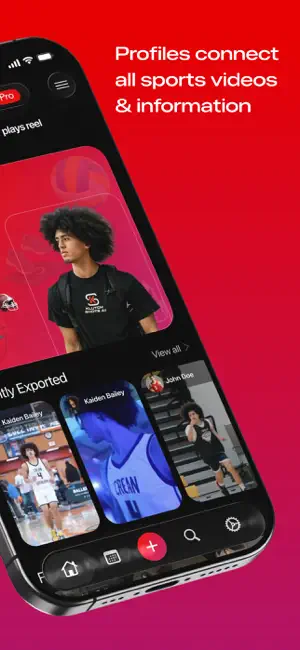
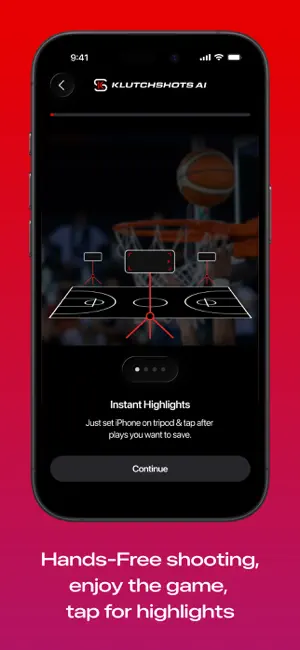
“KlutchShots Ai has provided high level highlights for us for a couple months now and we believe it’s the future of sharing highlights to social media in a seamless fashion. Our mission [Sierra Canyon] is to always find ways to push basketball forward and we believe KlutchShots Ai is in congruence with that mission.” - Coach Andre Chevalier KlutchShots AI delivers Social Media ready, vertical, action tracked sports highlights in seconds using on-device Ai and Computer Vision. All youth sports athletes and their family, friends and fans want high quality sports video highlights and they want them fast and easy. In the past this was difficult to impossible, but with KlutchShots it’s fast and easy. KlutchShots AI users shoot the game horizontally so they don’t miss any of the action and while they’re Shooting the AI and Computer Vision zooms in, tracks the action and reframes the video for vertical Social Media sharing. Key Features Instant Highlights - Just double tap your device screen or tap your Apple Watch and select the previous 5-20 seconds of video captured in 4k high resolution. Select the duration you want to capture for highlights and only get the highlights you want with no scrubbing through full games and editing on a laptop. Crowd Capture - Get the 5-20 seconds of video from your device and all other KlutchShots users shooting the game. Get video from multiple angles and choose the best or do multi-angle highlights and hype reels. AI Re-framer - For supported sports KlutchShots AI Re-framer works while users are shooting the game to identify and track the action, zoom in and re-frame into a vertical aspect ratio for sharing on social media. Once you stop recording you see your re-framed KlutchShots on the Event page. Manual Re-framer - For all sports KlutchShots Re-framer inputs the horizontal video into a vertical video frame and enables users to quickly and easily set key frames within the video so that it tracks the action exactly how they want. This is all done in seconds on the iPhone and just using finger and thumb movements everyone is used to. Re-frame Existing Highlights - Most people have existing horizontal sports video highlights already and you can import those into KlutchShots AI to have the AI Re-framer turn them into KlutchShots if the sport is supported or use the Manual Re-framer for any sport to turn your low quality video highlight into a high quality highlight to share on social media. Events - These can be games, practices or training sessions and are simple to create individually in the app as well as for clubs, schools and tournaments to batch create. Events enable all users to see the event information while also being where all video highlights and KlutchShots are organized and stored in the cloud and accessible to all users. Locker - This is each users personal house of highlights. Keep all of your favorite highlights and KlutchShots from all of your games in one organized location that doesn’t clog up your phone but is always accessible in cloud storage. Branding Packs - KlutchShots enables users, teams, tournaments and sponsors to have videos watermarked with their logos. This is a great new way for viewers to easily see team and tournament information as well as for KlutchShots to provide clubs, schools and tournament organizers with massive video content distributed via many social accounts that is measurable and data can be used to broaden sponsorship opportunities. EULA: https://app.termly.io/policy-viewer/policy.html?policyUUID=a39bdbaf-7833-4310-aae5-bdc804663753
Ratings & reviews
4.2
11 ratings
What’s new
Version 2.2.3 · Updated September 30, 2026
General bugfixes and improvements
App privacy
The developer, KlutchShots, reported these privacy practices to Apple.
Data Used to Track You
The following data may be used to track you across apps and websites owned by other companies:
- Identifiers: Device ID
Data Linked to You
The following data, which may be collected and linked to your identity, may be used for the following purposes:
- Identifiers: Device ID
- Contact Info: Email Address, Name
Used for: Analytics, App Functionality
Data Not Linked to You
The following data, which may be collected but is not linked to your identity, may be used for the following purposes:
- Diagnostics: Crash Data
- Location: Coarse Location
- User Content: Other User Content
Used for: Analytics, App Functionality
Alternatives to KlutchShots AI
Looking for apps like KlutchShots AI? Here are 6 similar apps on the App Store. The highest rated is Revocruit (5.0/5), and all 6 are free to download.
-
 Great American Shoot-Out
4.8
Great American Shoot-Out
4.8
-
 Border League
4.9
Border League
4.9
-
 Scholastic Series
4.9
Scholastic Series
4.9
-
 Revocruit
5.0
Revocruit
5.0
-
 Hi-Top Hoops
4.9
Hi-Top Hoops
4.9
-
 Hype Her Hoops Circuit
4.9
Hype Her Hoops Circuit
4.9
| App | Rating | Price | Last updated | Compare |
|---|---|---|---|---|
| KlutchShots AI | 4.2 / 5 (11 ratings) | Free | September 30, 2026 | |
| Great American Shoot-Out | 4.8 / 5 (481) | Free | Mar 29, 2024 | Compare |
| Border League | 4.9 / 5 (115) | Free | Apr 17, 2024 | Compare |
| Scholastic Series | 4.9 / 5 (59) | Free | Sep 9, 2024 | Compare |
| Revocruit | 5.0 / 5 (22) | Free | May 17, 2026 | Compare |
| Hi-Top Hoops | 4.9 / 5 (102) | Free | Mar 27, 2024 | Compare |
| Hype Her Hoops Circuit | 4.9 / 5 (381) | Free | Sep 9, 2024 | Compare |
Compare KlutchShots AI with the top alternatives: ratings, updates, ASO score and keyword gaps →