

Text Recognition - OCR Scanner
ryo muranaka Productivity iPhoneiPadiPod touch
Text Recognition - OCR Scanner is a free Productivity app for iPhone and iPad by ryo muranaka. Requires iOS 15.6. Updated October 17, 2026.
- Price
- Free
- on the App Store
- Size
- 32 MB
- Age 4+
- Updated
- Oct 17
- 2026 · v1.5.1
Screenshots


About Text Recognition - OCR Scanner
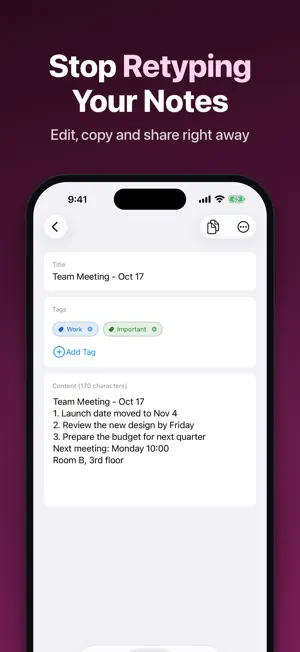
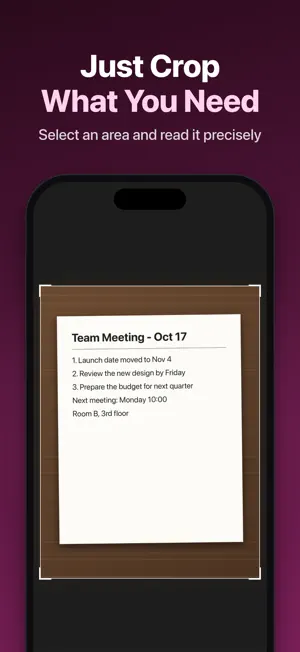
1. "Text Recognition" is an app that easily reads and digitizes text in images. Extract text from photos of reports, textbooks, handwritten notes, etc., to improve learning and work efficiency. 2. Features a. High Accuracy Text Recognition The app uses Apple's text recognition technology to detect text in images with high accuracy and speed. It supports handwritten, printed, and different fonts, and accurately converts them to text. b. Multi-functional Learning Support Edit and search digitized text for quick access to needed information. c. Easy-to-Use Interface Intuitive and user-friendly UI design eliminates complicated procedures and obstacles to learning. d. Online and Offline Support Recognize and digitize text by taking photos even without an internet connection, enabling use in any situation. 3. Use Cases For Students: Take photos of lecture notes or textbooks, extract important information, and optimize study time. For Researchers & Business Users: Capture meeting notes or technical documents in photos, quickly convert to text and edit for improved work efficiency. For Language Learners: Import foreign language texts or handwritten practice problems via photos to support language learning. 4. Future Plans We continue to make improvements, adding new features and updates based on user feedback to meet user needs. 5. Premium Features (Subscription) • Ad-free experience • Batch processing (up to 20 photos) • QR/Barcode scanning • Tag management • All export formats (PDF, Word, etc.) • Full-text search 6. Conclusion "Text Recognition" is an advanced app that realizes efficiency in learning and work with its sophisticated text recognition technology and ease of use. Easily digitize knowledge and strongly support your learning.
What’s new
Version 1.5.1 · Updated October 17, 2026
Minor improvements.
App privacy
The developer, ryo muranaka, reported these privacy practices to Apple.
Data Used to Track You
The following data may be used to track you across apps and websites owned by other companies:
- Location: Coarse Location
- Identifiers: User ID, Device ID
- Usage Data: Product Interaction, Advertising Data
Data Linked to You
The following data, which may be collected and linked to your identity, may be used for the following purposes:
- Location: Coarse Location
- Identifiers: User ID, Device ID
- Usage Data: Product Interaction, Advertising Data
Used for: Third-Party Advertising
Alternatives to Text Recognition - OCR Scanner
Looking for apps like Text Recognition - OCR Scanner? Here are 6 similar apps on the App Store. The highest rated is Photo Text Scanner OCR (3.7/5), and all 6 are free to download.
-
 The Text Scanner Offline
-
 Photo Text Scanner OCR
3.7
Photo Text Scanner OCR
3.7
-
 bunkoOCR
-
 TypeScan - Scan Text Fast
-
 撮るだけ文字認識
-
 ocr text scanner app
| App | Rating | Price | Last updated | Compare |
|---|---|---|---|---|
| Text Recognition - OCR Scanner | – | Free | October 17, 2026 | |
| The Text Scanner Offline | – | Free | Jan 27, 2025 | Compare |
| Photo Text Scanner OCR | 3.7 / 5 (3) | Free | Jan 29, 2026 | Compare |
| bunkoOCR | – | Free | Aug 23, 2025 | Compare |
| TypeScan - Scan Text Fast | – | Free | Jul 15, 2026 | Compare |
| 撮るだけ文字認識 | – | Free | Feb 14, 2026 | Compare |
| ocr text scanner app | – | Free | Dec 2, 2025 | Compare |