

DocFlip
Solueman Hussain Productivity iPhoneiPadiPod touch
DocFlip is a free Productivity app for iPhone and iPad by Solueman Hussain. Requires iOS 17.6. Updated October 4, 2026.
- Price
- Free
- on the App Store
- Size
- 14 MB
- Age 4+
- Updated
- Oct 4
- 2026 · v26.4
Screenshots


About DocFlip
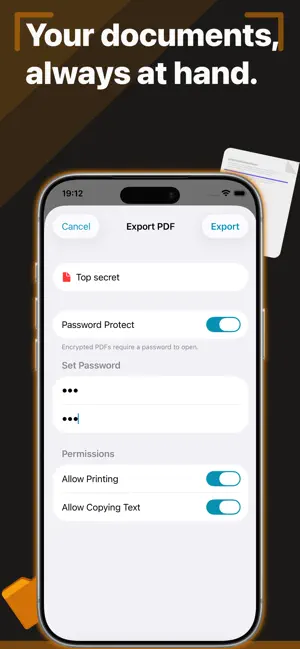
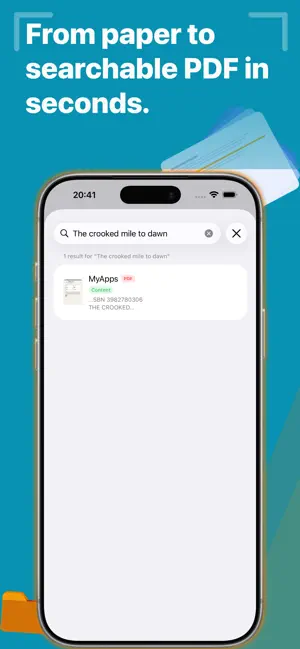
Scan anything to a crisp PDF, sign it and find it again in seconds. DocFlip turns your iPhone and iPad into a pocket document scanner with OCR, e-signatures, true redaction and smart organisation. Contracts, receipts, invoices, forms, letters, study notes: capture them once and DocFlip sorts them, suggests a name and makes every word searchable. WHY PEOPLE LOVE DocFlip · Scan to PDF in seconds with automatic edge detection · Sign and fill PDF forms without printing anything · Search the text inside every scan with built-in OCR · Redact for real: hidden content is removed, not just covered · Find documents from Spotlight, Siri and the Shortcuts app SCAN & IMPORT · Scan paper documents with automatic edge detection · Convert photos to PDF right from the Photos app: tap Share, then "Convert to PDF" · Scan QR codes and barcodes · Import PDFs and keep them native or convert them into editable pages · Drag and drop images or PDFs from Files, Safari, Mail and other apps SMART ORGANISATION · Receipts, business cards and general documents are sorted automatically · Smart name suggestions based on content: document type, date and amount · Folders and tags, with tag search across your library · Merge files or split out individual pages · Restore deleted documents for up to 30 days SEARCH EVERYTHING · Built-in OCR makes every scanned page searchable · Recognise text in all your documents at once and choose the languages · Your documents and the text inside your scans show up in Spotlight · Use Siri or Shortcuts to scan, import from Photos or search your documents EDIT & ANNOTATE · Crop, rotate, reorder and enhance pages · Highlight, underline, strikethrough and add text boxes · Draw with Apple Pencil or your finger SIGN, FILL & PROTECT · Save your handwritten signature and place it on any page · Fill PDF forms without printing, scanning or switching apps · Permanently black out sensitive information with true redaction · Export PDFs with optional password protection and your own watermark MADE FOR iPHONE, iPAD & MAC · Keep your library in sync across your devices with iCloud · Use Split View on iPad to read and work side by side Download DocFlip and turn today's paper pile into a searchable library.
What’s new
Version 26.4 · Updated October 4, 2026
A big update: DocFlip is now smarter, quicker to reach and easier to keep organised. • Photos to PDF in one tap: select photos in the Photos app, tap Share and choose "Convert to PDF". The PDF is saved to your library, and you can save a copy to Files. • Siri & Shortcuts: scan a document, import from Photos or search your documents by voice or in the Shortcuts app. • Spotlight search: find your documents, and the text inside your scans, right from your Home Screen. • Smart names: rename suggestions based on the document's content (type, date, amount). • Auto-sorting: receipts, business cards and general documents are sorted automatically. • Tags: organise documents with tags and search by tag in your library. • Markup: highlight, add text boxes and redact. Redactions are permanently blacked out when saved. • Watermarks: add your own text watermark with adjustable opacity when exporting a PDF. • QR code and barcode scanner built in. • Batch text recognition: recognise text in all your documents at once and choose which languages to recognise. Improvements • Password-protected PDFs now ask for the password instead of being skipped. • Fixed photo imports. • Improved VoiceOver support and translations. • Stability, sync and performance improvements. Enjoying DocFlip? A quick rating on the App Store helps more people find it. Thank you!
App privacy
The developer, Solueman Hussain, reported these privacy practices to Apple.
Data Not Collected
The developer does not collect any data from this app.
Alternatives to DocFlip
Looking for apps like DocFlip? Here are 6 similar apps on the App Store. The highest rated is HeyCue: AI Personal Assistant (5.0/5), and 5 of the 6 are free to download.
-
 AI Cleaner
4.7
-
 Flight WiFi Scanner
-
 HeyCue: AI Personal Assistant
5.0
-
 G.R.I.O.T
-
 EmpiricCommander File Manager
-
 Yellow Note
5.0
| App | Rating | Price | Last updated | Compare |
|---|---|---|---|---|
| DocFlip | – | Free | October 4, 2026 | |
| AI Cleaner | 4.7 / 5 (6) | Free | Apr 2, 2026 | Compare |
| Flight WiFi Scanner | – | Free | May 5, 2026 | Compare |
| HeyCue: AI Personal Assistant | 5.0 / 5 (1) | Free | Aug 16, 2026 | Compare |
| G.R.I.O.T | – | Free | Oct 26, 2026 | Compare |
| EmpiricCommander File Manager | – | Free | Oct 25, 2026 | Compare |
| Yellow Note | 5.0 / 5 (5) | 14.99 USD | May 14, 2026 | Compare |
Compare DocFlip with the top alternatives: ratings, updates, ASO score and keyword gaps →