

Voiser: Speech to Text & STT
Voiser Teknoloji Limited Sirketi Utilities iPhoneiPadiPod touch
Voiser: Speech to Text & STT is a free Utilities app for iPhone and iPad by Voiser Teknoloji Limited Sirketi. Rated 4.5/5 from 31 ratings. Requires iOS 15.0.
- Rating
- 4.5
- 31 ratings
- Price
- Free
- on the App Store
- Size
- 50 MB
- Age 17+
- Updated
- Oct 21
- 2026 · v2.0.0
Screenshots

About Voiser: Speech to Text & STT
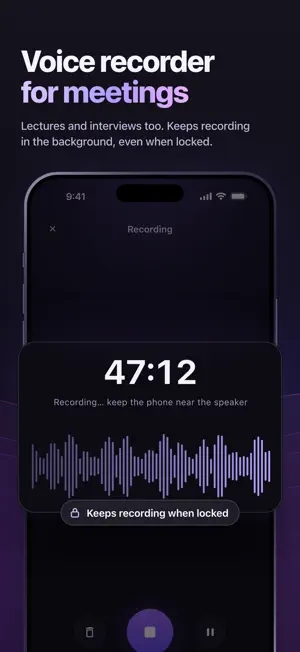
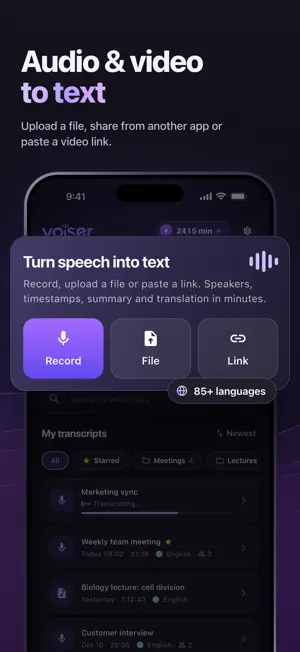
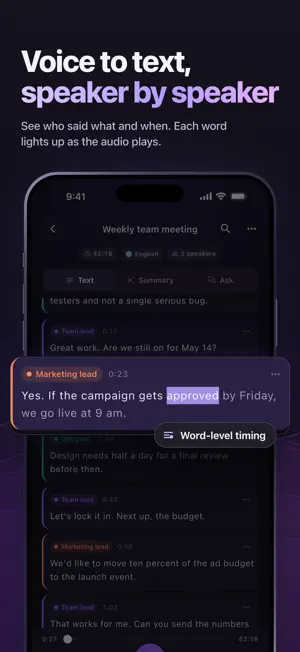
Convert audio to text with AI. Record a meeting or a lecture, upload an audio or video file, or paste a video link, and get an accurate transcript with speakers and timestamps in minutes. Then read a summary, ask questions about it or translate it into 120+ languages. How it works 1. Add audio: record in the app (it keeps recording with the screen locked), upload an audio or video file, share a voice message or a video from another app, or paste a video link. 2. Transcribe: choose the spoken language or let the app detect it, turn on speaker labels and add custom words for names and terms. You can close the app; we'll notify you when your transcript is ready. 3. Use it: read along with the audio, search, edit, summarize, ask questions, translate and export. Features • Speech to text in 85+ languages, with automatic language detection • Speaker labels: see who said what and give each speaker a name • Timestamps on every line: tap a line to play it, and words light up as the audio plays • Playback speed, search inside a transcript and line editing • AI summary with key points and action items • Ask your transcript: answers come with timestamps you can tap to jump there • Translate transcripts into 120+ languages • Export to PDF, DOCX, TXT and SRT or VTT subtitles, with or without speaker names and timestamps • Custom words, so names, companies and terms are spelled right • Your library with folders, stars, search and sorting • Works with common audio and video files such as MP3, M4A, WAV, MP4 and MOV • No sign-up needed • App available in 14 languages Great for • Meetings: notes, decisions and next steps • Lectures and classes: never miss a word • Interviews and research • Voice memos and voice messages: voice to text you can search • Videos and podcasts: video to text, subtitles, summaries and translations Only transcribe recordings and videos you have the right to use. Your recordings and data To transcribe, summarize, translate and answer your questions, your audio and transcripts are sent to Voiser's servers and processed by our AI provider. They are used only to provide these features, and you agree to this before your first transcript. Audio is deleted after 90 days; the text stays in your library until you delete it. You can delete any transcript, and you can delete your account in Settings. Summaries and answers are generated by AI, so check important details against the transcript. AI Transcriber PRO New users get free minutes to try transcription. For more, choose a PRO plan: • Weekly: 750 minutes a week • Monthly: 3,000 minutes a month PRO also gives you recordings up to 5 hours and 200 AI questions per transcript. Payment is charged to your Apple Account when you confirm the purchase. Subscriptions renew automatically unless canceled at least 24 hours before the end of the current period, and the renewal is charged within the 24 hours before the period ends. You can manage or cancel your subscription in your App Store account settings. Terms of Use: https://voiser.ai/terms-of-use Privacy Policy: https://voiser.ai/privacy-policy
Ratings & reviews
4.5
31 ratings
What’s new
Version 2.0.0 · Updated October 21, 2026
Meet the new AI Transcriber, rebuilt from the ground up. • Your transcripts, your subscription and any unfinished recordings come with you to the new version. Transcripts from the previous version keep their text. • A simpler flow: record, upload a file or paste a video link • Speaker labels, timestamps on every line and read-along playback • AI summaries with key points and action items, plus answers to your questions • Translation into 120+ languages and export to PDF, DOCX, TXT, SRT and VTT • Folders, stars and custom words for names and terms
App privacy
The developer, Voiser Teknoloji Limited Sirketi, reported these privacy practices to Apple.
Data Used to Track You
The following data may be used to track you across apps and websites owned by other companies:
- Purchases: Purchase History
- Identifiers: Device ID
- Usage Data: Product Interaction, Advertising Data
- Other Data: Other Data Types
Data Linked to You
The following data, which may be collected and linked to your identity, may be used for the following purposes:
- Purchases: Purchase History
- Identifiers: Device ID, User ID
- Usage Data: Product Interaction, Advertising Data
- User Content: Photos or Videos, Audio Data, Other User Content
- Diagnostics: Crash Data, Performance Data
Used for: Third-Party Advertising, Analytics, App Functionality
Data Not Linked to You
The following data, which may be collected but is not linked to your identity, may be used for the following purposes:
- Other Data: Other Data Types
Used for: Third-Party Advertising, Analytics
Alternatives to Voiser: Speech to Text & STT
Looking for apps like Voiser: Speech to Text & STT? Here are 6 similar apps on the App Store. The highest rated is Speech to Text & Voiceover (4.7/5), and all 6 are free to download.
-
 Speech to Text & Voiceover
4.7
Speech to Text & Voiceover
4.7
-
 Audio Transcriber AI
-
 Auro - AI Voice Memo Summary
4.1
Auro - AI Voice Memo Summary
4.1
-
 Transcribe Speech To Text WP
3.3
Transcribe Speech To Text WP
3.3
-
 Voist AI - Speech to Text
-
 Transcribe Voice Notes: Rec AI
| App | Rating | Price | Last updated | Compare |
|---|---|---|---|---|
| Voiser: Speech to Text & STT | 4.5 / 5 (31 ratings) | Free | October 21, 2026 | |
| Speech to Text & Voiceover | 4.7 / 5 (3) | Free | Oct 10, 2025 | Compare |
| Audio Transcriber AI | – | Free | Aug 27, 2026 | Compare |
| Auro - AI Voice Memo Summary | 4.1 / 5 (33) | Free | Sep 10, 2026 | Compare |
| Transcribe Speech To Text WP | 3.3 / 5 (6) | Free | Oct 28, 2024 | Compare |
| Voist AI - Speech to Text | – | Free | Mar 16, 2024 | Compare |
| Transcribe Voice Notes: Rec AI | – | Free | Mar 19, 2025 | Compare |