

Intro Maker Animated Videos
Jyoti Yadav Photo & Video iPhoneiPadiPod touch
Intro Maker Animated Videos is a free Photo & Video app for iPhone and iPad by Jyoti Yadav. Rated 5.0/5 from 2 ratings. Requires iOS 13.0.
- Rating
- 5.0
- 2 ratings
- Price
- Free
- on the App Store
- Size
- 32 MB
- Age 4+
- Updated
- Dec 12
- 2023 · v1.3
Screenshots


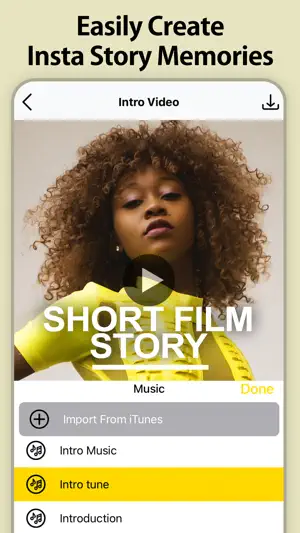

About Intro Maker Animated Videos
Certainly! A "Intro Maker Animated Text Videos" app is a text-based mobile application designed to bring creativity and visual appeal to textual content. The app focuses on enhancing and stylizing text elements, allowing users to create eye-catching and unique text designs for various purposes. Here's a description of what a Textro app might offer: 1. Text Styling Features: Textro offers a wide array of font styles, sizes, and colors to allow users to customize the appearance of their text. It may include both classic and trendy fonts to suit different design preferences. 2. Text Effects and Filters: The app provides creative text effects and filters, allowing users to add shadows, gradients, outlines, or other visual enhancements to make their text stand out. This helps in creating visually appealing and dynamic designs. 3. Background Customization: Users can customize the background of their text, choosing from a variety of colors, gradients, or even uploading their own images. This feature ensures that the text integrates seamlessly into the overall design. 4. Animation Effects: For added dynamism, the app may offer animation and motion effects for text elements. Users can create scrolling, fading, or other animated effects to make their text visually engaging. 5. Real-Time Preview: A real-time preview feature allows users to see how their text designs will look before finalizing them. This enables them to make adjustments and ensure that the final result meets their expectations. 6. Export Options: Textro supports various export options, enabling users to save their text designs in different formats suitable for social media, presentations, documents, or other platforms. 7. Integration with Photo and Design Apps: The app seamlessly integrates with photo editing and design applications, allowing users to combine their stylized text with other visual elements to create comprehensive designs. 8. Social Media Sharing: Users can easily share their text designs directly from the app to social media platforms or messaging apps. This facilitates quick and convenient sharing of creative content. SUBSCRIPTION: You can subscribe to premium features, choosing from the following plans: – 1 month – 12 months – Lifetime (Unlock Everything) The subscription automatically renews unless auto-renewal is turned off at least 24 hours before the end of the current period. Payment will be charged to your iTunes account at confirmation of purchase. Account will be charged for renewal within 24 hours of the end of the current period, and the cost of the renewal will be provided. Subscriptions may be managed by the user. Auto-renewal may be turned off by going to the user’s Account Settings after purchase. No cancellation of the current subscription is allowed during active subscription period. Any unused portion of a free trial period, if offered, will be forfeited when the user purchases a subscription to that publication. TERMS OF USE: https://awesomeappleappsprivacy.blogspot.com/2019/12/terms-of-use.html PRIVACY POLICY: https://awesomeappleappsprivacy.blogspot.com/2019/12/privacy-and-policy.html
What’s new
Version 1.3 · Updated December 12, 2023
- Updates with 2 new text animations. - Enhancements on animation & fixes.
App privacy
The developer, Jyoti Yadav, reported these privacy practices to Apple.
Data Used to Track You
The following data may be used to track you across apps and websites owned by other companies:
- Identifiers: Device ID
- Usage Data: Advertising Data
Data Linked to You
The following data, which may be collected and linked to your identity, may be used for the following purposes:
- Usage Data: Advertising Data
Used for: Third-Party Advertising, Developer’s Advertising or Marketing, Analytics, Product Personalization, App Functionality
Data Not Linked to You
The following data, which may be collected but is not linked to your identity, may be used for the following purposes:
- Identifiers: Device ID
Used for: Third-Party Advertising, Developer’s Advertising or Marketing, Analytics, Product Personalization, App Functionality
Alternatives to Intro Maker Animated Videos
Looking for apps like Intro Maker Animated Videos? Here are 6 similar apps on the App Store. The highest rated is Textro - Animated Text Videos (4.8/5), and all 6 are free to download.
-
 Textro - Animated Text Videos
4.8
Textro - Animated Text Videos
4.8
-
 Intro Maker: Text Beat
4.7
Intro Maker: Text Beat
4.7
-
 Cute Cut-Reel Maker Video Crop
4.1
Cute Cut-Reel Maker Video Crop
4.1
-
 Typewriter: Typing Video Maker
4.4
Typewriter: Typing Video Maker
4.4
-
 Thumbnail Maker & Editor AI
3.2
Thumbnail Maker & Editor AI
3.2
-
 Intro Maker: Make Outro for YT
4.6
Intro Maker: Make Outro for YT
4.6
| App | Rating | Price | Last updated | Compare |
|---|---|---|---|---|
| Intro Maker Animated Videos | 5.0 / 5 (2 ratings) | Free | December 12, 2023 | |
| Textro - Animated Text Videos | 4.8 / 5 (802) | Free | May 17, 2026 | Compare |
| Intro Maker: Text Beat | 4.7 / 5 (6) | Free | Apr 30, 2025 | Compare |
| Cute Cut-Reel Maker Video Crop | 4.1 / 5 (460) | Free | Oct 26, 2023 | Compare |
| Typewriter: Typing Video Maker | 4.4 / 5 (167) | Free | Sep 5, 2024 | Compare |
| Thumbnail Maker & Editor AI | 3.3 / 5 (8) | Free | Oct 7, 2026 | Compare |
| Intro Maker: Make Outro for YT | 4.6 / 5 (10,121) | Free | Nov 8, 2023 | Compare |