
Avatalk: Talking Avatar & More
Elden Studios Company Photo & Video iPhoneiPadiPod touch
Avatalk: Talking Avatar & More is a free Photo & Video app for iPhone and iPad by Elden Studios Company. Rated 4.5/5 from 43 ratings. Requires iOS 17.0.
- Rating
- 4.5
- 43 ratings
- Price
- Free
- on the App Store
- Size
- 55 MB
- Age 4+
- Updated
- Oct 14
- 2026 · v8.0
Screenshots

About Avatalk: Talking Avatar & More
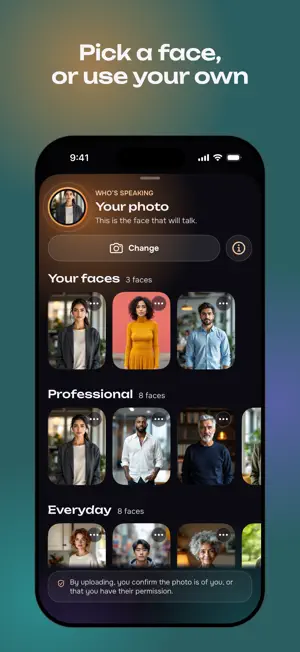
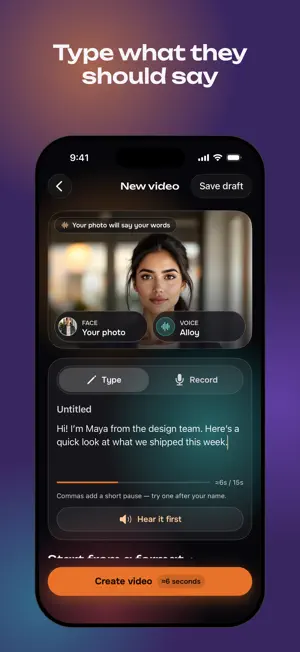
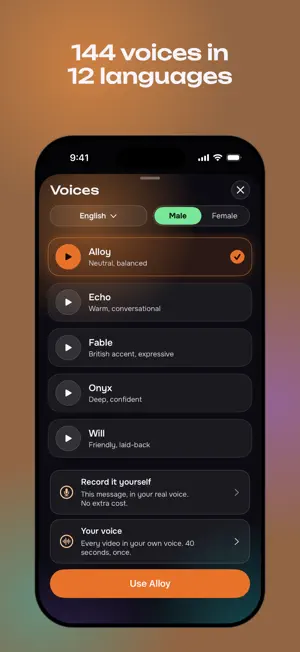
Upload a photo of a person. Type what you want them to say, or record it yourself. Avatalk gives you back a video of them saying it — lips, posture and gestures moving with the words, in a voice you choose or your own. Works with a headshot or a full-body shot. Give it the whole person and you get the whole performance. No filming, no studio, no editing. • Your own photo, or 40 ready-made full-body presenters • 144 voices across 12 languages, or your own recorded voice • Painted cards to wrap a video in, for birthdays and every day • Reminders for the days that matter, a year ahead • A new look for a face • Videos up to 29 seconds, saved to your device Rendering takes a few minutes — close the app and come back. Use a clear, front-facing photo with one person in it, and only one you have the right to use. Credits are seconds of video: 1 credit = 1 second. Start with a short first video, then pick up a credit pack when you want more. Packs are one-time purchases — no subscription, nothing renews, credits never expire. Terms of Use (EULA): https://www.apple.com/legal/internet-services/itunes/dev/stdeula/
Ratings & reviews
4.5
43 ratings
What’s new
Version 8.0 · Updated October 14, 2026
Avatalk now speaks Arabic. The whole app is in Arabic and reads right to left. Set your iPhone to Arabic, or choose it in Settings › Language. Arabic voices have Arabic names, and special-day messages come in the voice's language. Say it in your own voice • Switch Create to Record, say your message, and your photo says it back in your own voice. Cards • Put a video in a painted card for a birthday or an everyday moment, with your own greeting. Special days • Reminders look a whole year ahead and remind you on the day itself. • See whether reminders are on, edit your days, and save someone's day after you send them a card. • The widget says Ready to send when a video is waiting for its day. Replies • Make my reply brings you back to the video you're answering, and replies you receive wait for you on Home. Create • Leave Create and your words are kept as a draft. Save draft is one tap. • Hear it first marks the words a voice may say wrong, and tells you when another voice read it. Sharing • Captions on screen go with the video, and Save to Photos is right there. Your photo, faster • Take or choose a photo, frame your face, and use it straight away. It's kept in Saved faces. Buying credits • The shop says how many credits your video needs, and one tap after buying carries on making it. • A purchase is never lost, and Restore says what it found. • 1 credit = 1 second of video, everywhere in the app. Also • A smaller download, quicker lists, and better support for VoiceOver, Bold Text and Reduce Motion. • A notification when a video can't be made, when an HD copy is ready, and when a finished video is still waiting for you. • HD exports finish and save. A video that seemed to fail can be checked again, and arrives if it was made. • The progress bar drags both ways, and deleting a video also stops its link.
App privacy
The developer, Elden Studios Company, reported these privacy practices to Apple.
Data Linked to You
The following data, which may be collected and linked to your identity, may be used for the following purposes:
- Usage Data: Product Interaction
- Purchases: Purchase History
- User Content: Photos or Videos
- Identifiers: User ID
Used for: Analytics, App Functionality