

Panoptic
Tonbridge School Education iPhoneiPadiPod touchMac
Panoptic is a free Education app for iPhone and iPad by Tonbridge School. Requires iOS 15.0. Updated October 21, 2026.
- Price
- Free
- on the App Store
- Size
- 84 MB
- Age 4+
- Updated
- Oct 21
- 2026 · v2026.10.6
Screenshots


About Panoptic
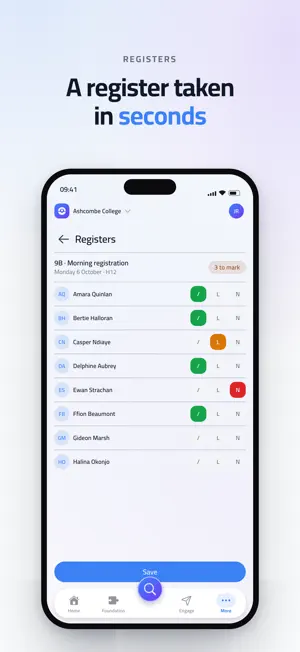
Panoptic is the app your School runs on. It needs a School account: enter your School code, sign in, and the School day is in one place. If your School does not use Panoptic, there is nothing in here you can open. WHAT YOU SEE DEPENDS ON WHO YOU ARE One app, three experiences. Pupils, parents and staff sign in to the same app and each land on what matters to them. Your School decides what your account can reach, so there is nothing to set up and no wrong version to download. FOR PUPILS AND PARENTS - The week's timetable: every lesson, room, set and teacher, with the day you are in marked. - School reports and assessments as the School published them. - Attendance, day by day and session by session, with the rate alongside it. - Exam candidate numbers when the School has issued them. - Messages from the School, by email and as a notification on your phone. - For parents, the same view of each of your children. FOR STAFF - Registers taken in a few taps, for your own lessons or for a colleague you are covering. - School reports written in the shape your School designed, with the grade scales, the field lengths and the deadlines it set. - The full pupil, staff and contact lists, with each person's record behind them: form, house, sets, teachers, attendance, relations and notes. - Lesson cover, free periods and absence summaries. - Messages to a year group, a house, a set or one family, from your School's own sending address. SEARCH IS THE FRONT DOOR One field finds any pupil, member of staff, contact or page in the app. It is on the home screen, it is a keystroke away everywhere else, and it is how most people use Panoptic. IT IS YOUR SCHOOL'S APP Panoptic wears your School's name, crest and colour, and your School's data lives in your School's own database. Sign in to more than one School on the same device, which staff who work at two and parents with children at two can both do, and switch between them without signing out. MADE TO LIVE IN - Light and dark, following your device or set here. - More contrast, for when frosted panels are hard to read. - Reduced motion, which also follows your device's own setting. - English, French, Spanish and German. - Built for VoiceOver and for a large text size. Panoptic does not take payments and shows no advertising. SUPPORT Ask your School first: your account, your permissions and your data are theirs to manage. For anything else, the support link on this page reaches us.
What’s new
Version 2026.10.6 · Updated October 21, 2026
This update introduces Meet, a new module for parents' evenings, alongside privacy improvements and a smoother experience on more devices. For schools using Meet, parents' evenings now run from start to finish in Panoptic. Families can book appointments without clashes, even when everyone books at once, share their schedule with another parent or carer, and request an appointment after booking has closed. Reminders arrive by email, push notification and in the app, and a PDF schedule is always to hand. Evenings can also run online through Microsoft Teams, Zoom or Google Meet, with meetings created, moved and cancelled automatically. On the night, your next appointment can appear on your lock screen and update as the evening runs. Staff get simple setup tools, spreadsheet imports for availability and rooms, a printable run sheet, and a clear view of anything that has changed since setup. Elsewhere, address details can now only be viewed and changed by people linked to that person, and addresses held in your school's MIS appear as read-only. Panoptic also adapts to foldable iPhone models, buttons stay readable whatever your school's colours, and depending on your school's setup there are improvements to Resources, exports and Reports.
App privacy
The developer, Tonbridge School, reported these privacy practices to Apple.
Data Linked to You
The following data, which may be collected and linked to your identity, may be used for the following purposes:
- Identifiers: User ID, Device ID
- Contact Info: Physical Address, Email Address, Name, Phone Number, Other User Contact Info
Used for: Analytics, App Functionality
Data Not Linked to You
The following data, which may be collected but is not linked to your identity, may be used for the following purposes:
- Usage Data: Product Interaction, Other Usage Data
- Diagnostics: Crash Data, Performance Data, Other Diagnostic Data
Used for: Analytics
Alternatives to Panoptic
Looking for apps like Panoptic? Here are 6 similar apps on the App Store. The highest rated is Squeebles Times Tables Connect (3.7/5), and 5 of the 6 are free to download.
-
 The New Beacon
-
 AKids Dictionary - Kids Words
-
 Mastering Memory Pictures
-
 Vocabiz
-
 The Athlete Place
-
 Squeebles Times Tables Connect
3.7
Squeebles Times Tables Connect
3.7
| App | Rating | Price | Last updated | Compare |
|---|---|---|---|---|
| Panoptic | – | Free | October 21, 2026 | |
| The New Beacon | – | Free | Aug 19, 2026 | Compare |
| AKids Dictionary - Kids Words | – | Free | Oct 3, 2026 | Compare |
| Mastering Memory Pictures | – | 2.99 USD | Sep 8, 2026 | Compare |
| Vocabiz | – | Free | Dec 5, 2023 | Compare |
| The Athlete Place | – | Free | Jul 21, 2026 | Compare |
| Squeebles Times Tables Connect | 3.7 / 5 (3) | Free | Nov 2, 2025 | Compare |
Compare Panoptic with the top alternatives: ratings, updates, ASO score and keyword gaps →