

Barcode Scanner & Copy
Easy Simple Smart Utilities iPhoneiPadiPod touch
Barcode Scanner & Copy is a free Utilities app for iPhone and iPad by Easy Simple Smart. Requires iOS 18.6. Updated October 13, 2026.
- Price
- Free
- on the App Store
- Size
- 4 MB
- Age 4+
- Updated
- Oct 13
- 2026 · v2.0
Screenshots

About Barcode Scanner & Copy
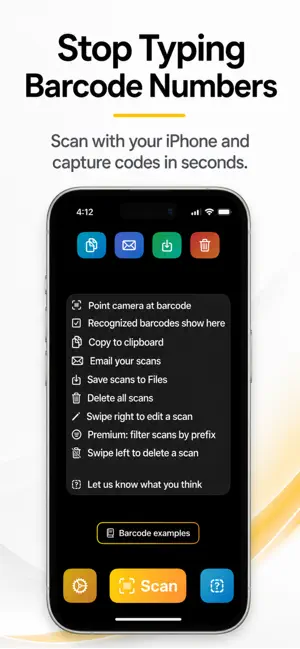
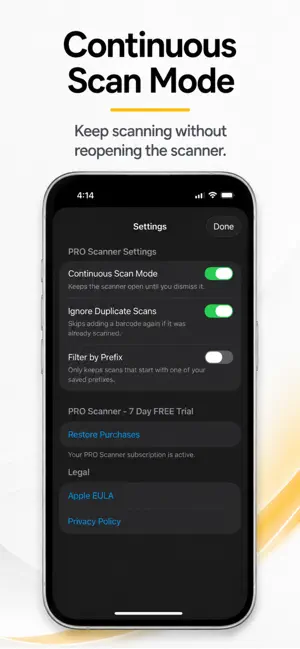
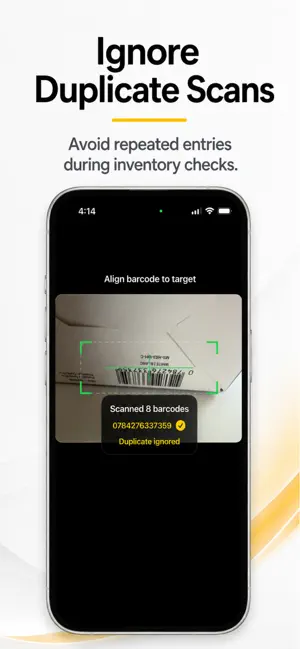
Stop typing barcode numbers by hand. Scan labels into an editable list, then copy, email, or save the results as a text file. Barcode Scanner & Copy helps you collect product codes, equipment tag numbers, and other barcode text using your iPhone or iPad. No app account or complex setup required. SCAN, COPY, AND SHARE — FREE Build a Barcode List Use the barcode scanner to capture codes one at a time. Review your list, edit individual values, and delete entries you no longer need. Your list is saved on your device between uses. Copy and Paste Barcode Numbers Copy your entire list to the clipboard in one tap. Paste the barcode text into Notes, messages, forms, or other apps without typing each number. Email Your Barcode List Send collected codes together using Apple Mail. Share product identifiers, equipment tag numbers, or other scanned values with a colleague. Save Your Results Export your list to Files as a plain-text file for later use. Clear the list when you are ready to begin a new task. SCAN MULTIPLE BARCODES WITH PRO Continuous Scanning Keep the camera open while scanning labels one after another. Collect multiple codes without reopening the scanner each time. Ignore Duplicate Scans Skip codes already in your saved list. Avoid repeated entries as you move between shelves, boxes, or equipment. Filter by Prefix Keep only codes that begin with your chosen characters. Save up to five prefixes to help collect the identifiers relevant to your task. BUILT FOR EVERYDAY BARCODE TASKS Collect barcode numbers during stock checks, record asset identifiers during equipment checks, or gather product codes for documentation. Copy, email, or save the list for use in your existing workflow. The app collects barcode text; it does not look up product details or maintain stock quantities. SIMPLE AND LOCAL • Scan, edit, copy, and save files offline. • Keep your scan list on your device. • Start without creating an account. • Use scanning and all export options for free. • Unlock continuous scanning, duplicate filtering, and prefix filtering with a monthly or yearly PRO subscription. WIDE BARCODE SUPPORT Read common barcode formats including QR Code, Code 39, Code 128, EAN-8, EAN-13, UPC-E, Data Matrix, PDF417, Aztec, Codabar, and more. Email requires an account configured in Apple Mail. Subscription purchases and restoration require internet access. Terms of Use (EULA): https://www.apple.com/legal/internet-services/itunes/dev/stdeula/ Privacy Policy: https://easysimplesmart.com/apps/apps-privacy-policy
What’s new
Version 2.0 · Updated October 13, 2026
improved barcode performance, improved auto-focus
App privacy
The developer, Easy Simple Smart, reported these privacy practices to Apple.
Data Not Collected
The developer does not collect any data from this app.
Alternatives to Barcode Scanner & Copy
Looking for apps like Barcode Scanner & Copy? Here are 6 similar apps on the App Store. The highest rated is Friends Log - People Journal (5.0/5), and 4 of the 6 are free to download.
-
 Decide For Me - Stop Thinking
-
 Friends Log - People Journal
5.0
Friends Log - People Journal
5.0
-
 Age calculator - AgeSphere
-
 B4U Post
5.0
B4U Post
5.0
-
 XPS Viewer - XPS to PDF
5.0
XPS Viewer - XPS to PDF
5.0
-
 CleanerBot: clean up storage
1.0
CleanerBot: clean up storage
1.0
| App | Rating | Price | Last updated | Compare |
|---|---|---|---|---|
| Barcode Scanner & Copy | – | Free | October 13, 2026 | |
| Decide For Me - Stop Thinking | – | Free | Feb 24, 2026 | Compare |
| Friends Log - People Journal | 5.0 / 5 (2) | Free | Mar 26, 2026 | Compare |
| Age calculator - AgeSphere | – | 4.49 USD | Nov 7, 2025 | Compare |
| B4U Post | 5.0 / 5 (2) | Free | Feb 21, 2026 | Compare |
| XPS Viewer - XPS to PDF | 5.0 / 5 (8) | Free | Sep 19, 2026 | Compare |
| CleanerBot: clean up storage | 1.0 / 5 (1) | 5.99 USD | Dec 15, 2025 | Compare |