

DoCube: PDF Reader & Notes
Hangzhou Wenxu Interactive Technology Co., Ltd Productivity iPhoneiPadiPod touchMac
DoCube: PDF Reader & Notes is a free Productivity app for iPhone and iPad by Hangzhou Wenxu Interactive Technology Co., Ltd. Rated 5.0/5 from 11 ratings.
- Rating
- 5.0
- 11 ratings
- Price
- Free
- on the App Store
- Size
- 104 MB
- Age 17+
- Updated
- Oct 21
- 2026 · v1.8.1
Screenshots

About DoCube: PDF Reader & Notes
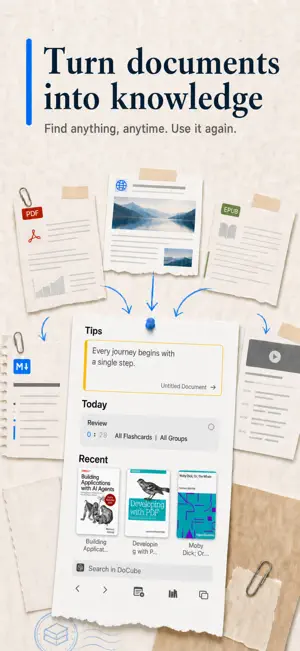
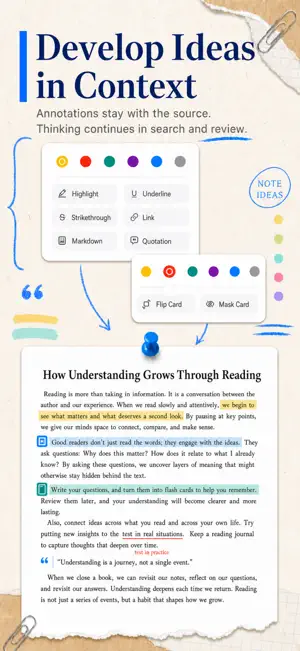
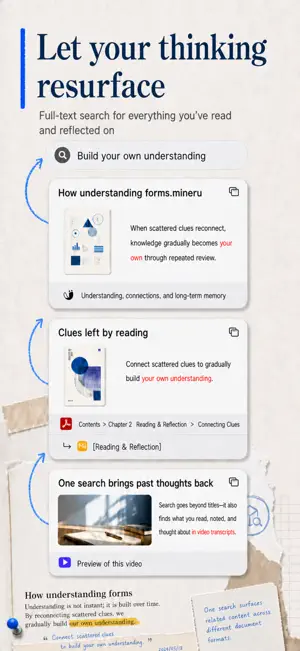
DoCube is a multi-format reader and personal knowledge base built for deep reading. Bring PDFs, EPUBs, local videos, web snapshots, Markdown, and organized scanned documents into one library. Annotate, link, search, translate, export, and review while you read or watch. Your materials are not merely stored—they gradually become knowledge you can retrieve, connect, and remember. 【Deep Reading Across Formats】 DoCube supports PDFs, EPUBs, local videos, offline webpages, Markdown, and parsed documents. Whether you work with research papers, ebooks, web articles, course videos, lectures, interviews, or your own Markdown notes, you can read, watch, and manage them together in DoCube. 【Deep Study for Video】 Import local videos and study courses, lectures, and interviews as deeply as documents. DoCube can read embedded subtitles and, on supported devices, generate subtitles for videos that do not have them. Search subtitles; switch between original, translated, and bilingual views; annotate subtitles; use chapter outlines, playback speeds, and A/B looping. Open a search result, annotation, or chapter to return to the exact moment, turning video into knowledge you can retrieve, connect, and review. 【Multi-Tab Reading】 Open multiple documents and videos in tabs, just like a browser, and switch quickly between materials. Read a paper, compare references, watch a course, or return to where you left off without losing context. 【Annotations and Notes in Context】 Use highlights, underlines, strikethroughs, quotations, links, and Markdown notes directly on source text or at a precise location in video subtitles. Your thinking stays connected to its context. 【Link Materials Together】 DoCube can link an annotation in a document or video to a precise location in another resource. Connect scattered chapters, paragraphs, webpages, video clips, and notes into your own paths through knowledge. 【Search What You Have Read and Watched】 Search not only titles and body text, but also video subtitles, highlights, quotations, links, notes, and cards. Anything you have read, watched, marked, or written can help you find the right material again. 【Keep Reading in Other Languages】 Translate selected text while reading. Some document types support full-document translation and translated exports, while videos support subtitle translation and original, translated, or bilingual display. Read foreign papers, webpages, ebooks, and course videos without constantly switching tools. 【From Annotation to Review】 Turn important content from documents and videos into review cards. Flip cards, mask cards, and review plans bring what you have read and watched back at the right time, instead of letting it disappear after you finish. 【Export and Sync】 Export document content and translations to common formats, including bilingual versions. DoCube is available on iPhone, iPad, and Mac, with iCloud sync and local Wi-Fi transfer. Ideal for: - People who read research papers and professional materials - Learners organizing PDFs, EPUBs, webpages, Markdown, and videos - People who study long-term with course, lecture, and interview videos - Deep readers who want annotations, notes, and review in one loop - Anyone building a personal knowledge base instead of merely collecting files The free version manages up to 5 documents and lets you experience the core reading and knowledge-management workflow. Upgrade to Pro to remove the document limit and build an unrestricted personal library.
Ratings & reviews
5.0
11 ratings
What’s new
Version 1.8.1 · Updated October 21, 2026
Markdown now includes a right-click menu on Mac for quick text formatting. Quickly add and remove masks on mask cards, even while reading. Fixed issues with note card review and navigation to search results, and improved video insertion and the keyboard experience.
App privacy
The developer, Hangzhou Wenxu Interactive Technology Co., Ltd, reported these privacy practices to Apple.
Data Not Linked to You
The following data, which may be collected but is not linked to your identity, may be used for the following purposes:
- Usage Data: Product Interaction, Other Usage Data
Used for: Analytics
Alternatives to DoCube: PDF Reader & Notes
Looking for apps like DoCube: PDF Reader & Notes? Here are 6 similar apps on the App Store. The highest rated is Intent - AI Meeting Prep (5.0/5), and 5 of the 6 are free to download.
-
 PromptKit - AI Prompt Manager
-
 EasyMD - MD reader & editor
-
 Tudo: AI Voice To-Do Planner
4.8
Tudo: AI Voice To-Do Planner
4.8
-
 Intent - AI Meeting Prep
5.0
Intent - AI Meeting Prep
5.0
-
 sort & find documents: DocSort
-
 Dotly - Habit Tracker
5.0
Dotly - Habit Tracker
5.0
| App | Rating | Price | Last updated | Compare |
|---|---|---|---|---|
| DoCube: PDF Reader & Notes | 5.0 / 5 (11 ratings) | Free | October 21, 2026 | |
| PromptKit - AI Prompt Manager | – | Free | Aug 17, 2026 | Compare |
| EasyMD - MD reader & editor | – | Free | May 11, 2026 | Compare |
| Tudo: AI Voice To-Do Planner | 4.8 / 5 (8) | Free | Oct 8, 2026 | Compare |
| Intent - AI Meeting Prep | 5.0 / 5 (2) | 1.99 USD | Apr 12, 2026 | Compare |
| sort & find documents: DocSort | – | Free | Apr 15, 2026 | Compare |
| Dotly - Habit Tracker | 5.0 / 5 (4) | Free | Oct 19, 2026 | Compare |