

Authenticator App · 2FA
FirstOrder.AI Utilities iPhoneiPadiPod touchMacApple Watch
Authenticator App · 2FA is a free Utilities app for iPhone and iPad by FirstOrder.AI. Rated 4.2/5 from 381 ratings. Requires iOS 15.0.
- Rating
- 4.2
- 381 ratings
- Price
- Free
- on the App Store
- Size
- 114 MB
- Age 17+
- Updated
- Apr 11
- 2026 · v4.5.2
Screenshots

About Authenticator App · 2FA
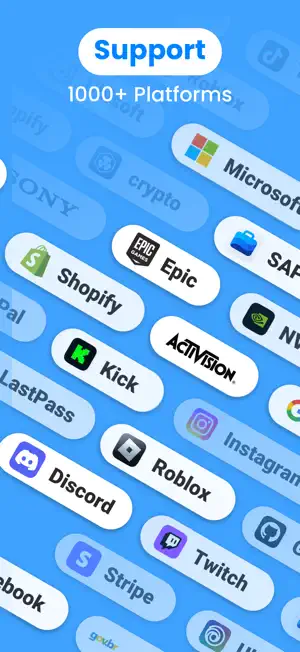
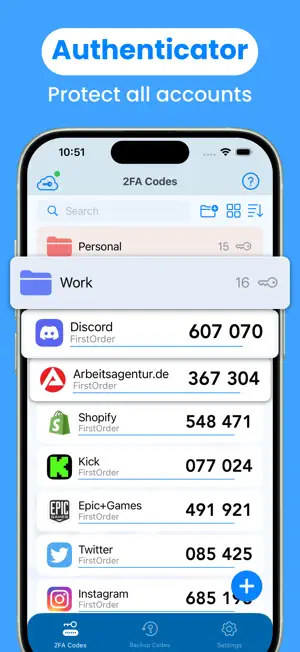
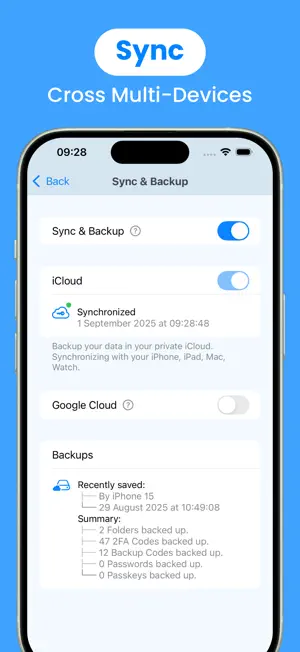
Authenticator App is a highly secure application designed to provide two-factor authentication (2FA) for your online accounts. By generating unique security token/time-based one-time password (TOTP/OTP), the 2FA Authenticator app provides an extra layer of protection to your accounts when logging in, mitigating the risks of unauthorized access and identity theft and managing all your device online apps 2-factor authentication codes with just one authentication app. Support logging in with passkeys and accounts synchronization across all kinds of smartphones, tablets and mac using iCloud & Google Cloud. We support any service that provides 2 step verification, including the most popular services like Microsoft, Google, Facebook, TikTok, PayPal, Amazon, Snapchat, Coinbase, Roblox, Discord, Twitch, Reddit, Epic, SAP, Shopify, Login.gov, Kick, Activision, NVIDIA, LastPass, Sony, One Healthcare ID, crypto, Stripe, Rockstar, Sprintax, Sterling, Ubisoft, Autotask, Instagram, Air Force, GitHub, mo.gov. Our 2fa Authenticator app ensures the security of your personal data and Apple passwords, safeguarding them from hackers and malicious attacks. Download this authenticator (T)OTP manager now to fortify your digital security! Key Features: 1. Store and generate 2-factor Authentication code/security token. The 2 step verification code will update to a new one every 30 seconds. 2. Easy to setup two-factor Authentication. Scan QR Code or enter manually to add Authenticator secure ID, support import from Google Authenticator. 3. User-friendly guide. The 2FA authentication application has instructions that describe basic steps, such as adding 2FA/MFA/(T)OTP Code. 4. Encrypted sync & backup using iCloud & Google Cloud. Sync your accounts across iPhone, iPad, Mac, Apple Watch and any other smartphones or tablets. 5. Backup codes & Recovery codes. Easily manage and recognize codes using OCR. 6. Support Passkeys. Enhance account security with passwordless logins and prevent hacking attacks. 7. Support Passwords. Auto generate strong passwords and enjoy AutoFill. 8. Widgets. You can access and copy your two factor Authentication Code on homescreen. 9. Live Activities. You can access the copied 2 step verification code & its validity time on Dynamic Island. 10. App level security by Face ID/Touch ID. You are the only one who can read your two factor authentication otp codes. 11. Folders. Too many keys? Don't worry, manage your keys with custom groups. 12. Support 14 languages: English, German, French, Japanese, Korean, Italian, Spanish, Portuguese, Russian, Simplified Chinese, Traditional Chinese, Polish, Ukrainian. Subscription Terms: This (T)OTP Apple password/passkey authentication app offers monthly or annual subscriptions to provide you with unlimited access to all features while you maintain an active subscription. 1. Payment will be charged to the credit card connected to your iTunes Account when you confirm the initial subscription purchase. 2. Subscriptions automatically renew unless auto-renew is turned off at least 24-hours before the end of the current subscription period. 3. Account will be charged for renewal within 24-hours before the end of the current period, and identify the cost of the renewal. 4. You may manage your subscription and auto-renewal may be turned off by going to your Account Settings after the purchase. 5. Any unused portion of a free trial period, if offered, will be forfeited when you purchase a subscription, where applicable. If you have any thoughts, questions or suggestions about our security service app, please feel free to contact us at [email protected]. Home Page: https://authenticator.firstorder.ai Terms of Use: https://authenticator.firstorder.ai/terms-of-service Privacy Policy: https://authenticator.firstorder.ai/privacy-policy-authenticator
Ratings & reviews
4.2
381 ratings
What’s new
Version 4.5.2 · Updated April 11, 2026
New update includes: 1. Fixed some minor bugs. Make your Authenticator App experience even smoother. 2. Added a bunch of missing icons.
App privacy
The developer, FirstOrder.AI, reported these privacy practices to Apple.
Data Used to Track You
The following data may be used to track you across apps and websites owned by other companies:
- Identifiers: Device ID
- Usage Data: Advertising Data
Data Not Linked to You
The following data, which may be collected but is not linked to your identity, may be used for the following purposes:
- Identifiers: Device ID
- Usage Data: Advertising Data, Product Interaction
- Diagnostics: Crash Data
Used for: Third-Party Advertising, Analytics, App Functionality
Alternatives to Authenticator App · 2FA
Looking for apps like Authenticator App · 2FA? Here are 6 similar apps on the App Store. The highest rated is Authenticator App-2FAS・MFA・OTP (4.6/5), and all 6 are free to download.
-
 Authenticator App-2FAS・MFA・OTP
4.6
Authenticator App-2FAS・MFA・OTP
4.6
-
 Authenticator ·
4.6
Authenticator ·
4.6
-
 Authenticator App ™
4.4
Authenticator App ™
4.4
-
 Authenticator app - 2FA, MFA
4.6
Authenticator app - 2FA, MFA
4.6
-
 BlazeAuth - MFA Authenticator
4.5
BlazeAuth - MFA Authenticator
4.5
-
 Authenticator App†
4.5
Authenticator App†
4.5
| App | Rating | Price | Last updated | Compare |
|---|---|---|---|---|
| Authenticator App · 2FA | 4.2 / 5 (381 ratings) | Free | April 11, 2026 | |
| Authenticator App-2FAS・MFA・OTP | 4.6 / 5 (679) | Free | May 4, 2026 | Compare |
| Authenticator · | 4.6 / 5 (26,345) | Free | Oct 6, 2026 | Compare |
| Authenticator App ™ | 4.4 / 5 (24,650) | Free | May 17, 2024 | Compare |
| Authenticator app - 2FA, MFA | 4.6 / 5 (5,793) | Free | Sep 9, 2026 | Compare |
| BlazeAuth - MFA Authenticator | 4.5 / 5 (2,104) | Free | Sep 22, 2026 | Compare |
| Authenticator App† | 4.5 / 5 (2,531) | Free | Oct 10, 2025 | Compare |