

StandBy Clocks - Date and Time
Bud Copmany Lifestyle iPhoneiPadiPod touch
StandBy Clocks - Date and Time is a free Lifestyle app for iPhone and iPad by Bud Copmany. Rated 4.4/5 from 38 ratings. Requires iOS 17.0.
- Rating
- 4.4
- 38 ratings
- Price
- Free
- on the App Store
- Size
- 126 MB
- Age 4+
- Updated
- Apr 23
- 2026 · v1.9.9
Screenshots


About StandBy Clocks - Date and Time
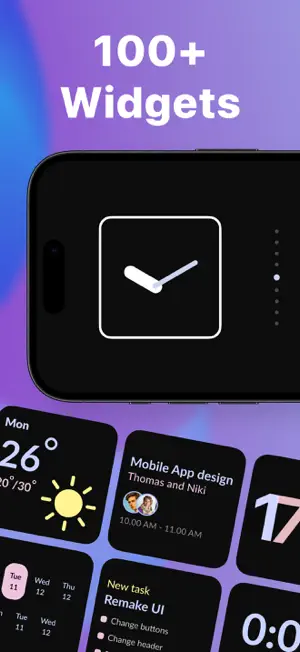
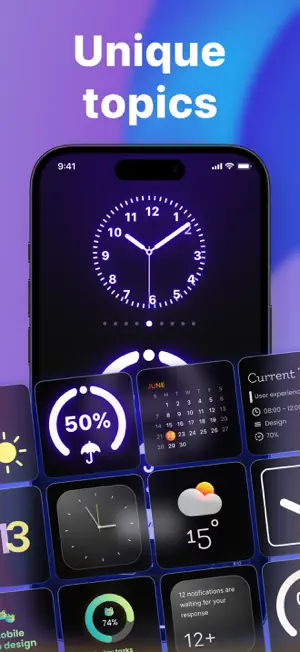
Clocks for Standby transforms your device’s screen into a stylish desk clock with useful widgets. The app supports customizable digital and analog clocks, as well as additional elements such as date, calendar, reminders, and other information blocks. You can personalize the appearance by choosing a design style, changing text color, background, and font so that widgets match your environment and personal preferences. The built-in editor allows you to quickly and easily adjust the design, switch between themes, and adapt the screen for different scenarios — from your work desk to your bedside table. A night mode is included for comfortable viewing in low-light conditions. App Benefits: – wide selection of stylish design templates – quick setup without unnecessary steps – flexible personalization of all interface elements – smooth animation and clear information display – optimized performance without overloading the system – stability and fast response time – design that fits any interior The app is aimed at those who value visual order, functionality, and individuality in details. SUBSCRIPTION INFORMATION The app offers a subscription plan that provides unlimited access to all widgets. Payment will be charged to your iTunes account upon confirmation of purchase. Subscription automatically renews unless auto-renew is turned off at least 24 hours before the end of the current period. The account will be charged for renewal within 24 hours prior to the end of the current period, indicating the cost of the renewal. Users can manage subscriptions and turn off auto-renewal by going to their account settings after purchase. Any unused portion of a free trial period, if offered, will be forfeited when the user purchases a subscription, where applicable. Privacy Policy: https://polbudapp.com/policy.html Terms of Use: https://polbudapp.com/terms.html
Ratings & reviews
4.4
38 ratings
What’s new
Version 1.9.9 · Updated April 23, 2026
Minor improvements and bug fixes
App privacy
The developer, Bud Copmany, reported these privacy practices to Apple.
Data Not Linked to You
The following data, which may be collected but is not linked to your identity, may be used for the following purposes:
- Purchases: Purchase History
Used for: Analytics
Alternatives to StandBy Clocks - Date and Time
Looking for apps like StandBy Clocks - Date and Time? Here are 6 similar apps on the App Store. The highest rated is StandBy Widget & Always On (4.6/5), and all 6 are free to download.
-
 StandBy Widget & Always On
4.6
StandBy Widget & Always On
4.6
-
 StandBy 17: Themes, Widgets #1
4.4
StandBy 17: Themes, Widgets #1
4.4
-
 Bedside Clock - Time widgets
4.5
Bedside Clock - Time widgets
4.5
-
 Big Clock - Pro Time Widgets
4.0
Big Clock - Pro Time Widgets
4.0
-
 Clock Pocket:standby widget
4.1
Clock Pocket:standby widget
4.1
-
 Nightstand Desk Clock & Widget
3.5
Nightstand Desk Clock & Widget
3.5
| App | Rating | Price | Last updated | Compare |
|---|---|---|---|---|
| StandBy Clocks - Date and Time | 4.4 / 5 (38 ratings) | Free | April 23, 2026 | |
| StandBy Widget & Always On | 4.6 / 5 (130) | Free | Jun 1, 2026 | Compare |
| StandBy 17: Themes, Widgets #1 | 4.4 / 5 (18) | Free | Nov 24, 2023 | Compare |
| Bedside Clock - Time widgets | 4.5 / 5 (3,685) | Free | Jul 10, 2026 | Compare |
| Big Clock - Pro Time Widgets | 4.0 / 5 (710) | Free | May 26, 2026 | Compare |
| Clock Pocket:standby widget | 4.1 / 5 (41) | Free | Dec 9, 2024 | Compare |
| Nightstand Desk Clock & Widget | 3.5 / 5 (4) | Free | Jun 19, 2024 | Compare |