

SMMAI: Social Media Templates
Anastasiia Trofimova Graphics & Design iPhoneiPadiPod touchMac
SMMAI: Social Media Templates is a free Graphics & Design app for iPhone and iPad by Anastasiia Trofimova. Rated 5.0/5 from 48 ratings. Requires iOS 18.0.
- Rating
- 5.0
- 48 ratings
- Price
- Free
- on the App Store
- Size
- 9 MB
- Age 4+
- Updated
- Sep 8
- 2026 · v2.0.1
Screenshots


About SMMAI: Social Media Templates
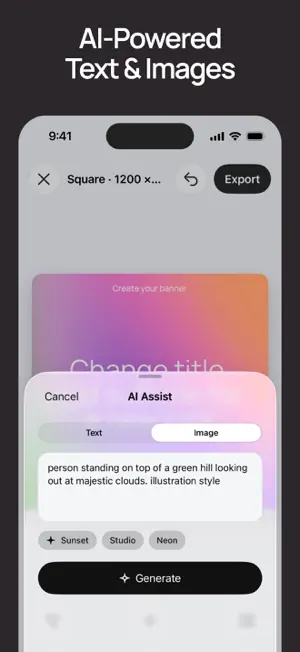
Turn one idea into thousands of ready-to-post visuals. SMMAI is a free, AI-powered app for creating social media posts, stories, and banners. Add your text and image and get multiple ready-made design options in seconds. Or use AI to generate text and images from scratch — for free. SMMAI is now fully native: faster, more stable, and redesigned to make creating banners even simpler. CREATE SOCIAL POSTS IN MINUTES • Add text and an image — SMMAI automatically creates multiple layout variations. • Or use AI to generate copy and a matching image. • Browse your options in one grid and quickly find the right design. • Pick a version, make quick edits, and export a ready-to-post PNG. MADE FOR SOCIAL MEDIA • Core formats: 1200×1200, 1080×1920, and 1200×628. • Great for Instagram, Facebook, X (Twitter), LinkedIn, Pinterest, Telegram, Snapchat, and more. • Modern, minimalist compositions for posts, stories, and banners. WHY SMMAI • Fast: go from idea to finished visual in seconds. • Simple: no complicated design tools to learn. • More choice: see many different compositions at once instead of starting from one template. • Free AI: text and image generation remain free. • No sign-up: start creating right away. • No watermark: export clean, ready-to-use images. • Native app: a fast, stable interface built specifically for iOS. KEY FEATURES • AI-powered social post, story, and banner maker. • Thousands of minimalist layouts and templates. • AI text generation. • AI image and background generation. • Upload your own images. • Text size, alignment, and placement controls. • Quickly preview multiple design variations. • Export ready-to-post PNGs with no watermark. • No sign-up or subscription required to get started. WHO IT’S FOR • Social media managers and content creators who need fresh visuals fast. • Small businesses and founders who want quality posts without a designer. • Freelancers and students creating social media content. • Anyone looking for a simple AI banner maker instead of a complex graphic editor. HOW IT WORKS 1. Pick a format: 1200×1200, 1080×1920, or 1200×628. 2. Add a headline, subheadline, and image. 3. Or ask AI to generate the text and image. 4. Browse the automatically generated design options. 5. Choose one, edit it, and save a ready-to-post PNG. WHAT YOU CAN CREATE • A social media post or story. • A product, event, or sale announcement. • An advertising banner. • Quote cards, tips, and educational content. • Cover graphics for channels and communities. • Simple visual announcements for feeds and stories. WHY IT’S DIFFERENT Big graphic editors are great for complex projects. SMMAI is built for something else: turning an idea into a finished design fast. Instead of a blank canvas, you immediately get multiple compositions. Choose the one you like, make your edits, and publish. And with the fully native app, the whole experience is now even faster and more stable. START CREATING FOR FREE Create, edit, and publish visuals with AI. Free text and image generation, thousands of design variations, a simple interface, and ready-to-post results in seconds. Got suggestions or need help? Contact us at [email protected]
Ratings & reviews
5.0
48 ratings
What’s new
Version 2.0.1 · Updated September 8, 2026
HDR is here! Add HDR effects to text and background images, then export your design in HDR.
App privacy
The developer, Anastasiia Trofimova, reported these privacy practices to Apple.
Data Not Collected
The developer does not collect any data from this app.
Alternatives to SMMAI: Social Media Templates
Looking for apps like SMMAI: Social Media Templates? Here are 6 similar apps on the App Store. The highest rated is Yvee AI: Logo Design Generator (5.0/5), and 5 of the 6 are free to download.
-
 AI Interior Home Design: iDEA
3.7
AI Interior Home Design: iDEA
3.7
-
 Aink - AI Tattoo Generator App
4.3
Aink - AI Tattoo Generator App
4.3
-
 Yvee AI: Logo Design Generator
5.0
Yvee AI: Logo Design Generator
5.0
-
 Mockuper: Phone Frame Mockup
4.8
Mockuper: Phone Frame Mockup
4.8
-
 Divo AI: Logo Design Generator
4.6
Divo AI: Logo Design Generator
4.6
-
 logol - Add Watermark and Logo
4.6
logol - Add Watermark and Logo
4.6
| App | Rating | Price | Last updated | Compare |
|---|---|---|---|---|
| SMMAI: Social Media Templates | 5.0 / 5 (48 ratings) | Free | September 8, 2026 | |
| AI Interior Home Design: iDEA | 3.7 / 5 (29) | Free | Feb 18, 2026 | Compare |
| Aink - AI Tattoo Generator App | 4.3 / 5 (18) | Free | Apr 1, 2025 | Compare |
| Yvee AI: Logo Design Generator | 5.0 / 5 (20) | Free | Mar 12, 2025 | Compare |
| Mockuper: Phone Frame Mockup | 4.8 / 5 (60) | Free | Nov 8, 2025 | Compare |
| Divo AI: Logo Design Generator | 4.6 / 5 (77) | Free | May 11, 2025 | Compare |
| logol - Add Watermark and Logo | 4.6 / 5 (85) | 3.99 USD | Apr 11, 2026 | Compare |