

CyberDeck for Companion
Upload Studio Ltd. Photo & Video iPhoneiPadiPod touch
CyberDeck for Companion is a free Photo & Video app for iPhone and iPad by Upload Studio Ltd. Rated 4.8/5 from 5 ratings. Requires iOS 17.0.
- Rating
- 4.8
- 5 ratings
- Price
- Free
- on the App Store
- Size
- 4 MB
- Age 4+
- Updated
- Sep 3
- 2026 · v2.5
Screenshots



About CyberDeck for Companion
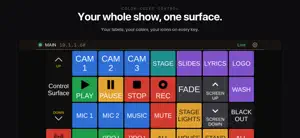
CyberDeck turns your iPhone or iPad into a button surface for Bitfocus Companion. If you run Companion on a Mac or PC to drive OBS, video switchers, lighting consoles, audio mixers, or anything else Companion supports, you can press those buttons from your phone. Setup takes seconds. No config files. CyberDeck auto-discovers your Companion server using mDNS, or you can enter the host and port manually. The connection persists across launches and reconnects automatically if it drops. Connection status lives in a rail at the top of the screen: name, address, and live state, with retry and switching one tap away. What you get free: - Live button surface that mirrors any Companion page - Touch presses send to Companion instantly - Page navigation drives Companion page changes - The screen stays awake while you're connected (can be turned off) - PIN pad for locked surfaces - Diagnostics view with a shareable event log - Dark, light, and system theme; optional haptic feedback The Full Version (one-time in-app purchase) unlocks: - Operator Roles. Build a role, a chosen set of buttons and variables, and publish it to someone on your crew. They run it on DeckHand, the operator app, paired over your local network with a QR code or a 6-character code. They get exactly that surface and nothing else. See who is connected, push updates when the role changes, and revoke access when the show is over. - Custom Dashboards. Pull the buttons you use most from any Companion pages into one screen. Each cell can be a button or a rotary encoder. - Multi-connection switching. Configure multiple Companion servers and switch between them with a tap. DeckHand is a separate app for the operator you hand a role to. It shows only the role you published, nothing else, so anyone on the crew can run their part without touching your Companion setup. Look for DeckHand for CyberDeck on the App Store. Rotary encoders: touch and hold an encoder cell, then drag vertically to rotate clockwise or counter-clockwise. Same gesture on the live surface and inside Custom Dashboards. V1 owners: you're already grandfathered. The Full Version unlocks automatically the first time you launch v2 on the same Apple ID that bought v1. No re-purchase, no setup. Support and bug reports: [email protected]. The Settings > Diagnostics view has a Share button that exports the event log; attach it if you're hitting a connection or subscription issue.
Ratings & reviews
4.8
5 ratings
What’s new
Version 2.5 · Updated September 3, 2026
2.5 is a polish release. - The connection rail is a full height row again. It keeps the slimmer height only in iPhone landscape, where screen space is tight, and it no longer disappears while Settings is open. - Settings is reorganized. Connections, Dashboards, Operator Roles, and Quick Buttons sit together in one block at the top, and the Privacy Policy moved into About. - Connection lists are alphabetical everywhere: the switcher, Settings, and every picker. The order stays put when you switch between Companions. - The pairing walkthrough links straight to DeckHand on the App Store at the step where the operator needs it. - The old rating popup is gone. CyberDeck now uses Apple's standard rating prompt, at most once a year, and only after real use. A new Rate CyberDeck row under Support opens the App Store review page any time.
App privacy
The developer, Upload Studio Ltd., reported these privacy practices to Apple.
Data Not Collected
The developer does not collect any data from this app.
Alternatives to CyberDeck for Companion
Looking for apps like CyberDeck for Companion? Here are 6 similar apps on the App Store. The highest rated is Vxio (4.8/5), and all 6 are free to download.
-
 MixEffect (Trial & Pro Unlock)
4.7
MixEffect (Trial & Pro Unlock)
4.7
-
 NDI Player
3.8
NDI Player
3.8
-
 NDI Monitor Pro
4.3
NDI Monitor Pro
4.3
-
 NDI Multiview
4.0
NDI Multiview
4.0
-
 DirectorMonitor
-
 Vxio
4.8
Vxio
4.8
| App | Rating | Price | Last updated | Compare |
|---|---|---|---|---|
| CyberDeck for Companion | 4.8 / 5 (5 ratings) | Free | September 3, 2026 | |
| MixEffect (Trial & Pro Unlock) | 4.7 / 5 (131) | Free | Jan 20, 2026 | Compare |
| NDI Player | 3.8 / 5 (18) | Free | Aug 25, 2025 | Compare |
| NDI Monitor Pro | 4.3 / 5 (143) | Free | Sep 24, 2026 | Compare |
| NDI Multiview | 4.0 / 5 (128) | Free | Oct 4, 2026 | Compare |
| DirectorMonitor | – | Free | Jun 24, 2026 | Compare |
| Vxio | 4.8 / 5 (99) | Free | Oct 9, 2026 | Compare |