

Trade Memo - Investment Log
Makoto Fujio Finance iPhoneiPadiPod touch
Trade Memo - Investment Log is a free Finance app for iPhone and iPad by Makoto Fujio. Rated 4.9/5 from 52 ratings. Requires iOS 16.6.
- Rating
- 4.9
- 52 ratings
- Price
- Free
- on the App Store
- Size
- 77 MB
- Age 4+
- Updated
- Oct 19
- 2026 · v6.2.2
Screenshots

About Trade Memo - Investment Log
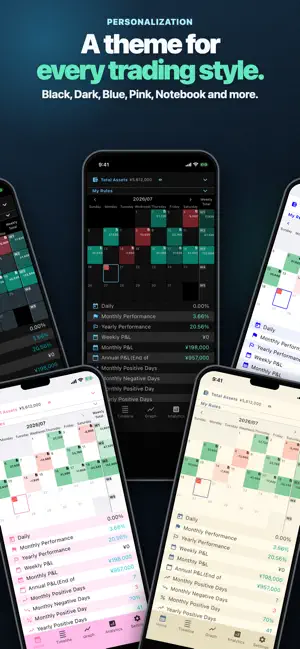
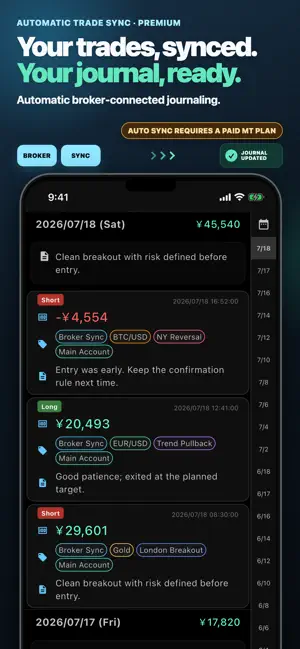
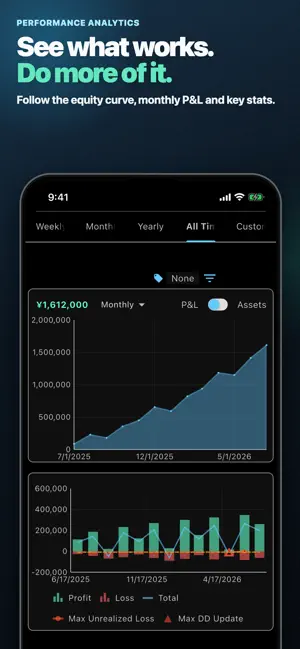
[Investment Record App - No Account Registration Required] Record your stock and FX investment gains and losses, along with notes, directly on your device. Your data will not be transmitted externally. Start using immediately without the hassle of creating an account. [Intuitive Operation for Easy Recording] Easily record your investment gains and losses. With the added note-taking feature, you won't forget the details of your transactions, making it a perfect investment journal. There is no limit to the amount of data you can input per day. [Automatic exchange rate retrieval] Record profits and losses not only in your own currency, but also in U.S. dollars and virtual currencies. Rates are obtained automatically. (*Today's rates are only available for Premium Plan) When you record profit/loss in dollars or virtual currencies, the amount of assets in your home currency is automatically calculated. [Efficient Data Management with Customizable Tags] Easily categorize and organize your investment records with customizable tags. Quickly identify the type of transaction at a glance. Set frequently used tags as fixed input tags for automatic insertion, saving you time. [Comprehensive Asset Overview with Deposit and Withdrawal Records] Record deposits and withdrawals associated with FX and stock trades. By recording these transactions, you can easily see not just the trend in profits but also the overall asset progression. [Calendar view] The profit/loss list is displayed in a calendar format. You can easily check the amount of profit and loss for each day. [Analyze with Weekly, Monthly, and Yearly Graphs] You can visually analyze income and expenses with weekly cumulative profit and loss charts, monthly cumulative profit and loss charts, total asset trend charts, and daily profit and loss bar charts. In the total asset trend chart, you can check the asset trends for each currency. [Trade Performance Details] You can check trade performance such as profit/loss, positive days, negative days, maximum profit, maximum loss, average return, and maximum drawdown by tag, month, year, and entire period. [Flexible Data Management with Export/Import Function] Export your data in CSV format. Easily transfer data to other devices. [Image Saving Feature] Save trade images directly within the app. Keep visual records of your charts and trading setups for future reference. [Trade Evaluation Log] You can record the quality of your daily trades in three levels. Enable it in Calendar settings to make it available. [Passcode Lock] Supports Face ID and Touch ID for smooth unlocking. [Enhanced Features with the Premium Plan] Ad-Free Experience Maximize your screen usage by hiding ad spaces. Unlimited Use of Fixed Input Tags Free users can use up to three, while there are no restrictions for premium plan users. Automatic acquisition of latest rates Free users can get the previous day's rates automatically. Premium plan users get the latest hourly rates automatically. Cloud Backup You can back up your data to cloud, making it easy to switch to another device. Cloud Image Storage Images are automatically saved to the cloud, so you don't have to worry about device storage. [Premium Plan MT - Easily Retrieve Data with System Trading (PC Required)] You can easily retrieve trading data from system trading. ※ EA must be executed on the specified trading platform.
Ratings & reviews
4.9
52 ratings
What’s new
Version 6.2.2 · Updated October 19, 2026
[New] • View PAPER wallet/staked balances, total quantity, reference price and USD value in Holdings. [Improved] • Refresh with history sync or from Holdings; see update times. Failed updates retain prior values and synced history. • Layout aligned with Hyperliquid. [Fixed] • Some Papertrade withdrawals failed to import. • Large deposit/withdrawal amounts and reordered trade rows overflowed. Note: PAPER values use Hyperliquid futures mark prices, not realized P&L.
App privacy
The developer, Makoto Fujio, reported these privacy practices to Apple.
Data Used to Track You
The following data may be used to track you across apps and websites owned by other companies:
- Identifiers: Device ID
Data Not Linked to You
The following data, which may be collected but is not linked to your identity, may be used for the following purposes:
- Identifiers: Device ID
- Usage Data: Advertising Data, Product Interaction, Other Usage Data
Used for: Third-Party Advertising, Analytics, App Functionality
Alternatives to Trade Memo - Investment Log
Looking for apps like Trade Memo - Investment Log? Here are 6 similar apps on the App Store. The highest rated is FX Journal - Trading Journal (5.0/5), and all 6 are free to download.
-
 Trading Journal: Trade Tracker
4.2
Trading Journal: Trade Tracker
4.2
-
 UltraTrader - Trading Journal
4.7
UltraTrader - Trading Journal
4.7
-
 Leaprr: Trading Journal
4.4
Leaprr: Trading Journal
4.4
-
 Trading Journal – Plancana AI
4.7
Trading Journal – Plancana AI
4.7
-
 TradesViz Trading Journal
3.2
TradesViz Trading Journal
3.2
-
 FX Journal - Trading Journal
5.0
FX Journal - Trading Journal
5.0
| App | Rating | Price | Last updated | Compare |
|---|---|---|---|---|
| Trade Memo - Investment Log | 4.9 / 5 (52 ratings) | Free | October 19, 2026 | |
| Trading Journal: Trade Tracker | 4.2 / 5 (47) | Free | Jul 24, 2026 | Compare |
| UltraTrader - Trading Journal | 4.7 / 5 (61) | Free | Oct 21, 2026 | Compare |
| Leaprr: Trading Journal | 4.4 / 5 (47) | Free | Oct 17, 2026 | Compare |
| Trading Journal – Plancana AI | 4.7 / 5 (98) | Free | Oct 1, 2026 | Compare |
| TradesViz Trading Journal | 3.2 / 5 (5) | Free | Oct 24, 2026 | Compare |
| FX Journal - Trading Journal | 5.0 / 5 (2) | Free | Aug 11, 2026 | Compare |