

Photo Pages - Layout & Print
Aliaksei Khutarshchykau Productivity iPhoneiPadiPod touch
Photo Pages - Layout & Print is a free Productivity app for iPhone and iPad by Aliaksei Khutarshchykau. Rated 5.0/5 from 12 ratings. Requires iOS 17.0.
- Rating
- 5.0
- 12 ratings
- Price
- Free
- on the App Store
- Size
- 22 MB
- Age 4+
- Updated
- Sep 17
- 2026 · v2.2.0
Screenshots
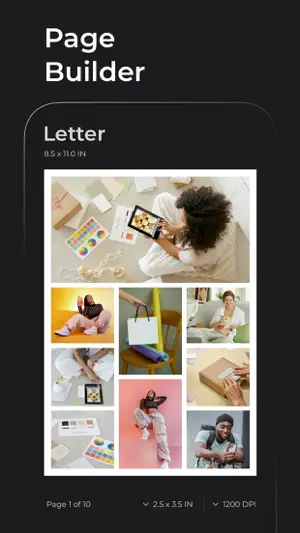


About Photo Pages - Layout & Print
Create stunning, print-ready photo pages with full control — layout, resize, and print your photos with precision and ease. Perfect for scrapbooks, albums, portfolios, or printable collages. The app lets you manage an unlimited number of projects, create photo pages of Letter and other paper sizes, arrange photos manually or automatically, and print or share your work as PDF, TIFF, HEIC, and more. Whether you're mastering layouts such as Auto, Grid, and Collage, or fine-tuning photos by resizing, cropping, rounding corners, and adding borders in pixels, inches, or centimetres — the app equips you with essential tools to handle most real-world tasks. Explore all features and capabilities in the app or on our website photopages.app. There you will find step-by-step guides on how to get started and a detailed overview of key features. Key features: PHOTO IMPORT • Drag and drop photos from other apps • Add photos from the Photo Library, Files, or Camera • Drag and drop photos between pages • Most photo formats are supported, including RAW photos PHOTO EDITING • Move and Resize photos on pages • Multi-Select photos for batch editing • Specify exact size for one or multiple photos • Copy, Rotate, Flip, Delete photos, and Crop any single photo • Bring photos above or below others • Add colored border to photos: Inside, Center, or Outside • Round corners of photos • Anamorphic de-squeeze photos with standard or custom factors • Swap and Insert photos in Grid and Collage layout modes PAGE SIZE & RESOLUTION • Choose page size from a list of standard paper sizes: Letter, Envelope, A4, A3, A5, etc. • Specify custom page size, and add or delete sizes from the list • Choose resolution from presets or specify a custom value in DPI or DPCM • Page size and resolution apply to all pages in the project PAGE LAYOUT • Choose layout mode for one or all pages: Normal, Auto, Grid, or Collage • Specify number of columns in Grid mode • Select template for Collage mode • Specify number of rows and columns in Collage Matrix mode • Split and merge cells in Collage mode PAGE CUSTOMIZATION • Set margins and spacing for one or all pages • Choose background color and add up to 3 background images for one or all pages • Select page orientation: Landscape or Portrait PROJECTS • Add, Open, Duplicate, or Delete projects • Configure project behavior in Project Settings INCHES, PIXELS & CENTIMETRES • Choose units of measurement: Inches, Pixels, or Centimetres • Sizes, positions, and margins are automatically recalculated based on your chosen units and the project’s resolution setting PRINT & EXPORT • AirPrint your project directly from the app • Share your project as Document in PDF, TIFF, PNG, JPEG, or HEIC formats • Share your photos as Solo Photos in TIFF, PNG, JPEG, or HEIC formats • Specify image quality for PDF, TIFF, HEIC, and JPEG formats Access all features without restrictions using one of our subscription plans with a 7-day free trial. You can explore and try the full functionality of the app without any risk of being charged upfront. Your family members can also benefit from your subscription and use the app completely free as long as Family Sharing is enabled and subscription is active. Info & links: • Terms of Use: https://www.apple.com/legal/internet-services/itunes/dev/stdeula/ • Commercial License: https://photopages.app/commercial-license/ • Privacy Policy: https://photopages.app/privacy/ • Contact Us: https://photopages.app/contact/ or via the app: Menu > App Info & Links > Email Support
Ratings & reviews
5.0
12 ratings
What’s new
Version 2.2.0 · Updated September 17, 2026
Update 2.2.0 introduces commercial use license, major project engine upgrade, and minor UI, layout, and copy enhancements. Commercial Use License is now officially granted to all paid option holders. You can now legally use all exported materials in your business, client projects, and commercial workflows. New projects include extended image optimization with privacy-focused metadata removal and high-precision PDF exports with smaller file sizes. Existing projects retain original behavior until upgraded in Project Settings.
App privacy
The developer, Aliaksei Khutarshchykau, reported these privacy practices to Apple.
Data Linked to You
The following data, which may be collected and linked to your identity, may be used for the following purposes:
- Diagnostics: Crash Data
Used for: Analytics, App Functionality
Alternatives to Photo Pages - Layout & Print
Looking for apps like Photo Pages - Layout & Print? Here are 6 similar apps on the App Store. The highest rated is Photos PDF : Scanner Converter (4.9/5), and all 6 are free to download.
-
 Print Photo Size · TinyPrinter
4.5
Print Photo Size · TinyPrinter
4.5
-
 NokoPrint - Mobile Printing
4.7
NokoPrint - Mobile Printing
4.7
-
 Notebook – AI Notes, Notepad
4.7
Notebook – AI Notes, Notepad
4.7
-
 TimeBloc - Daily Planner
4.3
TimeBloc - Daily Planner
4.3
-
 Photos PDF : Scanner Converter
4.9
Photos PDF : Scanner Converter
4.9
-
 The Image Converter □
4.6
The Image Converter □
4.6
| App | Rating | Price | Last updated | Compare |
|---|---|---|---|---|
| Photo Pages - Layout & Print | 5.0 / 5 (12 ratings) | Free | September 17, 2026 | |
| Print Photo Size · TinyPrinter | 4.5 / 5 (112) | Free | Jun 20, 2026 | Compare |
| NokoPrint - Mobile Printing | 4.7 / 5 (156) | Free | Sep 15, 2025 | Compare |
| Notebook – AI Notes, Notepad | 4.7 / 5 (23,855) | Free | Oct 27, 2026 | Compare |
| TimeBloc - Daily Planner | 4.3 / 5 (7,404) | Free | Sep 29, 2026 | Compare |
| Photos PDF : Scanner Converter | 4.9 / 5 (68,011) | Free | Oct 29, 2026 | Compare |
| The Image Converter □ | 4.6 / 5 (16,706) | Free | Oct 30, 2026 | Compare |