

Diskio: Disk & SSD Speed Test
Sergii Khliustin Utilities iPhoneiPadiPod touch
Diskio: Disk & SSD Speed Test is a paid Utilities app for iPhone and iPad by Sergii Khliustin. Rated 3.9/5 from 17 ratings. Requires iOS 16.0.
- Rating
- 3.9
- 17 ratings
- Price
- 5.99 USD
- on the App Store
- Size
- 9 MB
- Age 4+
- Updated
- Oct 9
- 2026 · v3.1.0
Screenshots
About Diskio: Disk & SSD Speed Test
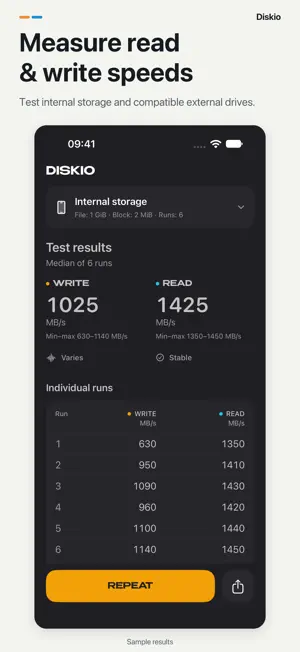
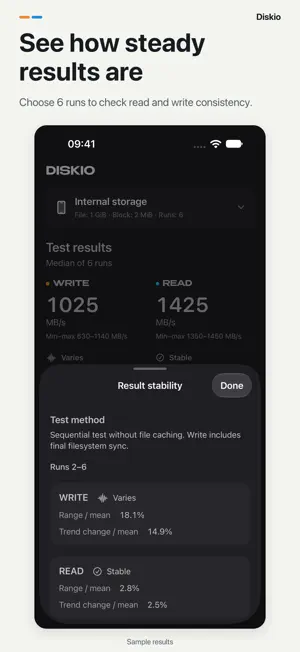
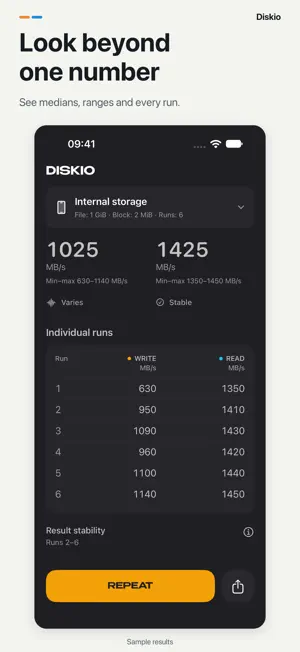
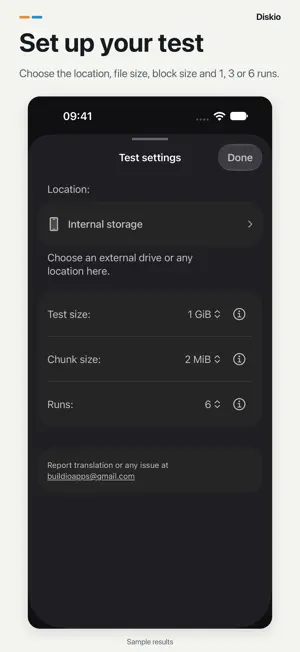
How fast is your storage? Measure sequential read and write speeds on your iPhone or a compatible external drive. Go beyond one number with repeat runs and a detailed report. SEE THE WHOLE RESULT Choose 1, 3 or 6 runs. With 3 or 6 runs, see median read and write speeds, minimum and maximum values, and the result of every run. CHECK CONSISTENCY Choose 6 runs to assess read and write stability separately over the last five. See whether results are stable or vary, with the criteria explained in the app. TEST YOUR SETUP Use your iPhone's internal storage or select a compatible, writable external drive through Files. Choose a test file from 1 to 5 GiB and a block size of 1, 2, 4, 8 or 16 MiB. The defaults are 6 runs, a 1 GiB file and a 2 MiB block. UNDERSTAND THE MEASUREMENT Speeds are shown in MB/s, and write timing includes final filesystem synchronization. Follow each write and read phase as the test runs. SHARE THE DETAILS Send a result card with the full report, test settings and, after 6 runs, the stability assessment. The interface supports light and dark appearances, larger text and Reduce Motion. ADAPTS TO YOUR DISPLAY On iPhone Duo, an expanded layout gives controls and results their own space. Your report stays available as the layout changes, and narrow windows use a compact view. GET STARTED 1. Select your storage and test settings. 2. Start the test and keep Diskio open. 3. Review the report or share your results. A test needs enough free space for a temporary file. External storage must be accessible and writable through Files. Results depend on the device, storage, connection, free space and test settings. The stability assessment adapts numerical criteria from SNIA SSS PTS. It is not a full SNIA-compliant benchmark, a drive-health check or a sustained-performance rating. Results from version 3.0 onward may differ from older versions because the measurement method was revised.
Ratings & reviews
3.9
17 ratings
What’s new
Version 3.1.0 · Updated October 9, 2026
• An adaptive layout for iPhone Duo gives test controls and results their own space. • Your report and open panels remain available as the layout changes, while narrow windows stay compact. • Improved handling when you leave or return to Diskio.
App privacy
The developer, Sergii Khliustin, reported these privacy practices to Apple.
Data Used to Track You
The following data may be used to track you across apps and websites owned by other companies:
- Identifiers: Device ID
Data Not Linked to You
The following data, which may be collected but is not linked to your identity, may be used for the following purposes:
- Identifiers: Device ID
- Diagnostics: Crash Data, Other Diagnostic Data
Used for: Third-Party Advertising, Analytics, App Functionality
Alternatives to Diskio: Disk & SSD Speed Test
Looking for apps like Diskio: Disk & SSD Speed Test? Here are 6 similar apps on the App Store. The highest rated is Jazz Disk Bench Pro (4.5/5), and 5 of the 6 are free to download.
-
 REC Disk Speed Test
3.8
REC Disk Speed Test
3.8
-
 Jazz Disk Bench Pro
4.5
Jazz Disk Bench Pro
4.5
-
 SSD Performance Test
2.0
SSD Performance Test
2.0
-
 U8-Disk
4.1
U8-Disk
4.1
-
 GravityMark GPU Benchmark
4.0
GravityMark GPU Benchmark
4.0
-
 Geekbench AI
4.2
Geekbench AI
4.2
| App | Rating | Price | Last updated | Compare |
|---|---|---|---|---|
| Diskio: Disk & SSD Speed Test | 3.9 / 5 (17 ratings) | 5.99 USD | October 9, 2026 | |
| REC Disk Speed Test | 3.8 / 5 (5) | Free | Oct 24, 2023 | Compare |
| Jazz Disk Bench Pro | 4.5 / 5 (30) | 2.99 USD | Jun 16, 2026 | Compare |
| SSD Performance Test | 2.0 / 5 (1) | Free | May 21, 2025 | Compare |
| U8-Disk | 4.1 / 5 (10) | Free | Aug 17, 2026 | Compare |
| GravityMark GPU Benchmark | 4.0 / 5 (9) | Free | May 19, 2025 | Compare |
| Geekbench AI | 4.2 / 5 (33) | Free | Sep 19, 2026 | Compare |