

Clicks Keyboard
Clicks Technology Ltd Utilities iPhoneiPadiPod touch
Clicks Keyboard is a free Utilities app for iPhone and iPad by Clicks Technology Ltd. Rated 2.9/5 from 59 ratings. Requires iOS 17.6.
- Rating
- 2.9
- 59 ratings
- Price
- Free
- on the App Store
- Size
- 100 MB
- Age 4+
- Updated
- Sep 15
- 2026 · v3.0.2
Screenshots
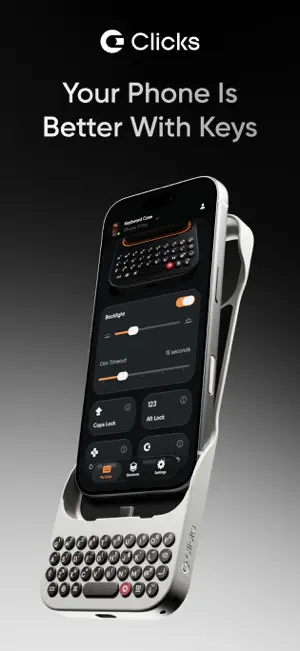


About Clicks Keyboard
The Clicks app unlocks new features for your keyboard. Toggle your keyboard backlight between 'automatic' and off. Use this feature to check the status of your backlight and reset it to automatic mode if it's been accidentally disabled through the keyboard shortcut. Caps lock - Control the behaviour of the shift key. When turned on, pressing the shift key once makes the next charater a capital letter. Double clicking the shift key enables shift lock. When disabled, you must press and hold shift to get a captial letter. Alt lock - Control the behaviour of the '123' key. When turned on, pressing the '123' key once makes the next typed character a number of symbol. Double clicking the shift key enables number lock - (great for typing phone numbers of long number strings!). When disabled, you must press and hold '123' to get numbers and symbols. Soft return - Choose between using the return to add a carriage return (soft return) or send a message (hard return). Clicks key customization - Decide whether you want the Clicks key to function as Tab or Control Cursor mode - Enable cursor mode to use WASD and IJKL as directional cursor keys Currency symbol - Customize your currency symbol Create or log in to your Clicks Keyboard account to get updated about the latest features coming to your Clicks Keyboard Update your keyboard firmware over the air to optimize the typing experience. Learn and explore your Clicks keyboard with access to tips and how-to's. * Certain features and functionality are dependant on your Clicks model.
Ratings & reviews
2.9
59 ratings
What’s new
Version 3.0.2 · Updated September 15, 2026
- Fix UI refresh / config data synchronization issue - Fix firmware version display issue
App privacy
The developer, Clicks Technology Ltd, reported these privacy practices to Apple.
Data Not Collected
The developer does not collect any data from this app.
Alternatives to Clicks Keyboard
Looking for apps like Clicks Keyboard? Here are 6 similar apps on the App Store. The highest rated is Wipr 2 (4.7/5), and 5 of the 6 are free to download.
-
 Pebble Core
4.5
Pebble Core
4.5
-
 SpaceWalker by VITURE
4.1
SpaceWalker by VITURE
4.1
-
 Supernote Partner
2.7
Supernote Partner
2.7
-
 Wipr 2
4.7
Wipr 2
4.7
-
 Screens 5: VNC Remote Desktop
4.5
Screens 5: VNC Remote Desktop
4.5
-
 Kagi for Safari
3.7
Kagi for Safari
3.7
| App | Rating | Price | Last updated | Compare |
|---|---|---|---|---|
| Clicks Keyboard | 2.9 / 5 (59 ratings) | Free | September 15, 2026 | |
| Pebble Core | 4.5 / 5 (72) | Free | Oct 15, 2026 | Compare |
| SpaceWalker by VITURE | 4.1 / 5 (1,463) | Free | Aug 24, 2026 | Compare |
| Supernote Partner | 2.7 / 5 (91) | Free | Oct 15, 2026 | Compare |
| Wipr 2 | 4.7 / 5 (1,338) | 4.99 USD | Oct 14, 2026 | Compare |
| Screens 5: VNC Remote Desktop | 4.5 / 5 (571) | Free | Oct 14, 2026 | Compare |
| Kagi for Safari | 3.7 / 5 (186) | Free | Jun 10, 2025 | Compare |
Compare Clicks Keyboard with the top alternatives: ratings, updates, ASO score and keyword gaps →