

FileLock: Secret Photo Vault
DNG SOFT COMPANY LIMITED Utilities iPhoneiPadiPod touch
FileLock: Secret Photo Vault is a free Utilities app for iPhone and iPad by DNG SOFT COMPANY LIMITED. Rated 5.0/5 from 3 ratings. Requires iOS 17.0.
- Rating
- 5.0
- 3 ratings
- Price
- Free
- on the App Store
- Size
- 26 MB
- Age 17+
- Updated
- Oct 12
- 2026 · v26.9.9
Screenshots

About FileLock: Secret Photo Vault
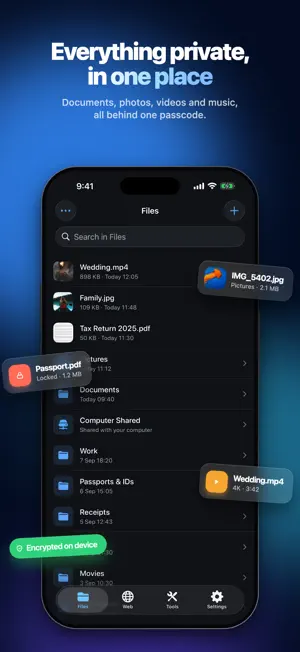
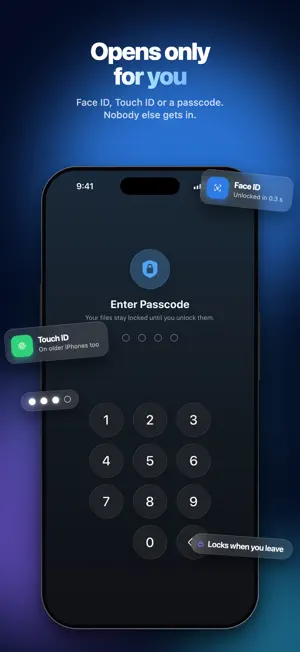
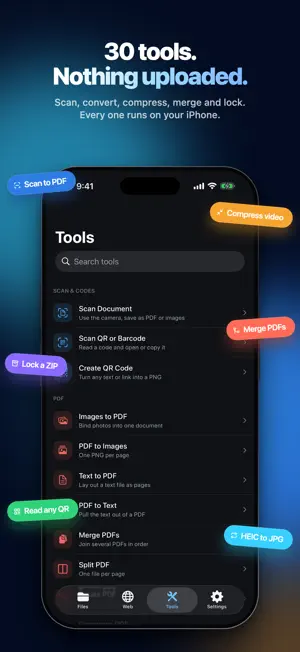
FileLock keeps your private files private. Photos, videos, documents and music go behind a passcode, and stay on your iPhone, where nobody else can reach them. HIDE WHAT MATTERS Move photos and videos out of your camera roll into a folder only you can open. Bring them in from Photos, from Files, from iCloud, or straight from your Mac over USB. Once they are in, they are out of everything else. OPENS ONLY FOR YOU Face ID, Touch ID or a four-digit passcode. FileLock re-locks itself after you leave, so a phone left on a table stays shut. 30 TOOLS, ALL ON DEVICE Scan documents to PDF. Merge, split, rotate, compress and password-protect PDFs. Convert HEIC to JPG, resize and compress images, pull the text out of a picture. Extract audio from a video, compress it, mute it. Zip and unzip, read QR codes and barcodes, make your own. Every one runs on your iPhone. Nothing is uploaded, and nothing needs a connection. A BROWSER THAT KEEPS QUIET Browse with real tabs. History and bookmarks stay behind your passcode. Download straight into your vault instead of into somebody else's cloud. PLAY WITHOUT LEAVING Music and video play inside the app, with a queue, background playback and a sleep timer. Cover art included. SEE WHAT IS INSIDE Storage broken down by type, so you know exactly what you are carrying. NO CLOUD. NO ACCOUNT. NO TRACKING. FileLock has no server to send anything to. There is no sign-up, nothing watching what you open, and no way for us, or anyone, to see what you keep. Your files never leave your device unless you send them somewhere yourself. FILELOCK PRO Everything is included free, with a daily cap on tool runs, imports and downloads. FileLock PRO removes every cap. FileLock PRO is an auto-renewing subscription, offered weekly or yearly. Payment is charged to your Apple Account at confirmation of purchase. It renews automatically unless auto-renew is turned off at least 24 hours before the end of the current period. Manage or cancel in your Apple Account settings. Terms of Use: https://app.dngsoft.com/apps/terms-of-use Privacy Policy: https://app.dngsoft.com/filelock/privacy-policy
What’s new
Version 26.9.9 · Updated October 12, 2026
Bug fixes and performance improvements for a smoother, more reliable experience.
App privacy
The developer, DNG SOFT COMPANY LIMITED, reported these privacy practices to Apple.
Data Used to Track You
The following data may be used to track you across apps and websites owned by other companies:
- Identifiers: Device ID
- Usage Data: Product Interaction, Advertising Data
Data Not Linked to You
The following data, which may be collected but is not linked to your identity, may be used for the following purposes:
- Identifiers: Device ID
- Usage Data: Product Interaction, Advertising Data
- Diagnostics: Crash Data
Used for: Developer’s Advertising or Marketing, Analytics, App Functionality
Alternatives to FileLock: Secret Photo Vault
Looking for apps like FileLock: Secret Photo Vault? Here are 6 similar apps on the App Store. The highest rated is Files Protection (4.6/5), and all 6 are free to download.
-
 Files Locker Keep Datas Safety
4.5
Files Locker Keep Datas Safety
4.5
-
 Files Protection
4.6
Files Protection
4.6
-
 Secret Photo Files Vault - MSV
-
 Locked Folder: Private files
4.3
Locked Folder: Private files
4.3
-
 File Manager: Vault & Explorer
3.5
File Manager: Vault & Explorer
3.5
-
 Private Vault – Store Files
4.0
Private Vault – Store Files
4.0
| App | Rating | Price | Last updated | Compare |
|---|---|---|---|---|
| FileLock: Secret Photo Vault | 5.0 / 5 (3 ratings) | Free | October 12, 2026 | |
| Files Locker Keep Datas Safety | 4.5 / 5 (388) | Free | Feb 2, 2025 | Compare |
| Files Protection | 4.6 / 5 (602) | Free | Apr 29, 2026 | Compare |
| Secret Photo Files Vault - MSV | – | Free | Aug 22, 2026 | Compare |
| Locked Folder: Private files | 4.3 / 5 (62) | Free | Oct 12, 2026 | Compare |
| File Manager: Vault & Explorer | 3.5 / 5 (8) | Free | Jul 8, 2025 | Compare |
| Private Vault – Store Files | 4.0 / 5 (1,231) | Free | Dec 15, 2024 | Compare |