

ArtSync: AR Drawing Projector
Radun Cicen Graphics & Design iPhoneiPadiPod touch
ArtSync: AR Drawing Projector is a free Graphics & Design app for iPhone and iPad by Radun Cicen. Rated 2.0/5 from 2 ratings. Requires iOS 17.0.
- Rating
- 2.0
- 2 ratings
- Price
- Free
- on the App Store
- Size
- 182 MB
- Age 4+
- Updated
- Oct 16
- 2026 · v2.2
Screenshots



About ArtSync: AR Drawing Projector
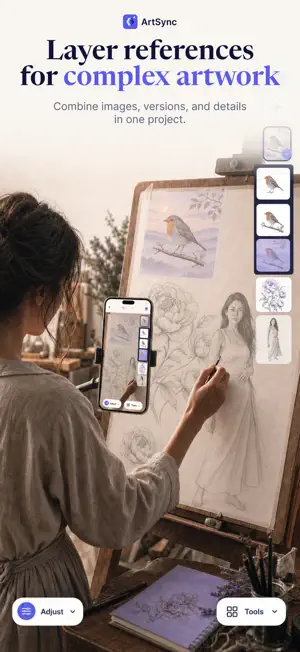
Turn any photo into a guide you can trace on paper, canvas, or a wall. ArtSync brings your reference image and real drawing surface together. Import an image, choose the setup that fits your project, align it precisely, and create at your own pace—whether you are practicing a sketch, painting on canvas, preparing a stencil, lettering a sign, or planning a mural. FIVE WAYS TO TRACE • AR Style Lock your reference to a real drawing surface and keep it aligned as you move your device. • Normal Style Follow your reference over the live camera view for a fast, familiar tracing setup. • Quick Anchor Pin your artwork to a surface with minimal setup and start tracing sooner. • Light Table Place paper over your device’s screen and trace the illuminated reference beneath it. • Remote Canvas Pair two devices for larger canvases and walls or just for ease of viewing experience. Use one as a fixed camera host and the other to view the live feed, position your reference, and control your tools while you work. TOOLS THAT KEEP YOU IN FLOW • Import and trace your own photos and artwork • Build compositions with multiple layers and sublayers • Move, scale, rotate, and fine-tune references with precision • Adjust opacity and align artwork using an interactive grid • Use Strobe Comparison to alternate your reference on and off, making it easy to compare your progress without stopping • Undo and redo changes without interrupting your process • Record high-quality video at 30 or 60 FPS, or capture your process as a timelapse • Adjust recording quality, speed, and timelapse settings to fit your workflow • Save, organize, favorite, and reopen your projects • Follow clear onboarding and tutorials whenever you need guidance MADE FOR YOUR NEXT IDEA Use ArtSync to learn and practice drawing, improve proportions, trace portraits, paint on canvas, create murals, prepare stencils, or transfer lettering and logos. Capture the process as a satisfying high-quality video or timelapse, then save it or share it on social media. Choose your reference. Find your setup. Start creating. Begin creating with ArtSync for free. When you’re ready to go further, ArtSync Pro unlocks advanced tracing modes and the complete creative toolkit.
What’s new
Version 2.2 · Updated October 16, 2026
Need a hand? Our new Support section makes it easier to get help, report a problem, share feedback, or request a feature. We’d love to hear from you! We’ve also made a few fixes for a smoother drawing experience.
App privacy
The developer, Radun Cicen, reported these privacy practices to Apple.
Data Linked to You
The following data, which may be collected and linked to your identity, may be used for the following purposes:
- Purchases: Purchase History
- Identifiers: User ID
- Usage Data: Product Interaction
- Diagnostics: Other Diagnostic Data, Crash Data
Used for: Analytics, App Functionality
Data Not Linked to You
The following data, which may be collected but is not linked to your identity, may be used for the following purposes:
- Diagnostics: Performance Data
Used for: Analytics, App Functionality
Alternatives to ArtSync: AR Drawing Projector
Looking for apps like ArtSync: AR Drawing Projector? Here are 6 similar apps on the App Store. The highest rated is Drawing & Sketch Trace App (4.5/5), and all 6 are free to download.
-
 Flowly: AR Projector Drawing
4.2
Flowly: AR Projector Drawing
4.2
-
 Ricalko: Camera Lucida Artwork
4.1
Ricalko: Camera Lucida Artwork
4.1
-
 Camera Lucida - Tracing App
1.8
Camera Lucida - Tracing App
1.8
-
 Drawing & Sketch Trace App
4.5
Drawing & Sketch Trace App
4.5
-
 Translucent: AR Trace & Draw
3.7
Translucent: AR Trace & Draw
3.7
-
 Drawing Projector - Trace&Draw
| App | Rating | Price | Last updated | Compare |
|---|---|---|---|---|
| ArtSync: AR Drawing Projector | 2.0 / 5 (2 ratings) | Free | October 16, 2026 | |
| Flowly: AR Projector Drawing | 4.2 / 5 (60) | Free | Jul 19, 2026 | Compare |
| Ricalko: Camera Lucida Artwork | 4.1 / 5 (83) | Free | Jul 14, 2026 | Compare |
| Camera Lucida - Tracing App | 1.8 / 5 (4) | Free | Feb 20, 2024 | Compare |
| Drawing & Sketch Trace App | 4.5 / 5 (39) | Free | Oct 15, 2026 | Compare |
| Translucent: AR Trace & Draw | 3.7 / 5 (26) | Free | Oct 3, 2026 | Compare |
| Drawing Projector - Trace&Draw | – | Free | Mar 24, 2026 | Compare |