

Faces Hub: Watch Faces
Maricel Mocanu Lifestyle iPhoneiPadiPod touchApple Watch
Faces Hub: Watch Faces is a free Lifestyle app for iPhone and iPad by Maricel Mocanu. Rated 3.5/5 from 2 ratings. Requires iOS 17.0.
- Rating
- 3.5
- 2 ratings
- Price
- Free
- on the App Store
- Size
- 38 MB
- Age 4+
- Updated
- Oct 25
- 2026 · v2.0
Screenshots


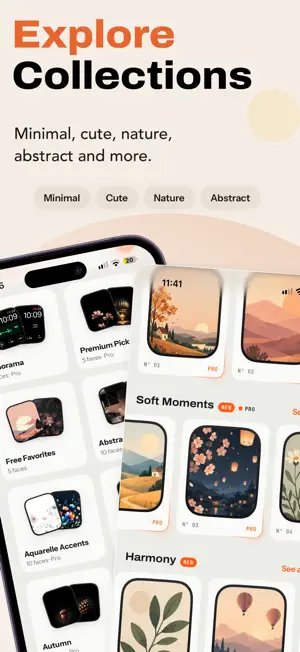

About Faces Hub: Watch Faces
Watch faces, wallpapers and complications from Monkey’s Dream, with your steps on your wrist. GROWS AS YOU WALK Every morning your Steps scene starts as a seed. As you walk, it grows through five stages and reaches full bloom at your daily goal. The Tree scene is free. With Pro you also get Seasons, Botanica, Pixel Trail, Halloween and Moonlight. READY-MADE WATCH FACES Pick a Steps face in the Steps tab or a design face in Explore, and add it to your Apple Watch from your iPhone. COMPLICATIONS Put your growing scene, your steps, your goal percent, your walking streak and your week as a small forest on compatible Apple Watch faces. More designs show heart rate, Move calories, battery, time in daylight and the year. Many of them are part of Pro. WALLPAPERS More than 330 wallpapers in collections. Filter by style: nature, flowers, animals, minimal, dark, maps and more. Premium Picks and Free Favorites change every Monday, and there is a new pick of the week. Save your favorites and turn a wallpaper into a watch face with Apple’s Photos face. IPHONE WIDGETS Your growing scene on the Home Screen and the Lock Screen: with your steps, with your week and streak, or as pure decoration. FACES HUB PRO One purchase, not a subscription: every Pro watch face and wallpaper, every Steps scene, the Pro complications and no ads. You can restore it any time in Settings. YOUR HEALTH DATA Faces Hub reads your steps, heart rate, Activity rings (Move calories and goal) and time in daylight from Apple Health. You choose which data to allow. Your Health data stays on your iPhone and Apple Watch: Faces Hub never writes to Apple Health, never uses your Health data for advertising and never uploads it. It leaves your devices only when you share a progress card yourself. REAL TREES Monkey’s Dream plants real trees every month with Treedom. You can visit our forest from the Steps tab. The watch app and complications require Apple Watch with watchOS 10 or later.
What’s new
Version 2.0 · Updated October 25, 2026
- Ready-made watch faces: add a Steps face or a design face to your Apple Watch from your iPhone. - Steps scenes that grow from seed to full bloom as you walk. - Complications for steps, heart rate, battery and more. - iPhone widgets for the Home Screen and the Lock Screen. - Explore by style: nature, flowers, animals, minimal, dark, maps and more. - Premium Picks and Free Favorites change every Monday, plus a new pick of the week. - A new app icon and a fresh look.
App privacy
The developer, Maricel Mocanu, reported these privacy practices to Apple.
Data Not Linked to You
The following data, which may be collected but is not linked to your identity, may be used for the following purposes:
- Location: Coarse Location
- Identifiers: Device ID
- Usage Data: Product Interaction, Advertising Data
- Diagnostics: Crash Data, Performance Data, Other Diagnostic Data
Used for: Third-Party Advertising, Analytics
Alternatives to Faces Hub: Watch Faces
Looking for apps like Faces Hub: Watch Faces? Here are 6 similar apps on the App Store. The highest rated is Watch Faces & iWatch Gallery (5.0/5), and all 6 are free to download.
-
 Watch Faces: Gallery+
4.8
-
 Watch Faces Gallery Plus
4.8
-
 Watch Faces & Studio Faces #1
3.0
-
 Watch Faces: Gallery
4.2
-
 Watch Faces Gallery Widgets
4.5
-
 Watch Faces & iWatch Gallery
5.0
| App | Rating | Price | Last updated | Compare |
|---|---|---|---|---|
| Faces Hub: Watch Faces | 3.5 / 5 (2 ratings) | Free | October 25, 2026 | |
| Watch Faces: Gallery+ | 4.8 / 5 (24) | Free | May 21, 2024 | Compare |
| Watch Faces Gallery Plus | 4.8 / 5 (23) | Free | Mar 25, 2025 | Compare |
| Watch Faces & Studio Faces #1 | 3.0 / 5 (2) | Free | Sep 26, 2024 | Compare |
| Watch Faces: Gallery | 4.2 / 5 (5) | Free | Oct 13, 2026 | Compare |
| Watch Faces Gallery Widgets | 4.5 / 5 (36) | Free | Feb 8, 2024 | Compare |
| Watch Faces & iWatch Gallery | 5.0 / 5 (21) | Free | Apr 23, 2024 | Compare |