

Swipe: Photo & Storage Cleaner
Mohamed Fakiri Utilities iPhoneiPadiPod touch
Swipe: Photo & Storage Cleaner is a free Utilities app for iPhone and iPad by Mohamed Fakiri. Rated 4.2/5 from 225 ratings. Requires iOS 16.0.
- Rating
- 4.2
- 225 ratings
- Price
- Free
- on the App Store
- Size
- 31 MB
- Age 4+
- Updated
- Oct 14
- 2026 · v10.0.2
Screenshots



About Swipe: Photo & Storage Cleaner
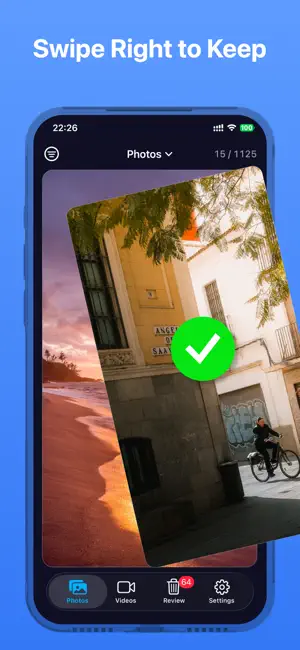
Your camera roll is full. You know you should clean it, but scrolling through thousands of photos feels impossible. Swipe makes it effortless. Just swipe. Right to keep. Left to delete. That's it. No complicated menus. No AI guessing what you want. Just you, your photos, and a satisfying card-stack interface that makes decluttering feel like a game. —————————————————————— HOW IT WORKS 1. Pick a month or jump right in 2. Swipe through your photos and videos one by one 3. Review everything you marked for deletion before committing 4. Confirm and reclaim your storage Nothing is permanent until you say so. Every decision can be undone instantly. —————————————————————— WHY PEOPLE LOVE SWIPE ◆ Swipe-to-decide — Fluid card animations with haptic feedback make every decision satisfying ◆ Photos AND Videos — Clean your entire media library, not just photos ◆ Batch review — See all your decisions in one place before deleting anything ◆ Unlimited undo — Changed your mind? One tap to restore, even mid-session ◆ Smart preloading — Images load instantly. No waiting, no stuttering ◆ Full-screen preview — Tap to zoom in, pinch to explore every detail ◆ Share anywhere — Send photos and videos right from the curation screen ◆ Smart reminders — Get notified when your camera roll needs attention ◆ Progress tracking — See how much storage you're freeing in real time —————————————————————— BUILT FOR TRUST ◇ 100% offline — Your photos never leave your device. Ever. ◇ Non-destructive — Deleted items go to Recently Deleted, recoverable for 30 days ◇ No account required — No sign-up, no cloud, no tracking ◇ No ads — Clean experience from day one —————————————————————— PREMIUM Unlock Swipe Premium to access advanced filters, custom album selection, and unlimited session history. One purchase, full power. Works beautifully on iPhone and iPad. Your camera roll deserves better. Start swiping. Terms of Use: https://www.apple.com/legal/internet-services/itunes/dev/stdeula/
Ratings & reviews
4.2
225 ratings
What’s new
Version 10.0.2 · Updated October 14, 2026
Performance improvements and bug fixes.
App privacy
The developer, Mohamed Fakiri, reported these privacy practices to Apple.
Data Not Linked to You
The following data, which may be collected but is not linked to your identity, may be used for the following purposes:
- Diagnostics: Crash Data
Used for: App Functionality
Alternatives to Swipe: Photo & Storage Cleaner
Looking for apps like Swipe: Photo & Storage Cleaner? Here are 6 similar apps on the App Store. The highest rated is Swipe Cleaner: Clean Up Photos (4.7/5), and all 6 are free to download.
-
 Swipe Photo Cleaner: SwipeWipe
4.5
Swipe Photo Cleaner: SwipeWipe
4.5
-
 Swipy: Photo Delete Swipe
4.5
Swipy: Photo Delete Swipe
4.5
-
 Photo Purge: Swipe & Delete
4.4
Photo Purge: Swipe & Delete
4.4
-
 Swipe Cleaner: Clean Up Photos
4.7
Swipe Cleaner: Clean Up Photos
4.7
-
 Swipe & Delete Photo Declutter
4.5
Swipe & Delete Photo Declutter
4.5
-
 Gallery Cleaner : Swipe Delete
4.7
Gallery Cleaner : Swipe Delete
4.7
| App | Rating | Price | Last updated | Compare |
|---|---|---|---|---|
| Swipe: Photo & Storage Cleaner | 4.2 / 5 (225 ratings) | Free | October 14, 2026 | |
| Swipe Photo Cleaner: SwipeWipe | 4.5 / 5 (334) | Free | Oct 14, 2026 | Compare |
| Swipy: Photo Delete Swipe | 4.5 / 5 (423) | Free | Oct 28, 2026 | Compare |
| Photo Purge: Swipe & Delete | 4.4 / 5 (390) | Free | May 19, 2026 | Compare |
| Swipe Cleaner: Clean Up Photos | 4.7 / 5 (224) | Free | Aug 21, 2026 | Compare |
| Swipe & Delete Photo Declutter | 4.5 / 5 (1,044) | Free | Oct 3, 2026 | Compare |
| Gallery Cleaner : Swipe Delete | 4.7 / 5 (692) | Free | Sep 10, 2026 | Compare |