

Thingiverse Printables | 3D GO
SimpleDev LLC Utilities iPhoneiPadiPod touch
Thingiverse Printables | 3D GO is a free Utilities app for iPhone and iPad by SimpleDev LLC. Rated 4.7/5 from 4,122 ratings. Requires iOS 15.1.
- Rating
- 4.7
- 4.1K ratings
- Price
- Free
- on the App Store
- Size
- 58 MB
- Age 9+
- Updated
- Oct 7
- 2026 · v1.3.15
Screenshots
About Thingiverse Printables | 3D GO
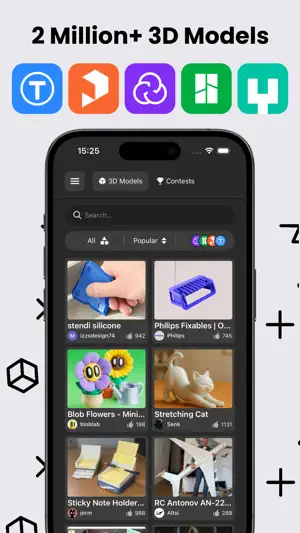
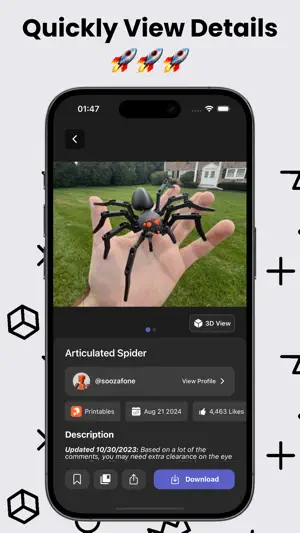
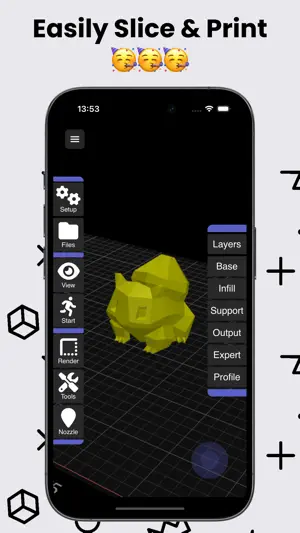
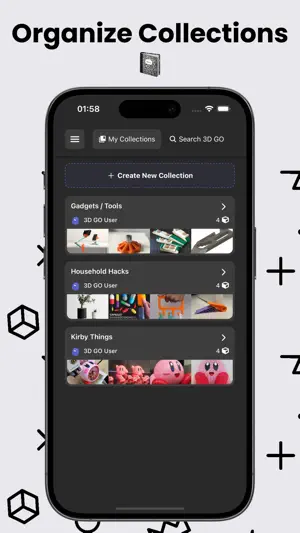
3D GO – 3D Printing, STL Viewer & Slicer 3D GO is a fast, all-in-one 3D printing app for finding, previewing, organizing, and slicing 3D models from the biggest sites in the world. Instead of jumping between five different websites, folders, and slicers, you can do everything in one place. Search across Thingiverse, Printables, MakerWorld, Cults3D, Creality Cloud, Thangs, MyMiniFactory and Sketchfab at the same time to find STL files for parts, tools, upgrades, miniatures, home décor, and just about anything else you want to 3D print. Whether you’re printing functional parts or artistic models, 3D GO makes it easy to discover the best files from the entire 3D printing community. Select models with a full 3D preview and STL viewer, so you can rotate, zoom, and inspect it before you download or slice. This helps you avoid bad files, broken geometry, and wasted filament. You can also open any STL from your device and view it instantly inside the app. When you’re ready to print, 3D GO includes a built-in 3D slicer that converts STL files into print-ready G-code. You can prepare files for PLA, PETG, ABS, TPU, and more, then export them for your printer using your normal workflow. It works great alongside Bambu Studio, PrusaSlicer, Cura, and Klipper-based setups. You can save any model from any site and organize them into custom collections. Keep folders for different printers, materials, or projects, search through your saved models, and manage even huge STL libraries without losing track of anything. 3D GO also lets you explore what’s happening across the entire 3D printing world. Browse trending 3D models, check out design contests, and discover new creators without visiting each site individually. No matter what 3D printer you use — Bambu Lab, Prusa, Creality, Anycubic, Flashforge, Ultimaker, and more — 3D GO fits right into your workflow. Key features • Search Thingiverse, Printables, MakerWorld, Cults3D, Creality Cloud, Thangs, MyMiniFactory & Sketchfab • Full 3D preview and STL viewer • Built-in 3D slicer with G-code export • Save models and create custom collections • Search and manage your STL library • View trending models and design contests • Works with all major 3D printers If you’re into 3D printing and tired of juggling multiple websites and slicer apps, 3D GO brings everything together into one clean, fast experience. Download 3D GO and make finding and preparing your next 3D print simple again. 3D GO is an independent app and is not affiliated with any of the sites or printer brands mentioned. All trademarks belong to their owners. Privacy Policy: https://3dgo.app/privacy Terms of Use: https://www.apple.com/legal/internet-services/itunes/dev/stdeula/
Ratings & reviews
4.7
4.1K ratings
What’s new
Version 1.3.15 · Updated October 7, 2026
Bug fixes and performance improvements.
App privacy
The developer, SimpleDev LLC, reported these privacy practices to Apple.
Data Not Collected
The developer does not collect any data from this app.
Alternatives to Thingiverse Printables | 3D GO
Looking for apps like Thingiverse Printables | 3D GO? Here are 6 similar apps on the App Store. The highest rated is Thingiverse MakerWorld | 3Drop (4.8/5), and all 6 are free to download.
-
 Thingiverse MakerWorld | 3Drop
4.8
Thingiverse MakerWorld | 3Drop
4.8
-
 Creality Cloud - 3D Printing
4.6
Creality Cloud - 3D Printing
4.6
-
 Flash Maker
2.0
Flash Maker
2.0
-
 Thangs
3.0
Thangs
3.0
-
 Thinger: 3D Printing Models
4.6
Thinger: 3D Printing Models
4.6
-
 Bambu Handy
4.8
Bambu Handy
4.8
| App | Rating | Price | Last updated | Compare |
|---|---|---|---|---|
| Thingiverse Printables | 3D GO | 4.7 / 5 (4,122 ratings) | Free | October 7, 2026 | |
| Thingiverse MakerWorld | 3Drop | 4.8 / 5 (403) | Free | Oct 22, 2026 | Compare |
| Creality Cloud - 3D Printing | 4.6 / 5 (7,192) | Free | Oct 22, 2026 | Compare |
| Flash Maker | 2.0 / 5 (628) | Free | Jan 15, 2026 | Compare |
| Thangs | 3.0 / 5 (117) | Free | Sep 21, 2026 | Compare |
| Thinger: 3D Printing Models | 4.6 / 5 (1,309) | Free | Oct 10, 2026 | Compare |
| Bambu Handy | 4.8 / 5 (39,515) | Free | Oct 21, 2026 | Compare |