

Coach Video Analysis
michal bojanowicz Sports iPhoneiPadiPod touchMac
Coach Video Analysis is a free Sports app for iPhone and iPad by michal bojanowicz. Rated 3.6/5 from 10 ratings. Requires iOS 16.0.
- Rating
- 3.6
- 10 ratings
- Price
- Free
- on the App Store
- Size
- 28 MB
- Age 4+
- Updated
- Sep 26
- 2026 · v1.7.7
Screenshots


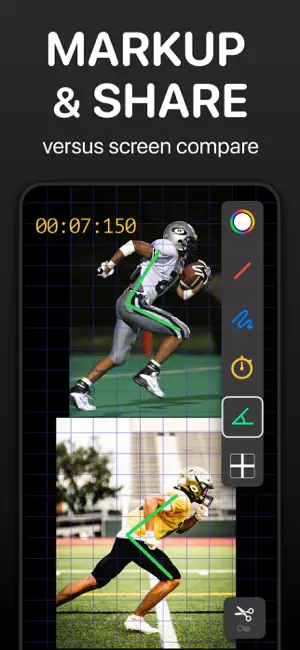

About Coach Video Analysis
Elevate Your Sports Analysis and Feedback! Designed with professional sports in mind, Coach's Video empowers you to refine technique like never before. Synchronize and compare two videos to analyze motion and mechanics. Whether you're a coach, physiotherapist, athlete, or someone striving for peak performance, Coach's Video has your back (and swings)! Try before you subscribe: No account. No payment details. No auto-renewing trial to cancel. A subscription unlocks everything. BENEFITS: >>Compare side-by-side or overlay Track Skill Development: Review videos from various training sessions and track athletes' progress. Identify improvements and areas that still need work. Visual Benchmarking: Compare your videos with videos of top players in your sport. See the differences in techniques, movements, and strategies, and specify topics requiring polishing. >>Clip a Moment Export a short highlight with or without the markups. >>Export Kinogram Our unique export method lets you curate a set of static shots from the video. Select frames showing the different stages of movement, arrange them horizontally or vertically, and save them as one picture. Track athletes' improvement in mechanics over time and provide visual feedback. Compare and discuss kinematic positions with other trainers. Create highlights of the game's best moments for parents. >>Mark It Up Add drawings to pinpoint the details. Provide colorful guidance, whether correcting a baseball hit, refining a golf swing, or perfecting a dance move. >>Slow It Down Slow-motion analysis helps understand the mechanics of movements and identify subtle changes in technique or form, which might not be apparent at a regular rate. >>Analyze Frame by Frame Scrub through videos to break down complex movements or analyze difficult positions. Use frame-by-frame navigation to synchronize videos down to the second. * Provide Personalized Feedback Provide more effective and targeted feedback, leading to faster progress and success on the field or in any discipline. * Track Physiotherapy Progress Sports therapists can track an athlete's progression over time to gradually increase exercise intensity and ensure a safe return to training. Whether striving to reach the level of top players or working towards recovery and getting back to peak performance, VideoCoach can be a valuable companion in an athlete's journey. * Revolutionize your analysis and empower your performance. Coach's Video Features: Link: Synchronize and link two media files. / The app automatically trims the beginnings and endings when merging videos to match the shorter file. Reverse the process by unlinking / Markup: Add drawings, measure angles or time. Mirror sketches from one video to another as you draw. Clip: Quick save button for short highlights. Slo-mo: Adjust the playback speed of individual videos. Rotate or Flip videos horizontally for better alignment. Layout: Upload two videos and review them side by side (vertically or horizontally) or overlaid. Aspect ratio: Choose from various formats. Export: Save files to the Photos folder in 4 formats /If you want to export the side-by-side videos, link them first/ * Kinogram & chronogram methods let you save a set of video frames as one photo. Frame-by-Frame: Scrub through videos step by step Zoom: Zoom in and out with your fingers. Double click doesn't reset the zoom. Grid View: Align videos for precise side-by-side comparison. Video Timelines: * Grab timeline borders to trim the video. * Zoom in on the timeline for precise analyses and linking. * Slide timelines separately or simultaneously. To slide two videos at once, grab between timelines. /Timelines must be unselected if you want to play videos simultaneously/ Terms of services: https://www.apple.com/legal/internet-services/itunes/dev/stdeula/
Ratings & reviews
3.6
10 ratings
What’s new
Version 1.7.7 · Updated September 26, 2026
* New: add your own camera to an annotation, as a small window you can drag anywhere. * Tags redesigned: fits iPhone, iPad and Mac, bigger buttons, and a simple list to reorder, rename and delete your tags. * Enjoying the app? Leave us a 5-star review, it means a lot to us!
App privacy
The developer, michal bojanowicz, reported these privacy practices to Apple.
Data Not Linked to You
The following data, which may be collected but is not linked to your identity, may be used for the following purposes:
- Location: Coarse Location
- Identifiers: Device ID
- Usage Data: Product Interaction, Other Usage Data
- Diagnostics: Crash Data, Other Diagnostic Data
- Other Data: Other Data Types
Used for: Analytics, Other Purposes
Alternatives to Coach Video Analysis
Looking for apps like Coach Video Analysis? Here are 6 similar apps on the App Store. The highest rated is Coachable Analysis (5.0/5), and all 6 are free to download.
-
 CoachLens: Video Coaching App
4.2
CoachLens: Video Coaching App
4.2
-
 MultiVideo -SideBySide Overlap
2.7
MultiVideo -SideBySide Overlap
2.7
-
 WithCoach: Video Coach Review
4.0
WithCoach: Video Coach Review
4.0
-
 VisualEyes: Video Coaching App
4.8
VisualEyes: Video Coaching App
4.8
-
 CoachView Slowmo Video Player
4.6
CoachView Slowmo Video Player
4.6
-
 Coachable Analysis
5.0
Coachable Analysis
5.0
| App | Rating | Price | Last updated | Compare |
|---|---|---|---|---|
| Coach Video Analysis | 3.6 / 5 (10 ratings) | Free | September 26, 2026 | |
| CoachLens: Video Coaching App | 4.2 / 5 (67) | Free | Jul 31, 2026 | Compare |
| MultiVideo -SideBySide Overlap | 2.7 / 5 (47) | Free | Aug 26, 2026 | Compare |
| WithCoach: Video Coach Review | 4.0 / 5 (8) | Free | Sep 21, 2026 | Compare |
| VisualEyes: Video Coaching App | 4.8 / 5 (400) | Free | Sep 26, 2026 | Compare |
| CoachView Slowmo Video Player | 4.6 / 5 (611) | Free | Jul 14, 2026 | Compare |
| Coachable Analysis | 5.0 / 5 (1) | Free | Aug 21, 2026 | Compare |