

Tracing Projector Draw Easy
Phuong Thao Vu Thi Graphics & Design iPhoneiPadiPod touch
Tracing Projector Draw Easy is a free Graphics & Design app for iPhone and iPad by Phuong Thao Vu Thi. Rated 4.4/5 from 652 ratings. Requires iOS 15.0.
- Rating
- 4.4
- 652 ratings
- Price
- Free
- on the App Store
- Size
- 79 MB
- Age 4+
- Updated
- Mar 23
- 2026 · v1.3.6
Screenshots


About Tracing Projector Draw Easy
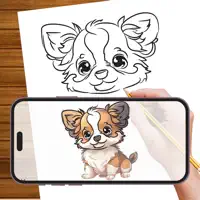
Tracing Projector Draw Easy helps you create beautiful drawings using camera-assisted tracing technology. Simply display an image on your screen and trace it onto paper with precision and ease. Whether you're a beginner learning proportions or an experienced artist refining your technique, this app makes drawing more accessible and enjoyable. How It Works Choose from our built-in image library or upload your own high-quality photo Adjust transparency and contrast to make the image easy to trace Position your phone on a tripod or stable surface above your paper Trace the outlines and start creating instantly Key Features • Camera-assisted tracing • AI Sketch image generation • Import images from your gallery • Multiple categories: Anime, Animals, Nature, Food, Portraits, and more • Record your drawing process • Save and organize your artwork Designed for artists of all levels, Tracing Projector Draw Easy provides a simple and effective way to practice sketching, improve accuracy, and explore creativity. Start tracing and bring your ideas to life today. Tracing Projector Draw Easy is independently designed and developed. This application is not affiliated with, endorsed by, or associated with any other drawing or augmented reality application. All content, visuals, and features are created independently by our team. Subscription Information Subscription automatically renews unless auto-renew is cancelled at least 24 hours before the end of the current period. The subscription fee is charged to your iTunes account at confirmation of purchase. You can manage your subscription and turn off auto-renewal in your Account Settings after purchase. No cancellation of the current subscription is allowed during the active subscription period. Refunds will not be provided for any unused portion of the term. Terms of Use: https://sites.google.com/view/ardrawingtracingprojector/terms-of-service Privacy Policy: https://sites.google.com/view/ardrawingtracingprojector/privacy-policy
Ratings & reviews
4.4
652 ratings
What’s new
Version 1.3.6 · Updated March 23, 2026
bug fixed
App privacy
The developer, Phuong Thao Vu Thi, reported these privacy practices to Apple.
Data Used to Track You
The following data may be used to track you across apps and websites owned by other companies:
- Usage Data: Advertising Data
Data Linked to You
The following data, which may be collected and linked to your identity, may be used for the following purposes:
- Usage Data: Advertising Data
Used for: Third-Party Advertising, Developer’s Advertising or Marketing, Analytics
Alternatives to Tracing Projector Draw Easy
Looking for apps like Tracing Projector Draw Easy? Here are 6 similar apps on the App Store. The highest rated is AR Drawing – Tracing Projector (4.6/5), and all 6 are free to download.
-
 AR Drawing – Tracing Projector
4.6
-
 AR Tracing: Drawing by Tayasui
4.3
-
 AR Trace Projector & Sketch
4.2
-
 Smart Phone Sketcher Drawing
4.3
-
 Ar Sketch Tracing Projector
3.4
-
 AR Drawing Sketch: Trace Draw
4.6
| App | Rating | Price | Last updated | Compare |
|---|---|---|---|---|
| Tracing Projector Draw Easy | 4.4 / 5 (652 ratings) | Free | March 23, 2026 | |
| AR Drawing – Tracing Projector | 4.6 / 5 (1,158) | Free | Sep 29, 2026 | Compare |
| AR Tracing: Drawing by Tayasui | 4.3 / 5 (2,768) | Free | Feb 12, 2026 | Compare |
| AR Trace Projector & Sketch | 4.2 / 5 (432) | Free | Aug 14, 2026 | Compare |
| Smart Phone Sketcher Drawing | 4.3 / 5 (569) | Free | Oct 15, 2026 | Compare |
| Ar Sketch Tracing Projector | 3.4 / 5 (49) | Free | Nov 8, 2024 | Compare |
| AR Drawing Sketch: Trace Draw | 4.6 / 5 (1,277) | Free | Sep 17, 2026 | Compare |