

OneToday: To Do & Get Started
Spam Musubi Technologies Productivity iPhoneiPadiPod touch
OneToday: To Do & Get Started is a free Productivity app for iPhone and iPad by Spam Musubi Technologies. Rated 4.3/5 from 6 ratings. Requires iOS 16.2.
- Rating
- 4.3
- 6 ratings
- Price
- Free
- on the App Store
- Size
- 122 MB
- Age 4+
- Updated
- Oct 6
- 2026 · v3.0.0
Screenshots
About OneToday: To Do & Get Started
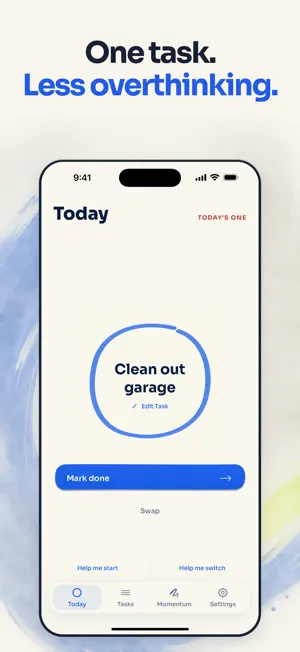
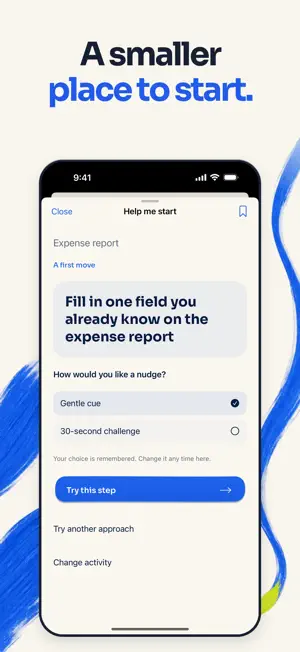
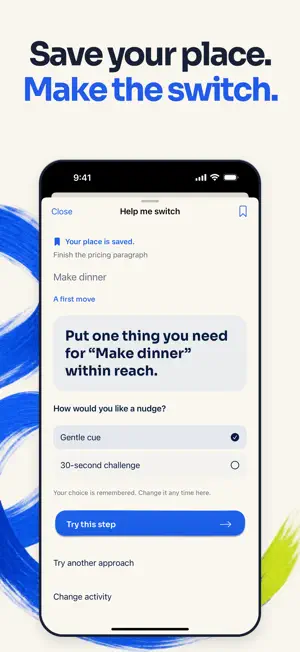
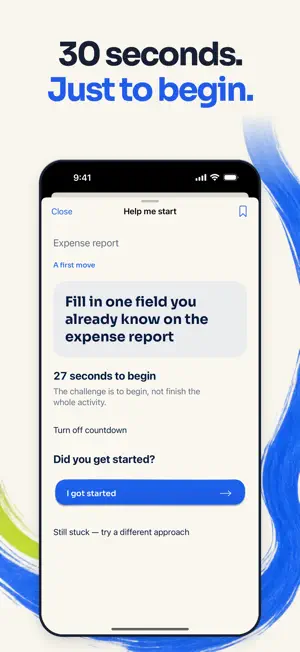
Too many choices? Know what needs doing but can’t quite begin? OneToday picks one task from your list and helps you find a smaller first move. Keep the rest out of view and count the progress you make. Getting started is hard. Switching can be, too. HELP ME START Use your selected task or enter any activity without making a list. Find a concrete first move, prepare what you need, or try a small part with permission to stop. If you’re still stuck, try a different approach. HELP ME SWITCH Leave a “When I return…” note before moving on. Save where you left off, then find a first move toward your next activity. Reopen your note from Saved places when you’re ready to return. CHOOSE YOUR NUDGE Try a gentle cue or an optional 30-second challenge to begin. Turn the countdown off whenever you like. OneToday remembers your choice and asks whether you got started. Starting never marks the whole task done. QUICK ACCESS Open Help me start or Help me switch through Siri or Shortcuts. Add either action to a Shortcuts widget for quick access. You can use these flows without setting up a task list. ADHD-FRIENDLY BY DESIGN One task in view, smaller first moves, return notes, and a choice of cues offer practical support for moments of choice overload and task inertia. Use what helps you and change what doesn’t. MAKE ROOM FOR PROGRESS Add your own tasks or edit a Starter Idea. Eligible urgent tasks are prioritized when you ask OneToday to pick, and future tasks wait until their start dates. Completed tasks and First Moves grow your pressure-free Momentum line. Your return notes, cue preference, and starting feedback stay on this device. Saved places remain until you delete them. Terms: https://www.termsfeed.com/live/cb562538-9fe5-437c-8a6d-04c61d8c8a7c Privacy Policy: https://www.termsfeed.com/live/4951102b-278f-44c3-bf80-2fe76ca63e00
Ratings & reviews
4.3
6 ratings
What’s new
Version 3.0.0 · Updated October 6, 2026
Meet Help me start and Help me switch. Find a first move, try a gentle cue or an optional 30-second challenge, and save a return note before switching activities. Open either flow from Siri or Shortcuts. Your cue preference is remembered, and reporting a start leaves your task open until you finish it.
App privacy
The developer, Spam Musubi Technologies, reported these privacy practices to Apple.
Data Linked to You
The following data, which may be collected and linked to your identity, may be used for the following purposes:
- Contact Info: Email Address
Used for: App Functionality
Data Not Linked to You
The following data, which may be collected but is not linked to your identity, may be used for the following purposes:
- Usage Data: Product Interaction
Used for: Analytics
Alternatives to OneToday: To Do & Get Started
Looking for apps like OneToday: To Do & Get Started? Here are 6 similar apps on the App Store. The highest rated is LIMITLSS Plan Days via AI Chat (5.0/5), and 5 of the 6 are free to download.
-
 LIMITLSS Plan Days via AI Chat
5.0
LIMITLSS Plan Days via AI Chat
5.0
-
 Daily Planner & Todo: Doday
4.0
Daily Planner & Todo: Doday
4.0
-
 Taska AI
5.0
Taska AI
5.0
-
 Daily 5 - Smart Todo List
5.0
Daily 5 - Smart Todo List
5.0
-
 ADHD To Do List: OneList
5.0
ADHD To Do List: OneList
5.0
-
 Plocs
3.7
Plocs
3.7
| App | Rating | Price | Last updated | Compare |
|---|---|---|---|---|
| OneToday: To Do & Get Started | 4.3 / 5 (6 ratings) | Free | October 6, 2026 | |
| LIMITLSS Plan Days via AI Chat | 5.0 / 5 (2) | Free | Jun 26, 2024 | Compare |
| Daily Planner & Todo: Doday | 4.0 / 5 (4) | Free | Nov 14, 2024 | Compare |
| Taska AI | 5.0 / 5 (2) | Free | Sep 3, 2026 | Compare |
| Daily 5 - Smart Todo List | 5.0 / 5 (3) | Free | Jan 2, 2026 | Compare |
| ADHD To Do List: OneList | 5.0 / 5 (3) | 4.99 USD | Sep 15, 2026 | Compare |
| Plocs | 3.7 / 5 (3) | Free | Nov 10, 2024 | Compare |