

Pho - Photo Sync, NAS & Cloud
渊浩 张 Productivity iPhoneiPadiPod touchMac
Pho - Photo Sync, NAS & Cloud is a free Productivity app for iPhone and iPad by 渊浩 张. Requires iOS 15.0. Updated August 31, 2026.
- Price
- Free
- on the App Store
- Size
- 54 MB
- Age 4+
- Updated
- Aug 31
- 2026 · v1.6.0
Screenshots


About Pho - Photo Sync, NAS & Cloud
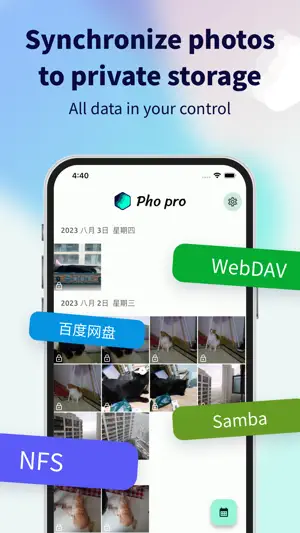
Pho is a serverless photo sync and gallery app. It backs up your photos directly to your own network storage — Samba (SMB), WebDAV, NFS, S3 and Google Drive — without routing them through any third-party cloud photo service. No middleman server. No database. No subscription lock-in. The files are entirely yours. [Your photos, only in your own storage] Pho never uploads your photos to a third-party server. All photos are stored in your own network storage using a "year/month/day" directory structure, with original filenames preserved. You can access, migrate, or reuse these raw files anytime without Pho — they're ordinary files, not packaged, not locked, not hidden behind a proprietary format. This is the fundamental difference between Pho and every cloud photo service. [Replace your built-in gallery] Pho isn't just for sync — it works as your daily gallery. Local and cloud photos appear in a single timeline, with: · Grouping by date, pinch-to-zoom · Lazy thumbnail loading — smooth even with tens of thousands of photos · Full EXIF info · Live Photo playback · Native HEIC / HEVC / RAW (DNG) / video support [Original quality, no compression] Pho preserves the original quality of your photos and videos — no compression, no re-encoding, no EXIF stripping. Your 4K videos and DNG RAW files stay exactly as they were. Cloud browsing is also original quality — no silent downscaling like some cloud photo services. [Background auto-sync] Scheduled sync runs in the background: on iOS, the system schedules it while charging — no need to open the app manually. Wi-Fi-only option avoids cellular data usage. A passive local notification is sent on completion (silent, no screen wake). After the first sync, Pho incrementally compares local and cloud, uploading only new photos. [AES encryption] Privacy-conscious? Pho supports AES encryption: photos are encrypted before upload and decrypted before download. Encrypted files use a .aes suffix — even if storage is inspected or leaked, originals cannot be recovered. Encrypted videos stream natively without downloading the whole file. You can always find these encrypted files in your own storage and decrypt them without Pho using the same algorithm and password. [Supported storage] · Samba (SMB) — works with NAS, router USB storage, Windows shared folders · WebDAV — works with self-hosted services, Jianguoyun, Nextcloud, etc. · NFS — works with Linux / NAS · Baidu Netdisk — popular in China, OAuth login Each storage type only needs to be configured once and connects automatically afterwards. Switch or reconfigure anytime. [Pro features] · Parallel upload: upload multiple photos at once for faster backups · Encrypted storage: AES encryption to protect your privacy · Custom upload filters: filter by file type and date · Camera-only album: intelligently filter out screenshots and downloads · Theme color: switch to your preferred theme · Free up storage: delete synced photos to reclaim phone space Three plans available: monthly, yearly, and lifetime. Subscriptions can be canceled anytime via App Store subscription management. [Who it's for] · Privacy-conscious users who don't want photos hosted by third-party cloud services · Users with a NAS, router USB storage, self-hosted WebDAV, or Baidu Netdisk · Users looking to replace the native gallery and manage local + cloud photos in one place · Users who need local encryption before backup [About Pho] Pho is an open-source project with source code publicly available on GitHub. No ads, no tracking, no data collection. Maintained by a single developer, continuously improved based on user feedback. For issues or suggestions, find feedback channels in Settings → About, or contact the developer directly. Thank you to every user who chose Pho. Privacy Policy: https://pho.tools/privacy.html Terms of Use: https://www.apple.com/legal/internet-services/itunes/dev/stdeula/
What’s new
Version 1.6.0 · Updated August 31, 2026
What's new in 1.6.0: S3-compatible object storage: AWS S3, Backblaze B2, Cloudflare R2, MinIO Google Drive support with account login Manage multiple storage configurations Connection test before saving + clearer error messages Redesigned settings & album picker Bug fixes: background sync without external power, lower memory on large photos, smarter album ordering
App privacy
The developer, 渊浩 张, reported these privacy practices to Apple.
Data Not Collected
The developer does not collect any data from this app.
Alternatives to Pho - Photo Sync, NAS & Cloud
Looking for apps like Pho - Photo Sync, NAS & Cloud? Here are 6 similar apps on the App Store. The highest rated is MarkMark - Read it later (4.7/5), and all 6 are free to download.
-
 Cloudreve: Easily manage files
3.8
Cloudreve: Easily manage files
3.8
-
 Xlist - Alist File Manager
4.2
Xlist - Alist File Manager
4.2
-
 Sync: File Backup & Cloud Sync
3.7
Sync: File Backup & Cloud Sync
3.7
-
 Moe Memos
4.2
Moe Memos
4.2
-
 MarkMark - Read it later
4.7
MarkMark - Read it later
4.7
-
 Memo - Timeline · Anniversary
4.3
Memo - Timeline · Anniversary
4.3
| App | Rating | Price | Last updated | Compare |
|---|---|---|---|---|
| Pho - Photo Sync, NAS & Cloud | – | Free | August 31, 2026 | |
| Cloudreve: Easily manage files | 3.8 / 5 (4) | Free | Jul 15, 2026 | Compare |
| Xlist - Alist File Manager | 4.2 / 5 (39) | Free | Apr 13, 2025 | Compare |
| Sync: File Backup & Cloud Sync | 3.7 / 5 (25) | Free | Sep 10, 2026 | Compare |
| Moe Memos | 4.2 / 5 (45) | Free | Aug 1, 2026 | Compare |
| MarkMark - Read it later | 4.7 / 5 (17) | Free | Jun 25, 2026 | Compare |
| Memo - Timeline · Anniversary | 4.3 / 5 (10) | Free | Apr 8, 2026 | Compare |