

Citation Styles: Generator
Michel Odreman Education iPhoneiPadiPod touch
Citation Styles: Generator is a free Education app for iPhone and iPad by Michel Odreman. Rated 5.0/5 from 2 ratings. Requires iOS 17.0.
- Rating
- 5.0
- 2 ratings
- Price
- Free
- on the App Store
- Size
- 140 MB
- Age 4+
- Updated
- Oct 10
- 2026 · v2.2.1
Screenshots



About Citation Styles: Generator
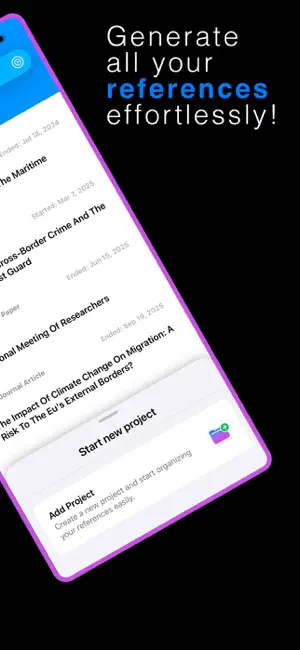
The Ultimate Citation and Research Companion Citation Styles is a complete citation generator, reference manager, and bibliography tool designed to make academic writing faster and easier to organize. Citation Styles helps you create references, manage sources, organize research, and generate formatted bibliographies from one streamlined workspace. SMARTER CITATION MANAGEMENT Stop formatting references manually. Add your sources, choose the citation style you need, organize your research, and let Citation Styles handle your bibliography. Inside each project, organize references into chapters so large bibliographies remain structured and easy to manage. AUTOMATIC REFERENCE GENERATION Add references using: • DOI • ISBN • PubMed ID (PMID) • Website or online URL • Manual entry Citation Styles can retrieve available metadata automatically, reducing repetitive data entry while keeping full control to review and edit every reference. 30+ CITATION STYLES Choose from more than 30 academic citation and bibliography formats used by universities, researchers, journals, and professional organizations. Switch styles anytime and reformat references and bibliographies automatically. ORGANIZE YOUR RESEARCH Keep every source connected to the right project, chapter, or topic. • Create and edit projects • Organize references into chapters • Add tags to important sources • View all chapters or selected sections • Edit reference details Chapters are useful for theses, dissertations, books, long research papers, and projects with many sources. NOTES AND ANNOTATIONS Add notes directly to each reference to save important arguments, reading summaries, reminders, observations, quotes to revisit, or research findings. Keep useful information connected to its source. BUILD AND EXPORT BIBLIOGRAPHIES Citation Styles automatically creates a bibliography from the references in your project. Choose which chapters to include, sort your bibliography, and prepare the final output using your selected citation style. You can: • Copy individual formatted references • Copy a complete bibliography • Export your bibliography as PDF • Select specific chapters • Sort bibliography entries • Change citation style at any time BUILT FOR STUDENTS, RESEARCHERS AND PROFESSIONALS Citation Styles is ideal for university students, master’s students, PhD candidates, academic researchers, professors, journal authors, writers, and professionals who work with references and bibliographies. Manage anything from a few assignment sources to a large long-term research library. FOCUS ON RESEARCH, NOT FORMATTING Spend less time creating citations manually and more time reading, writing, and researching. Citation Styles helps you create references faster, maintain consistent formatting, organize sources, and prepare bibliographies from one simple workflow. PREMIUM Upgrade to Premium to unlock additional citation styles, automatic reference generation, advanced organization tools, and complete bibliography features. Create. Organize. Cite. Export. Make Citation Styles your citation generator, bibliography creator, and reference manager for academic and professional research. For more information about the Terms of Use (EULA), visit: https://www.apple.com/legal/internet-services/itunes/dev/stdeula/
What’s new
Version 2.2.1 · Updated October 10, 2026
Citation Styles has been updated to provide a better experience: • Adaptation to the new operating system • New support for iPhone Duo • Functionality improvements • Bug fixes
App privacy
The developer, Michel Odreman, reported these privacy practices to Apple.
Data Used to Track You
The following data may be used to track you across apps and websites owned by other companies:
- Contact Info: Name
Data Linked to You
The following data, which may be collected and linked to your identity, may be used for the following purposes:
- Contact Info: Email Address, Other User Contact Info
- User Content: Photos or Videos, Customer Support, Other User Content
- Identifiers: User ID
Used for: App Functionality
Data Not Linked to You
The following data, which may be collected but is not linked to your identity, may be used for the following purposes:
- Identifiers: Device ID
- Usage Data: Product Interaction
- Contact Info: Name
Used for: Analytics, Product Personalization
Alternatives to Citation Styles: Generator
Looking for apps like Citation Styles: Generator? Here are 6 similar apps on the App Store. The highest rated is Academic Writing: Research AI (5.0/5), and 5 of the 6 are free to download.
-
 Citation Generator Lite
2.5
Citation Generator Lite
2.5
-
 APPA: Genera Bibliografías
-
 MLA Generator Lite
3.0
MLA Generator Lite
3.0
-
 Citation Generator
-
 AI Essay Writer Pro
4.8
AI Essay Writer Pro
4.8
-
 Academic Writing: Research AI
5.0
Academic Writing: Research AI
5.0
| App | Rating | Price | Last updated | Compare |
|---|---|---|---|---|
| Citation Styles: Generator | 5.0 / 5 (2 ratings) | Free | October 10, 2026 | |
| Citation Generator Lite | 2.5 / 5 (4) | Free | Jan 8, 2026 | Compare |
| APPA: Genera Bibliografías | – | Free | Oct 7, 2026 | Compare |
| MLA Generator Lite | 3.0 / 5 (2) | Free | Jul 29, 2025 | Compare |
| Citation Generator | – | 3.59 USD | Jan 8, 2026 | Compare |
| AI Essay Writer Pro | 4.8 / 5 (57) | Free | Nov 10, 2023 | Compare |
| Academic Writing: Research AI | 5.0 / 5 (3) | Free | Aug 27, 2026 | Compare |