

Calculator AiO
Matteus Barhaido Utilities iPhoneiPadiPod touch
Calculator AiO is a free Utilities app for iPhone and iPad by Matteus Barhaido. Rated 5.0/5 from 5 ratings. Requires iOS 18.0. Updated August 13, 2026.
- Rating
- 5.0
- 5 ratings
- Price
- Free
- on the App Store
- Size
- 41 MB
- Age 4+
- Updated
- Aug 13
- 2026 · v3.0.1
Screenshots

About Calculator AiO
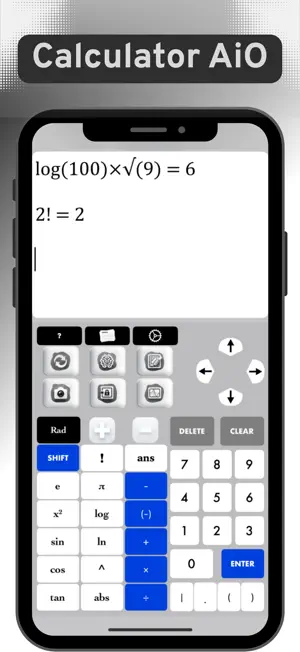
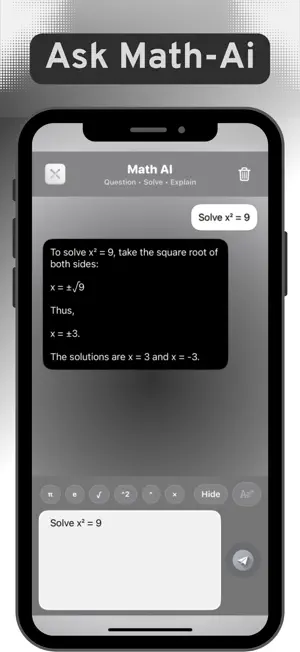
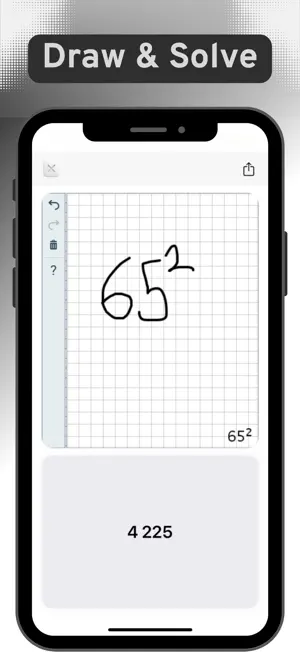
Introducing Calculator AiO — the calculator that adapts to how you work. Type on a crisp keypad, snap a photo of a problem, draw on a grid, chat with Math-AI, plot graphs, convert units and currency, and keep private media in a secure Vault. Your calculation history is always saved. 1) Calculator • All-in-One A fast, accurate keypad with advanced operators, history/tape, and undo/redo. Designed for clarity and speed. 2) Capture & Solve (Photo Math) Take a picture of an equation and get the step-by-step solution in seconds. Great for checking work anywhere. 3) Ask Math-AI to Solve Chat with a built-in math assistant. From quick arithmetic to tougher problems, get concise, plain-text steps and explanations. 4) Draw & Get Instant Results Write on a clean grid and see the expression recognized and evaluated immediately. 5) Plot Graphs & Inspect Plot linear, quadratic, polynomial, trigonometric, and more. Pan/zoom smoothly and inspect roots and intercepts. 6) Secure Images & Videos (Vault) Lock private media behind passcode/biometrics. Your files stay private and organized the way you want it. 7) Convert Units & Currency Quickly convert lengths, weights, temperatures, and more — plus live currency conversion. 8) Change Color Themes Personalize your workspace with multiple themes and adjustable font sizes. Why you’ll love it • Ad-free, privacy-minded design • Multiple input modes: keypad • camera • handwriting • Math-AI chat • Saved history you can revisit and reuse • Beautiful, responsive UI with thoughtful haptics • Angle units: degrees • radians • gradians (gon) • Advanced math: powers, roots, logs, trig, calculus helpers, and more Calculator AiO turns every kind of input — photo, drawing, text, or chat — into fast, reliable results with clean explanations and powerful tools. All in one. Terms of Use: https://www.apple.com/legal/internet-services/itunes/dev/stdeula/ Privacy Policy: https://spectralmoose.com/privacy
Ratings & reviews
5.0
5 ratings
What’s new
Version 3.0.1 · Updated August 13, 2026
• Amplified UI: a full visual overhaul for a cleaner, faster, more accessible experience. • Bug fixes
App privacy
The developer, Matteus Barhaido, reported these privacy practices to Apple.
Data Used to Track You
The following data may be used to track you across apps and websites owned by other companies:
- Identifiers: Device ID
Data Linked to You
The following data, which may be collected and linked to your identity, may be used for the following purposes:
- Identifiers: Device ID
Used for: Third-Party Advertising, Analytics
Data Not Linked to You
The following data, which may be collected but is not linked to your identity, may be used for the following purposes:
- Usage Data: Product Interaction
- User Content: Photos or Videos, Other User Content
Used for: Analytics, App Functionality
Alternatives to Calculator AiO
Looking for apps like Calculator AiO? Here are 6 similar apps on the App Store. The highest rated is Big Yellow Calculator (5.0/5), and all 6 are free to download.
-
 Big Yellow Calculator
5.0
Big Yellow Calculator
5.0
-
 My Talking Calculator
3.7
My Talking Calculator
3.7
-
 Voice-calculator
-
 Cuspart: myCal
5.0
Cuspart: myCal
5.0
-
 Calc: Multiline calculator
4.8
Calc: Multiline calculator
4.8
-
 Voice Calculator HD+
4.7
Voice Calculator HD+
4.7
| App | Rating | Price | Last updated | Compare |
|---|---|---|---|---|
| Calculator AiO | 5.0 / 5 (5 ratings) | Free | August 13, 2026 | |
| Big Yellow Calculator | 5.0 / 5 (1) | Free | Jul 8, 2026 | Compare |
| My Talking Calculator | 3.7 / 5 (3) | Free | Feb 7, 2024 | Compare |
| Voice-calculator | – | Free | Jul 29, 2026 | Compare |
| Cuspart: myCal | 5.0 / 5 (1) | Free | Sep 18, 2026 | Compare |
| Calc: Multiline calculator | 4.8 / 5 (44) | Free | May 12, 2025 | Compare |
| Voice Calculator HD+ | 4.7 / 5 (10) | Free | Sep 28, 2026 | Compare |
Compare Calculator AiO with the top alternatives: ratings, updates, ASO score and keyword gaps →