

Device Monitor Z: CPU x RAM OS
Phan Nhut Developer Tools iPhoneiPadiPod touch
Device Monitor Z: CPU x RAM OS is a free Developer Tools app for iPhone and iPad by Phan Nhut. Rated 4.5/5 from 274 ratings. Requires iOS 12.0.
- Rating
- 4.5
- 274 ratings
- Price
- Free
- on the App Store
- Size
- 39 MB
- Age 4+
- Updated
- Mar 22
- 2026 · v26.1.1
Screenshots


About Device Monitor Z: CPU x RAM OS
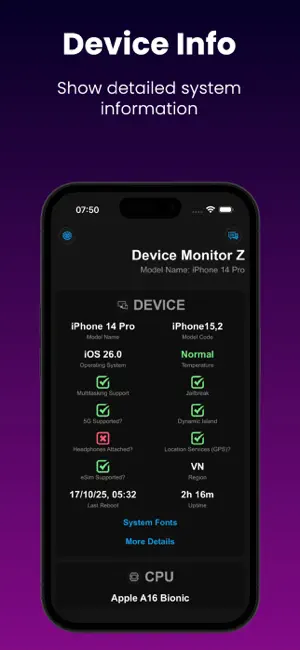
Discover the power of our app - Device Monitor Z (also known as iDevice Monitor) is an app optimized for iPhone, iPod Touch, and iPad users. It provides a quick and efficient way to access activity monitor (CPU monitor, detailed RAM, Storage space, ...) and system information of device. - Key Features: • View basic CPU information and real-time CPU monitor • View basic GPU information. • View basic device information (System status) • View basic OS (Operating System) information • View basic battery information • Check Memory & Disk (RAM & Storage) information details. • Monitor network traffic with real-time upload and download speeds. • Support Quick Actions to run functions quickly from Home Screen • Access camera information. • Access display information. • Check supported sensors - Support Widget to display device information such as RAM/Disk/CPU/Battery/Network info: • iOS 14 Home Widget • iOS 16 Lock Widget • iOS 17 Standby Mode for Widget - System Fonts: → Show all fonts available in the system - Additional Tools: • Performance Benchmark: → CPU Benchmark: Measure the computational capability of the device's CPU. → Disk Benchmark: Measure sequential read/write speed, random 4K read/write speed, and latency of internal storage. • Network Analyzer (also known as Wifi Analyzer or Network Tool), including: → SpeedTest: Evaluate internet download speed and upload speed (powered by SpeedChecker) → LAN Scanner (also known as Wifi Scanner or Network Scanner): Scan devices on your local network → Ping tool: Measure latency to a domain/IP Address → Traceroute → Port Scanner: Verify open or closed ports on domain/IP Address → DNS Lookup (support DoH and DoT): Retrieve domain information → DNS Speed Test (support DoH and DoT): Measures and compares the query response times of various DNS servers, helping users identify and select the fastest server for enhanced network performance. → Bonjour Service Browser: List the Bonjour services advertised on your wireless network. • Screen Test: → Perform quick screen tests • Sensor Monitor, including: → GPS → ALTIMETER → ACCELEROMETER → MAGNETOMETER → GYRO → MOTION COPROCESSOR → MAGNETIC → GRAVITY → ROTATION → ROTATE RATE • Toolkit: → Anti-Mosquito → Decibel Meter: Gauge ambient noise levels accurately in your surroundings. → Bluetooth Scanner: Find Bluetooth devices near your device. → Flashlight Torch. → Export all device information into a file with multiple formats (csv, pdf, xlsx, json, rtf, txt). • Thank you for choosing our app as your device information and monitoring app.
Ratings & reviews
4.5
274 ratings
What’s new
Version 26.1.1 · Updated March 22, 2026
We’re continuously working to enhance your experience. Here’s what’s new in this update: • Fix bugs Thank you for using our app!
App privacy
The developer, Phan Nhut, reported these privacy practices to Apple.
Data Used to Track You
The following data may be used to track you across apps and websites owned by other companies:
- Location: Coarse Location
Alternatives to Device Monitor Z: CPU x RAM OS
Looking for apps like Device Monitor Z: CPU x RAM OS? Here are 6 similar apps on the App Store. The highest rated is Docker Server Admin (4.7/5), and all 6 are free to download.
-
 Device Info Toolkit
4.3
Device Info Toolkit
4.3
-
 JellyCuts
3.6
JellyCuts
3.6
-
 Docker Server Admin
4.7
Docker Server Admin
4.7
-
 PortX - SSH (Deprecated)
3.8
PortX - SSH (Deprecated)
3.8
-
 Terminal & SSH
4.4
Terminal & SSH
4.4
-
 Secure Terminal
4.5
Secure Terminal
4.5
| App | Rating | Price | Last updated | Compare |
|---|---|---|---|---|
| Device Monitor Z: CPU x RAM OS | 4.5 / 5 (274 ratings) | Free | March 22, 2026 | |
| Device Info Toolkit | 4.3 / 5 (16) | Free | Jan 14, 2026 | Compare |
| JellyCuts | 3.6 / 5 (57) | Free | Jun 21, 2026 | Compare |
| Docker Server Admin | 4.7 / 5 (145) | Free | Apr 20, 2026 | Compare |
| PortX - SSH (Deprecated) | 3.8 / 5 (20) | Free | Jun 5, 2026 | Compare |
| Terminal & SSH | 4.4 / 5 (112) | Free | Oct 31, 2026 | Compare |
| Secure Terminal | 4.5 / 5 (63) | Free | Oct 21, 2026 | Compare |