

Pigeon - file transfer
广州艾拉网络技术有限公司 Utilities iPhoneiPadiPod touch
Pigeon - file transfer is a free Utilities app for iPhone and iPad by 广州艾拉网络技术有限公司. Requires iOS 16. Updated March 18, 2026.
- Price
- Free
- on the App Store
- Size
- 49 MB
- Age 12+
- Updated
- Mar 18
- 2026 · v2.0.0
Screenshots


About Pigeon - file transfer
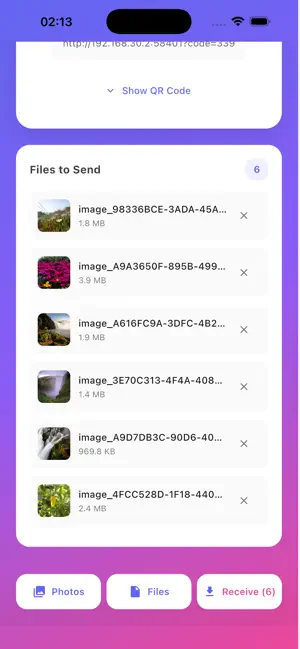
Pigeon makes local file transfer simple. Send photos, videos, documents, and other files from your iPhone to phones, tablets, and computers over the same Wi‑Fi network or personal hotspot. No cable. No extra app required on the receiving device. Just open the link in a browser, enter the access code, and start transferring. Why Pigeon: • Fast local transfer over Wi‑Fi or hotspot • No extra app needed on the receiving device • Works with phones, tablets, and computers • Send photos, videos, documents, and more • Easy connection with QR code, local address, and access code • Great for iPhone to PC, iPhone to tablet, and phone-to-phone sharing How it works: Open Pigeon on your iPhone Choose the files you want to send Scan the QR code or open the local address on another device Enter the access code Download or upload files directly in the browser Pigeon is designed for quick and direct sharing on your local network, making file transfer easier at home, in the office, or anywhere devices can join the same Wi‑Fi or hotspot. Notes: • Both devices need to be on the same Wi‑Fi network, or connected through your iPhone’s hotspot • Keep the app in the foreground during active transfers • Transfer speed depends on your local network quality English Auto-Renewable Subscription Description Pigeon offers the following auto-renewable subscriptions: • Pro Monthly Remove ads and unlock unlimited sending and receiving for each session. • Ad-free Monthly Remove rewarded ads while keeping the session file limit. Payment will be charged to your Apple ID account at confirmation of purchase. Subscriptions renew automatically unless canceled at least 24 hours before the end of the current billing period. Your account will be charged for renewal within 24 hours before the end of the current period. You can manage or cancel your subscription anytime in your App Store account settings after purchase. Terms of Service: https://protocol.ilnet.cn/app/terms-of-service Privacy Policy: https://protocol.ilnet.cn/app/privacy-policy
What’s new
Version 2.0.0 · Updated March 18, 2026
Major version refactor with overall experience improvements. Added and refined parts of the feature flow, fixed known issues, and improved stability and smoothness.
App privacy
The developer, 广州艾拉网络技术有限公司, reported these privacy practices to Apple.
Data Used to Track You
The following data may be used to track you across apps and websites owned by other companies:
- Usage Data: Advertising Data
Data Linked to You
The following data, which may be collected and linked to your identity, may be used for the following purposes:
- Usage Data: Advertising Data
Used for: Third-Party Advertising
Data Not Linked to You
The following data, which may be collected but is not linked to your identity, may be used for the following purposes:
- Location: Precise Location, Coarse Location
- Identifiers: User ID, Device ID
- Diagnostics: Crash Data, Performance Data, Other Diagnostic Data
Used for: Third-Party Advertising, Developer’s Advertising or Marketing, Analytics, Product Personalization, App Functionality, Other Purposes
Alternatives to Pigeon - file transfer
Looking for apps like Pigeon - file transfer? Here are 6 similar apps on the App Store. The highest rated is Air Transfer-File Sharing (5.0/5), and all 6 are free to download.
-
 ViaShare – Fast File Transfer
-
 Pigeon AI
-
 Air Transfer-File Sharing
5.0
-
 WhoPooped AI
-
 IronNova
-
 NVReTOOL PCU Lite
| App | Rating | Price | Last updated | Compare |
|---|---|---|---|---|
| Pigeon - file transfer | – | Free | March 18, 2026 | |
| ViaShare – Fast File Transfer | – | Free | Apr 3, 2026 | Compare |
| Pigeon AI | – | Free | Feb 1, 2026 | Compare |
| Air Transfer-File Sharing | 5.0 / 5 (1) | Free | Aug 30, 2026 | Compare |
| WhoPooped AI | – | Free | Jun 13, 2026 | Compare |
| IronNova | – | Free | Sep 14, 2026 | Compare |
| NVReTOOL PCU Lite | – | Free | Sep 12, 2025 | Compare |