

MP3 Converter-Remove Vocals
Shengpu Yuedong (wuhan) Technology Co., Ltd Music iPhoneiPadiPod touch
MP3 Converter-Remove Vocals is a free Music app for iPhone and iPad by Shengpu Yuedong (wuhan) Technology Co., Ltd. Rated 4.2/5 from 46 ratings.
- Rating
- 4.2
- 46 ratings
- Price
- Free
- on the App Store
- Size
- 143 MB
- Age 4+
- Updated
- Sep 16
- 2026 · v3.6.3
Screenshots


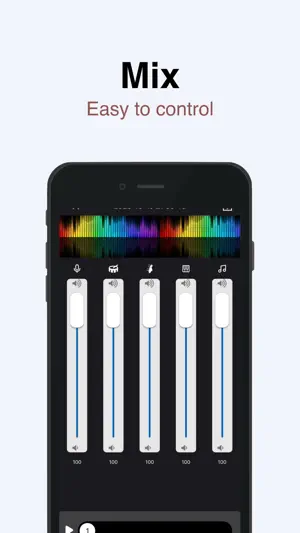
About MP3 Converter-Remove Vocals
"MP3 Converter" empowers your musical creativity and practice to reach new heights. This iOS-based app offers powerful features and intelligent experiences, allowing you to extract accompaniments, separate vocals from instrumentals, remove background music from videos, and enjoy a rich library of background music (BGM). "MP3 Converter" is a convenient audio extraction and format conversion tool that allows you to extract audio from various formats of videos. The converted audio files can be saved and played on your phone. With the accompaniment extraction master, you can easily extract the exciting music from short videos, save it as a sound file, and play it using any audio player. -Support various types of videos (3GP, FLV, MP4, MOV, MXF, MKV, AVI, MPG, MPEG, etc.); -Support extracting various types of audio from videos, such as MP3, AAC, M4A, M4R, WAV, OPUS, or other formats; Key Features: 1. Song Accompaniment Extraction: Easily extract the accompaniment from any song in your iOS music library. Remove vocals, focus on the instrumental parts, and create unique instrumental works or use them for personal practice. 2. Vocal Separation: Experience the powerful vocal separation function that separates vocals from the accompaniment. Remove vocals from songs, obtain pure instrumental tracks, suitable for karaoke, remixing, or personalized singing. 3. Video Background Music Removal: Remove unnecessary background music from videos, making vocals clearer, or add your own music. Make your video content more focused and captivating. "MP3 Converter" gives you control over your music. With an intuitive interface and advanced processing algorithms, you can easily extract, separate, and customize audio and video content. Whether you are a professional musician, aspiring artist, or music enthusiast, "MP3 Converter" will become your most valuable companion. Elevate your music production, create unique performance pieces, and enjoy the limitless possibilities of the music world. Download "MP3 Converter" now and experience unprecedented audio processing and music creation on the iOS platform. Unleash your creativity and embark on a brand new musical journey! Subscription instructions and terms 1. Monthly Membership - $3.99 2. Annual Membership - $14.99 3. Lifetime Membership - $29.99 【Payment】The payment will be charged to the user's iTunes account upon purchase confirmation. 【Renewal】“Continuous Monthly/Quarterly/Annual” products are auto-renewable subscriptions. Upon purchase confirmation, fees will be deducted from your iTunes account. Subscriptions will auto-renew unless auto-renewal is turned off at least 24 hours before the end of the current subscription period. Within 24 hours before your subscription expires, Apple will automatically charge your iTunes account and your membership will be automatically extended for one subscription period upon successful payment. 【Cancel Renewal】To cancel auto-renewal, manually go to iOS Settings > Apple ID > Subscriptions, and cancel the “MP3 Converter” subscription. -- Terms of Service https://htmlpreview.github.io/?https://github.com/zhangxin1982/panger/blob/main/agreement.html -- Privacy Policy https://htmlpreview.github.io/?https://github.com/zhangxin1982/panger/blob/main/audioPrivacyen.html
Ratings & reviews
4.2
46 ratings
What’s new
Version 3.6.3 · Updated September 16, 2026
1.Fix known issues.
App privacy
The developer, Shengpu Yuedong (wuhan) Technology Co., Ltd, reported these privacy practices to Apple.
Data Used to Track You
The following data may be used to track you across apps and websites owned by other companies:
- Usage Data: Product Interaction
Data Not Linked to You
The following data, which may be collected but is not linked to your identity, may be used for the following purposes:
- Usage Data: Product Interaction
Used for: Third-Party Advertising, Analytics
Alternatives to MP3 Converter-Remove Vocals
Looking for apps like MP3 Converter-Remove Vocals? Here are 6 similar apps on the App Store. The highest rated is 音乐剪辑助手-mp3转换器&音频剪辑工具 (4.9/5), and all 6 are free to download.
-
 Music Backing Tracks
4.6
Music Backing Tracks
4.6
-
 Remove Vocals-vocal extractor
4.4
Remove Vocals-vocal extractor
4.4
-
 Audio Editor: Video to Audio
4.5
Audio Editor: Video to Audio
4.5
-
 Audio Editing
4.5
Audio Editing
4.5
-
 音乐剪辑助手-mp3转换器&音频剪辑工具
4.9
音乐剪辑助手-mp3转换器&音频剪辑工具
4.9
-
 Vocal Remover, Audio Extractor
4.0
Vocal Remover, Audio Extractor
4.0
| App | Rating | Price | Last updated | Compare |
|---|---|---|---|---|
| MP3 Converter-Remove Vocals | 4.2 / 5 (46 ratings) | Free | September 16, 2026 | |
| Music Backing Tracks | 4.6 / 5 (49) | Free | Feb 1, 2025 | Compare |
| Remove Vocals-vocal extractor | 4.4 / 5 (1,419) | Free | Feb 10, 2025 | Compare |
| Audio Editor: Video to Audio | 4.5 / 5 (33) | Free | Jul 17, 2026 | Compare |
| Audio Editing | 4.5 / 5 (26) | Free | Feb 27, 2025 | Compare |
| 音乐剪辑助手-mp3转换器&音频剪辑工具 | 4.9 / 5 (10) | Free | Aug 1, 2026 | Compare |
| Vocal Remover, Audio Extractor | 4.0 / 5 (9) | Free | Jun 24, 2026 | Compare |