

Python Editor: Learn & Code
Julian Lau Developer Tools iPhoneiPadiPod touch
Python Editor: Learn & Code is a free Developer Tools app for iPhone and iPad by Julian Lau. Requires iOS 26.0. Updated October 30, 2026.
- Price
- Free
- on the App Store
- Size
- 34 MB
- Age 4+
- Updated
- Oct 30
- 2026 · v2.0.0
Screenshots



About Python Editor: Learn & Code
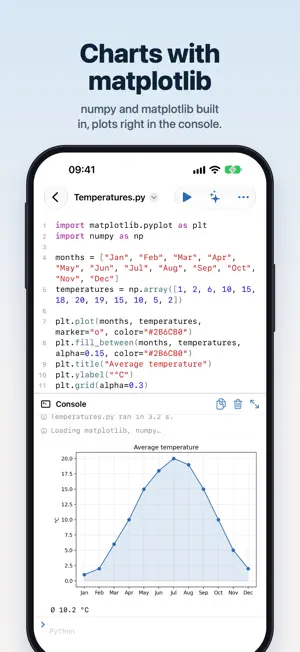
Learn Python and try it out – right on your iPhone, iPad and Mac. Python Editor runs your code on the device, with no account and no internet needed. Made for school, college, coding classes and everyone just getting started. RUN PYTHON • Python 3 runs right in the app, also offline • print(), input() and a console like a terminal • Errors with their line number and a hint in plain words about what went wrong • numpy and matplotlib are built in; other packages like pandas, scipy or sympy download on first import DRAWINGS AND CHARTS Watch the turtle draw stars, spirals and houses with the turtle module, just like in computer science class. Charts from matplotlib show up right in the console. JUPYTER NOTEBOOKS Open and write .ipynb files: code cells you run one at a time, with text and output in between. The cells share their variables – just like in Jupyter. 20 EXAMPLES TO START FROM Guess the number, rock paper scissors, prime numbers, a colorful spiral, grades from a CSV file, a quiz from JSON and more. Each example becomes a file of your own to run and change. MADE FOR WRITING CODE • Syntax highlighting and line numbers • Suggestions as you type for Python, math, random, turtle, numpy and more • A bar above the keyboard with Tab, symbols and building blocks like if, for, def and class • Brackets and quotes close themselves, and lines indent after a colon • Find and replace, go to line and keyboard shortcuts WHOLE PROJECTS Every folder is a project with a file list, tabs and search. Your program imports its own modules and reads files like data.csv from its folder. Open folders from the Files app and iCloud Drive right where they are. ALSO FOR MARKDOWN, JSON, CSV, YAML AND TOML With highlighting and a preview for Markdown. ON THE MAC TOO With a menu bar, multiple windows and keyboard shortcuts. PYTHON EDITOR PRO Python, packages, notebooks, examples and everything for learning are free. Pro adds comfort – as a monthly or yearly subscription: • AI assistant with Claude, ChatGPT or Gemini that explains your code and proposes changes • No ads • iCloud sync between iPhone, iPad and Mac • Import ZIP files and folders as projects, share projects as ZIP • Eight designs, from warm paper to deep black midnight • Widgets for the Home Screen and Lock Screen • Version history: bring back any earlier state • App lock with Face ID Payment is charged to your Apple Account. The subscription renews automatically unless canceled at least 24 hours before the end of the current period. You can manage and cancel it anytime in your App Store account settings. The AI assistant uses your own API key from Anthropic, OpenAI or Google; its provider bills requests through it. Terms of Use: https://www.apple.com/legal/internet-services/itunes/dev/stdeula/ Privacy Policy: https://jlau.netlify.app/python-editor/privacy/ Python Editor is built by an independent developer. If you enjoy it, a rating means a lot!
What’s new
Version 2.0.0 · Updated October 30, 2026
Python Editor 2.0 – completely new. • New: Python runs right in the app, also offline – with a console and input() • numpy and matplotlib built in, other packages like pandas on first import • Turtle graphics: watch the turtle draw • Open and write Jupyter notebooks • 20 examples to learn from and try out • Errors come with a hint in plain words • Suggestions as you type, building blocks above the keyboard and whole projects with tabs • Now on the Mac too • New: Python Editor Pro with an AI assistant, iCloud sync, designs, widgets and more Happy coding!
App privacy
The developer, Julian Lau, reported these privacy practices to Apple.
Data Used to Track You
The following data may be used to track you across apps and websites owned by other companies:
- Identifiers: Device ID
- Usage Data: Advertising Data
Data Not Linked to You
The following data, which may be collected but is not linked to your identity, may be used for the following purposes:
- Location: Coarse Location
- Identifiers: Device ID
- Usage Data: Product Interaction, Advertising Data
- Diagnostics: Crash Data, Performance Data
Used for: Third-Party Advertising, Analytics
Alternatives to Python Editor: Learn & Code
Looking for apps like Python Editor: Learn & Code? Here are 6 similar apps on the App Store. The highest rated is Pythonica: Code and Debug (5.0/5), and all 6 are free to download.
-
 Python Editor: Code & Run
-
 pythoni-run code,autocomplete
4.4
pythoni-run code,autocomplete
4.4
-
 Pythonica: Code and Debug
5.0
Pythonica: Code and Debug
5.0
-
 Python+
4.8
Python+
4.8
-
 Pytonic: Python Compiler & IDE
-
 Python Recipes: Code & SQL
4.7
Python Recipes: Code & SQL
4.7
| App | Rating | Price | Last updated | Compare |
|---|---|---|---|---|
| Python Editor: Learn & Code | – | Free | October 30, 2026 | |
| Python Editor: Code & Run | – | Free | Oct 18, 2026 | Compare |
| pythoni-run code,autocomplete | 4.4 / 5 (230) | Free | Sep 11, 2025 | Compare |
| Pythonica: Code and Debug | 5.0 / 5 (2) | Free | Oct 2, 2025 | Compare |
| Python+ | 4.8 / 5 (48) | Free | Oct 16, 2026 | Compare |
| Pytonic: Python Compiler & IDE | – | Free | Oct 22, 2026 | Compare |
| Python Recipes: Code & SQL | 4.7 / 5 (83) | Free | Oct 29, 2026 | Compare |