

MVP One Mobile
CMMS Data Group Business iPhoneiPadiPod touch
MVP One Mobile is a free Business app for iPhone and iPad by CMMS Data Group. Rated 5.0/5 from 6 ratings. Requires iOS 13.0. Updated October 22, 2026.
- Rating
- 5.0
- 6 ratings
- Price
- Free
- on the App Store
- Size
- 64 MB
- Age 4+
- Updated
- Oct 22
- 2026 · v1.6.16
Screenshots

About MVP One Mobile
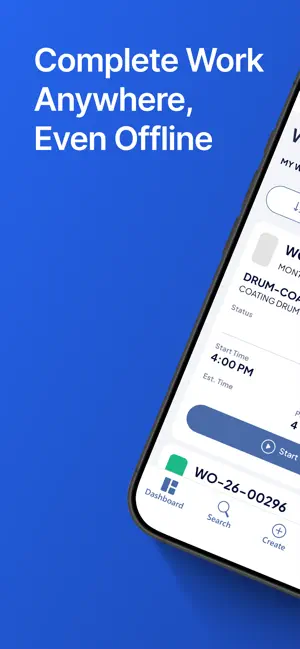
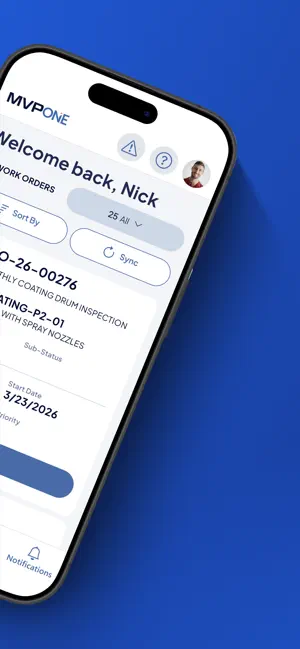
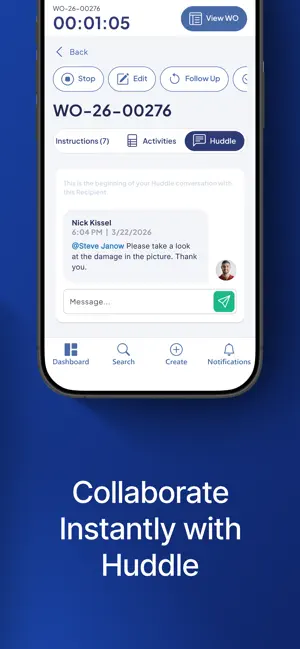
Keep Your Plant in Your Pocket. The MVP One mobile app is a field-ready mobile maintenance app designed to keep operations moving at full speed. Launch work orders in seconds and access full equipment histories from any mobile device. Whether you’re online or offline, MVP One gives your team instant access to the data you need to prevent downtime. Key Features: • Flexible work order templates • Inventory barcode check-out/return • Optimized views • Offline CMMS access • Real-time alerts • Huddle two-way chat • Swipe-friendly navigation Act faster than equipment failures. Download the MVP One mobile app and stop unplanned downtime today.
Ratings & reviews
5.0
6 ratings
What’s new
Version 1.6.16 · Updated October 22, 2026
Top New Features: Error handling has been optimized in this release. More context and information will be added to errors. Users will now be able to fully reference records associated with failed transactions so that, when you are correcting them, you can minimize menus and view record information. Work Order "Complete" action has been optimized to prevent unwarranted errors, thus stopping the processing of information. Pop-up windows will reappear if there was an error. Real-time validation was added for online users when entering information such as Part IDs or People IDs when adding labor. Priority description has been added to all Work Order records and to Work Order cards on the Dashboard, and has been added when choosing a Work Priority from the drop-down. The Move Part action has been added to Part records. General: More context and information will be added to errors. Record Syncing has been optimized. File downloading has been optimized. Users will now be able to fully reference records associated with failed transactions so that, when you are correcting them, you can minimize menus and view record information. Pop-up windows will reappear if there was an error. Real-time validation was added for online users when entering information such as Part IDs or People IDs when adding labor. Language support for Polish has been added. Language support for Czech has been added. UI Support for larger screens has been added. This bug fix release addressed an issue with the app defaulting to Czech
App privacy
The developer, CMMS Data Group, reported these privacy practices to Apple.
Data Linked to You
The following data, which may be collected and linked to your identity, may be used for the following purposes:
- User Content: Other User Content, Photos or Videos
- Location: Precise Location, Coarse Location
Used for: Analytics, Product Personalization, App Functionality
Data Not Linked to You
The following data, which may be collected but is not linked to your identity, may be used for the following purposes:
- User Content: Customer Support
- Usage Data: Product Interaction, Other Usage Data
- Diagnostics: Crash Data, Other Diagnostic Data
Used for: Analytics, App Functionality
Alternatives to MVP One Mobile
Looking for apps like MVP One Mobile? Here are 6 similar apps on the App Store. The highest rated is MxMobile for Maximo (5.0/5), and all 6 are free to download.
-
 MxMobile for Maximo
5.0
MxMobile for Maximo
5.0
-
 eFactoryPro Mobile
5.0
eFactoryPro Mobile
5.0
-
 I-care
-
 The Parlor HUB
5.0
The Parlor HUB
5.0
-
 AssetWatch
4.8
AssetWatch
4.8
-
 Danone Health
4.0
Danone Health
4.0
| App | Rating | Price | Last updated | Compare |
|---|---|---|---|---|
| MVP One Mobile | 5.0 / 5 (6 ratings) | Free | October 22, 2026 | |
| MxMobile for Maximo | 5.0 / 5 (3) | Free | Oct 2, 2026 | Compare |
| eFactoryPro Mobile | 5.0 / 5 (1) | Free | Aug 19, 2026 | Compare |
| I-care | – | Free | Jul 8, 2026 | Compare |
| The Parlor HUB | 5.0 / 5 (3) | Free | Jun 15, 2026 | Compare |
| AssetWatch | 4.8 / 5 (19) | Free | Oct 22, 2026 | Compare |
| Danone Health | 4.0 / 5 (4) | Free | Oct 20, 2026 | Compare |
Compare MVP One Mobile with the top alternatives: ratings, updates, ASO score and keyword gaps →