

Ultron AI: Chatbot & Assistant
Anton Mitrafanau, IE Productivity iPhoneiPadiPod touch
Ultron AI: Chatbot & Assistant is a free Productivity app for iPhone and iPad by Anton Mitrafanau, IE. Rated 5.0/5 from 2 ratings. Requires iOS 17.0.
- Rating
- 5.0
- 2 ratings
- Price
- Free
- on the App Store
- Size
- 26 MB
- Age 12+
- Updated
- Nov 3
- 2026 · v2.1.1
Screenshots
Save to Pinterest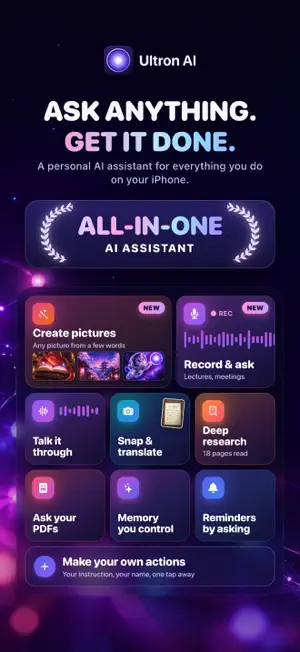


About Ultron AI: Chatbot & Assistant
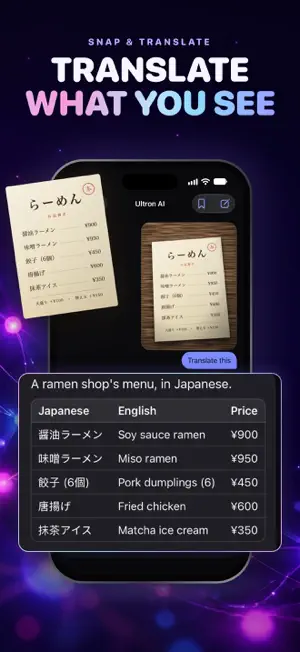
Ultron AI is a personal AI assistant for everything you do on your iPhone and iPad. Type a question, say it out loud, point your camera at it, or ask for a picture, and get an answer you can use. Your chat history stays on your device. ASK ANYTHING • Clear answers with headings, lists and tables, as they are written • Answers that need the web come with their sources • Write emails, essays and code, then make them shorter, clearer, friendlier or more professional in a tap • Suggested follow-ups to keep going CREATE PICTURES Describe a picture, or say it, and Ultron draws it: a photo, an illustration, anime, 3D, watercolor, a sketch, pixel art, or any style it chooses. Then change it with a few words, like "Make it night" or "Add snow", and the rest stays as it is. Your pictures are kept in your Library. TALK IT THROUGH Have a spoken conversation, with large captions you can read along and a voice you choose. Say "draw…" and Ultron draws it while you talk. What you say is recognized on your device, and the answer is read aloud. SCAN WITH THE CAMERA Point your camera at a menu, a sign, a label or a page. Translate it, have it explained, copy the text, or look it up on the web. RECORD AND ASK Record a lecture, a class or a meeting, or open a voice memo. It's written down on your device as it's said, and kept in your Library with the audio, which never leaves your device. Then get a summary with the time of each point, and ask about it. DEEP RESEARCH Ask one question and get a report with its sources. You see the plan before it starts, and the report is saved to your Library. YOUR DOCUMENTS Attach a PDF, a Word or text file, or a photo of a page, and ask about it. The file itself never leaves your device. PROJECTS AND MEMORY Keep a trip, a move or a job search in a project, with its own chats, files and instructions. Ultron can remember what you choose to tell it about yourself; you can see, change and delete all of it in Settings. ACTIONS Start from ready-made actions such as Translate, Explain simply, Plan a trip or Study helper, or make your own with an instruction you write. REMINDERS Say "Remind me to call Mom at six." Ultron prepares the reminder and adds it to Reminders when you tap Create. SIRI, WIDGETS AND MORE Ask Siri to start a chat, a talk, a scan or a picture, and find your chats in Spotlight. Add Ultron to your Home Screen and Control Center, and follow a recording or a research report in a Live Activity. Share text, a link or a photo from another app to ask about it. ULTRON LITE When your free messages run out, or you're offline, Ultron Lite answers right on your device with Apple Intelligence, where your device has it. ON IPAD Ultron uses the whole screen. Drop a photo or a PDF into a chat to ask about it, and start a new chat or send with the keyboard. PRIVACY Your conversations are stored on your device, not on our server. No ads, and no tracking. Answers and pictures come from OpenAI's models; before your first message, the app asks your permission to send them what you ask. FREE AND PREMIUM Try Ultron AI with 5 free messages, up to 3 of them camera scans and one of them a picture, in Ask anything, Write an email and Tell me a joke. Recording and transcripts are free. Ultron AI Premium unlocks unlimited messages with longer answers, up to 30 pictures a day, every action, deep research, documents, summaries of and questions about your recordings, unlimited scans, memory and actions of your own. Subscriptions renew automatically unless canceled at least 24 hours before the end of the period. Manage or cancel them in your Apple Account settings. Terms of Use: https://ultronai.app/terms Privacy Policy: https://ultronai.app/privacy
What’s new
Version 2.1.1 · Updated November 3, 2026
New in 2.1.1 • Turn your photo into a picture: pick a photo, then say how to redraw it, as anime, a watercolor, a sketch, an oil painting or pixel art. • Scan pages with the camera: photograph a chapter, a contract or your notes as one document, and ask about it. • Share any answer as a PDF or Markdown: a lecture's summary and flashcards go straight into Notes or Files. • Links into the app: ultronai://create, talk, scan, chat and record open Ultron where you want it, from Siri Shortcuts or a message. • Onboarding asks what you came for, pictures, camera translation or talking, and starts you there. • Larger Text: the whole app follows your text size, including the largest accessibility sizes. • Now in Spanish, Portuguese, German and French. • Pictures you share carry a small "Made with Ultron AI"; Premium members can turn it off in Settings. • Fixes and polish throughout.
App privacy
The developer, Anton Mitrafanau, IE, reported these privacy practices to Apple.
Data Linked to You
The following data, which may be collected and linked to your identity, may be used for the following purposes:
- Purchases: Purchase History
- Identifiers: Device ID
- Usage Data: Advertising Data
- User Content: Photos or Videos, Other User Content
Used for: Analytics, App Functionality
Data Not Linked to You
The following data, which may be collected but is not linked to your identity, may be used for the following purposes:
- Usage Data: Product Interaction
- Diagnostics: Crash Data, Performance Data
Used for: Analytics
Alternatives to Ultron AI: Chatbot & Assistant
Looking for apps like Ultron AI: Chatbot & Assistant? Here are 6 similar apps on the App Store. The highest rated is Chat AI: Chat Assistant AI+ (5.0/5), and all 6 are free to download.
-
 Chatbot: AI Genie Bot
-
 Chatbot Ask: AI Chat Assistant
4.8
-
 Ask Geoffrey - AI Assistant
4.2
-
 Chat AI: Chat Assistant AI+
5.0
-
 PL AI: Chatbot & AI Writer
-
 AI Chat Assistant Chatbot
5.0
| App | Rating | Price | Last updated | Compare |
|---|---|---|---|---|
| Ultron AI: Chatbot & Assistant | 5.0 / 5 (2 ratings) | Free | November 3, 2026 | |
| Chatbot: AI Genie Bot | – | Free | Aug 13, 2024 | Compare |
| Chatbot Ask: AI Chat Assistant | 4.8 / 5 (5) | Free | Feb 24, 2026 | Compare |
| Ask Geoffrey - AI Assistant | 4.2 / 5 (5) | Free | Apr 19, 2024 | Compare |
| Chat AI: Chat Assistant AI+ | 5.0 / 5 (1) | Free | Sep 23, 2026 | Compare |
| PL AI: Chatbot & AI Writer | – | Free | Jul 13, 2026 | Compare |
| AI Chat Assistant Chatbot | 5.0 / 5 (1) | Free | Oct 13, 2025 | Compare |