

GameDial: AI Game Backlog
Gamic Arts LLC Utilities iPhoneiPadiPod touch
GameDial: AI Game Backlog is a free Utilities app for iPhone and iPad by Gamic Arts LLC. Rated 5.0/5 from 3 ratings. Requires iOS 17.0.
- Rating
- 5.0
- 3 ratings
- Price
- Free
- on the App Store
- Size
- 5 MB
- Age 9+
- Updated
- Sep 6
- 2026 · v1.1
Screenshots


About GameDial: AI Game Backlog
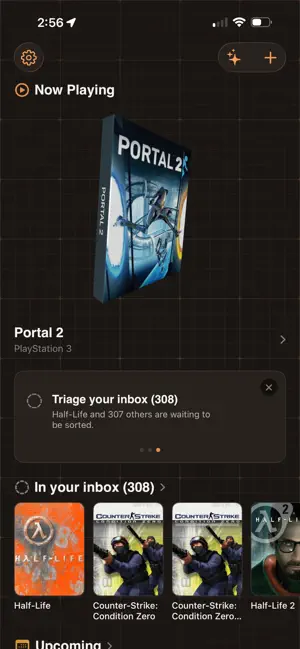
GameDial keeps every game you own in one place and helps you decide what to play next. Add games by searching, or bring your whole Steam library over in one go. Sort them onto shelves: playing, backlog, played, no plans, or wish list. New games land in an inbox so nothing arrives unsorted. THE PART THAT DECIDES FOR YOU Tell GameDial what you feel like playing, in your own words. "Two hours and I don't want to think." "Something I'll actually finish this month." It answers with real games, and says why it picked each one. Left a game half-finished months ago? Describe the last thing you remember and get a spoiler-free recap of the story up to that point, plus an estimate of how far through you are. PLAN THE WHOLE PILE The Backlog Journey lays your backlog out as a route: groups of games to clear, one after another, arranged by genre or by length. Drag games between groups, add your own, and see at a glance which ones are open to start now. KNOW WHAT'S COMING Wish-list games you don't own yet and see their release dates in one calendar, with the option to be reminded the morning something lands. Browse what's coming generally, not just what you already track. BACKLOG INSIGHTS See how many hours you're sitting on, which shelf is holding the most, and the quickest game you could finish this week. FREE AND PREMIUM Free: your whole library, unlimited games, six shelves, swipe or tap triage, Steam import, backlog insights, the upcoming release calendar, and basic play-next picks by shelf and time budget. Premium: ask for a game in your own words, spoiler-free story recaps and progress estimates, the Backlog Journey planner, and release-day reminders. GameDial Premium is an auto-renewing subscription: $2.99 per month or $19.99 per year, each starting with a 1-week free trial. Payment is charged to your Apple Account at confirmation of purchase. The subscription renews automatically unless cancelled at least 24 hours before the end of the current period, and can be managed or cancelled any time in your Apple Account settings. Prices are in US dollars and vary by region. YOUR DATA Your library is stored on your device and, if you leave iCloud sync on, in your own iCloud so it follows you between devices. There are no accounts and no sign-up. We run no analytics and no third-party trackers. Game data provided by IGDB.com. Terms of Use (EULA): https://www.apple.com/legal/internet-services/itunes/dev/stdeula/ Privacy Policy: https://gamicarts.com/gamedial/privacy
What’s new
Version 1.1 · Updated September 6, 2026
THE BACKLOG JOURNEY IS NOW FREE Lay your backlog out as a route: categories of games, each with its own row. Drag games between them to decide what you're doing in what order, and see what's open to play next. NEW IN PREMIUM Plan it for me. Your backlog put in an order that works, with short wins to open on and the ninety-hour games somewhere you'll actually reach them. Your Gaming Personality. GameDial reads your shelves and works out what you actually like: the kinds of worlds you go to, whether you play alone, and how long you want a game to last. It names the taste behind your library, then suggests games that fit it and games that would widen it. MORE ON EVERY GAME Screenshots, who made it, how it plays, the series it belongs to, its age rating, and a link to the trailer. Critic scores now say how many reviews they're an average of. ALSO IMPROVED - Adding a game is one tap now. Pick its shelf afterwards, or not at all. - Backlog Insights sits on the home screen instead of inside your library. - Grouping your journey is something you ask for. A new journey starts as one row, and Reset always puts it back. - Games you're playing carry a badge on the journey, next to finished ones. - Dragging a game shows exactly where it will land before you let go. - Premium shows monthly and yearly side by side, and the free trial is stated before you subscribe rather than after. FIXED - A crash that could happen when the same game arrived twice through iCloud sync. - Backlog Insights showing no genres or scores on a freshly imported library. - Empty journey groups refusing drops, the first drag of a game losing its artwork, and the drop marker flickering between cards. - A shelf picker that looked switched off on some shelves. - The ruled background stopping short of the bottom of the screen.
App privacy
The developer, Gamic Arts LLC, reported these privacy practices to Apple.
Data Not Linked to You
The following data, which may be collected but is not linked to your identity, may be used for the following purposes:
- User Content: Other User Content
- Search History: Search History
- Diagnostics: Crash Data
Used for: App Functionality
Alternatives to GameDial: AI Game Backlog
Looking for apps like GameDial: AI Game Backlog? Here are 6 similar apps on the App Store. The highest rated is RetroGrade: Game Collector App (5.0/5), and all 6 are free to download.
-
 RetroGrade: Game Collector App
5.0
-
 Gaminglist: Video Game Tracker
-
 Gamedex
-
 Faceplate
5.0
-
 Wonder Incog - Privacy Browser
4.3
-
 Gamekore: Game Backlog Manager
| App | Rating | Price | Last updated | Compare |
|---|---|---|---|---|
| GameDial: AI Game Backlog | 5.0 / 5 (3 ratings) | Free | September 6, 2026 | |
| RetroGrade: Game Collector App | 5.0 / 5 (1) | Free | Oct 19, 2026 | Compare |
| Gaminglist: Video Game Tracker | – | Free | Jul 29, 2026 | Compare |
| Gamedex | – | Free | Jan 12, 2026 | Compare |
| Faceplate | 5.0 / 5 (3) | Free | Apr 30, 2026 | Compare |
| Wonder Incog - Privacy Browser | 4.3 / 5 (6) | Free | Oct 26, 2026 | Compare |
| Gamekore: Game Backlog Manager | – | Free | Sep 25, 2026 | Compare |